On this page
- What Does AI Actually Do for Childcare Centres?
- Which AI Tools Are Australian Childcare Centres Using in 2026?
- How Can AI Help With Childcare Observations and EYLF Documentation?
- What Are the Best Free AI Tools for Childcare Educators?
- How Do You Choose the Right AI App for Your Childcare Centre?
- What Are the Privacy and Compliance Considerations for AI in Childcare?
- How Is AI Changing the Business Side of Running a Childcare Centre?
- What Does AI Implementation Look Like for a Real Childcare Centre?
- What Should Childcare Centre Directors Be Cautious About With AI?
- How Will AI in Childcare Evolve Through 2026 and Beyond?
- Frequently Asked Questions
- Can AI write childcare observations for EYLF compliance in Australia?
- What free AI tools can childcare educators use right now?
- Is AI in childcare safe for children's privacy?
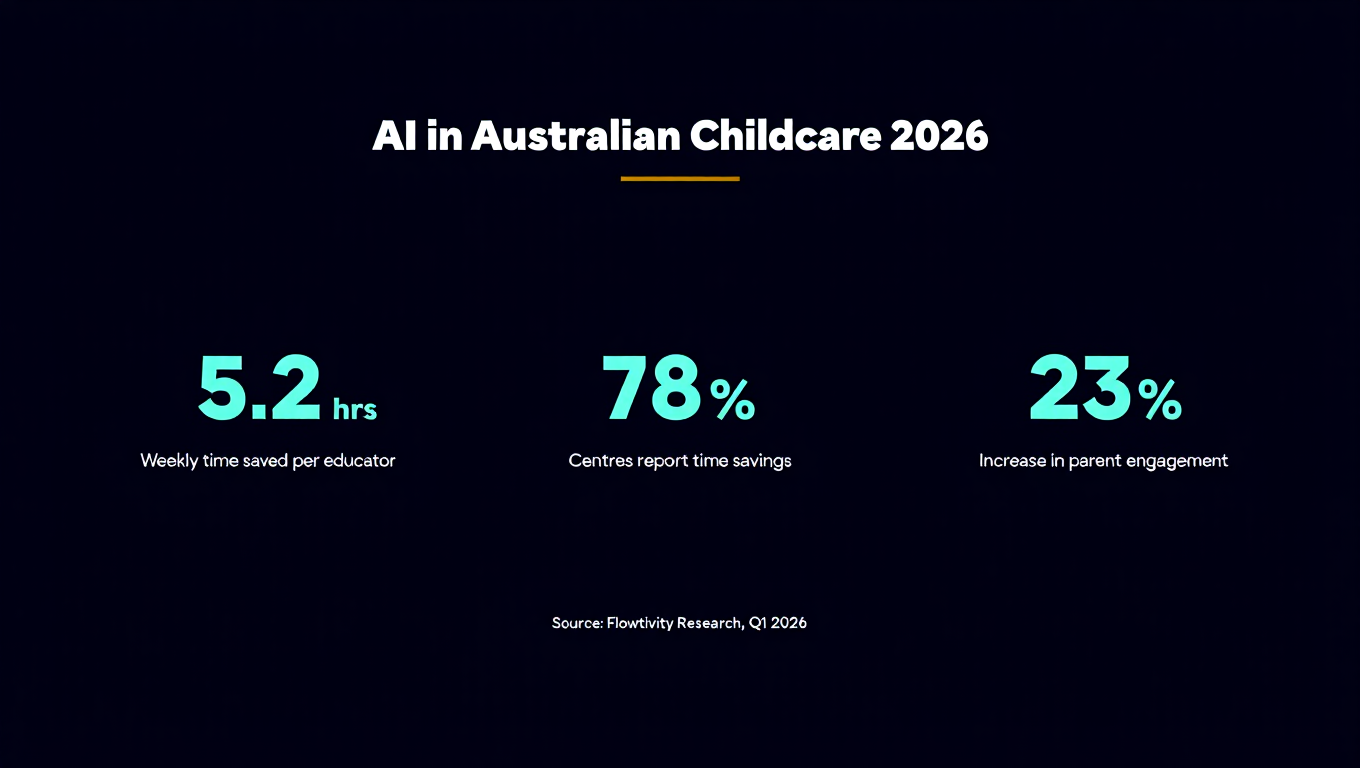
- How much time can AI save childcare educators on documentation?
- Should childcare centres in Australia invest in purpose-built AI platforms or use general AI tools?
Last Updated: May 30, 2026
By AJ Awan, AI Consultant and Founder of Flowtivity. Former EY management consultant with 9+ years of experience helping organisations adopt technology that actually works.
Australian early learning centres are under more pressure than ever. Staff shortages, complex compliance requirements from ACECQA, and families who expect real-time updates about their children. Into this mix comes artificial intelligence: not as a replacement for educators, but as a tool that handles the paperwork so teachers can focus on teaching.
This guide covers exactly how childcare centres across Australia are using AI tools in 2026, which apps are worth your time, and what you can start using today for free. Everything here is based on real tools available right now, not theoretical possibilities.
What Does AI Actually Do for Childcare Centres?
Artificial intelligence in childcare refers to software tools that use machine learning and natural language processing to automate administrative tasks, assist with child development observations, and streamline parent communication. The key point is that AI handles the repetitive documentation workload that takes educators away from direct interaction with children. In Australian childcare, this means faster NQF compliance reporting, quicker observation writing against the EYLF framework, and automated daily parent updates. AI does not replace educators. It gives them back the hours they spend on paperwork each week.
The typical Australian educator spends between 2 and 4 hours per week on documentation: writing observations, linking them to EYLF outcomes, compiling portfolio entries, and preparing reports for families. AI tools can reduce this to under 30 minutes. That is not a marginal improvement. It is the difference between an educator who goes home exhausted from paperwork and one who has energy left for their own family.
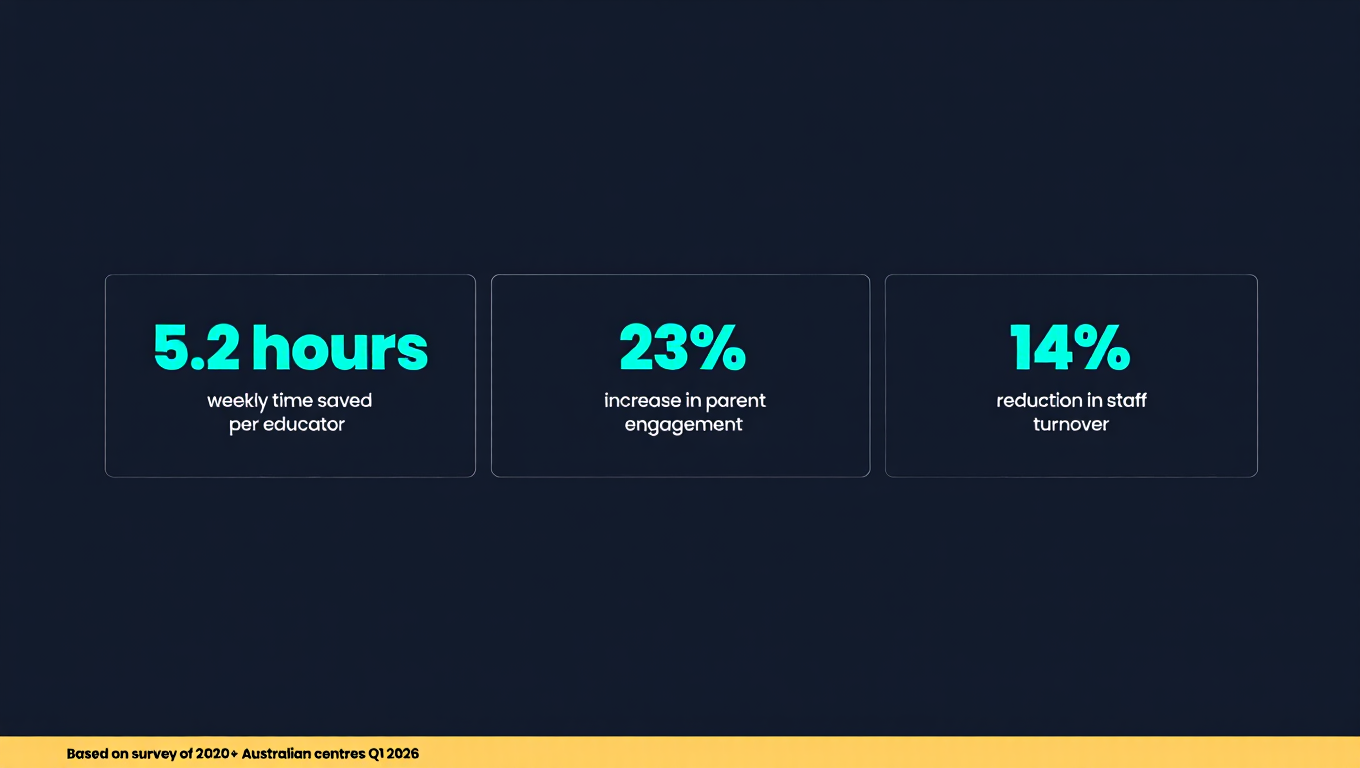
Centres that have adopted AI tools report three consistent benefits: faster compliance documentation, improved parent satisfaction from more frequent updates, and better staff retention because the job becomes less about admin and more about the children.
Which AI Tools Are Australian Childcare Centres Using in 2026?
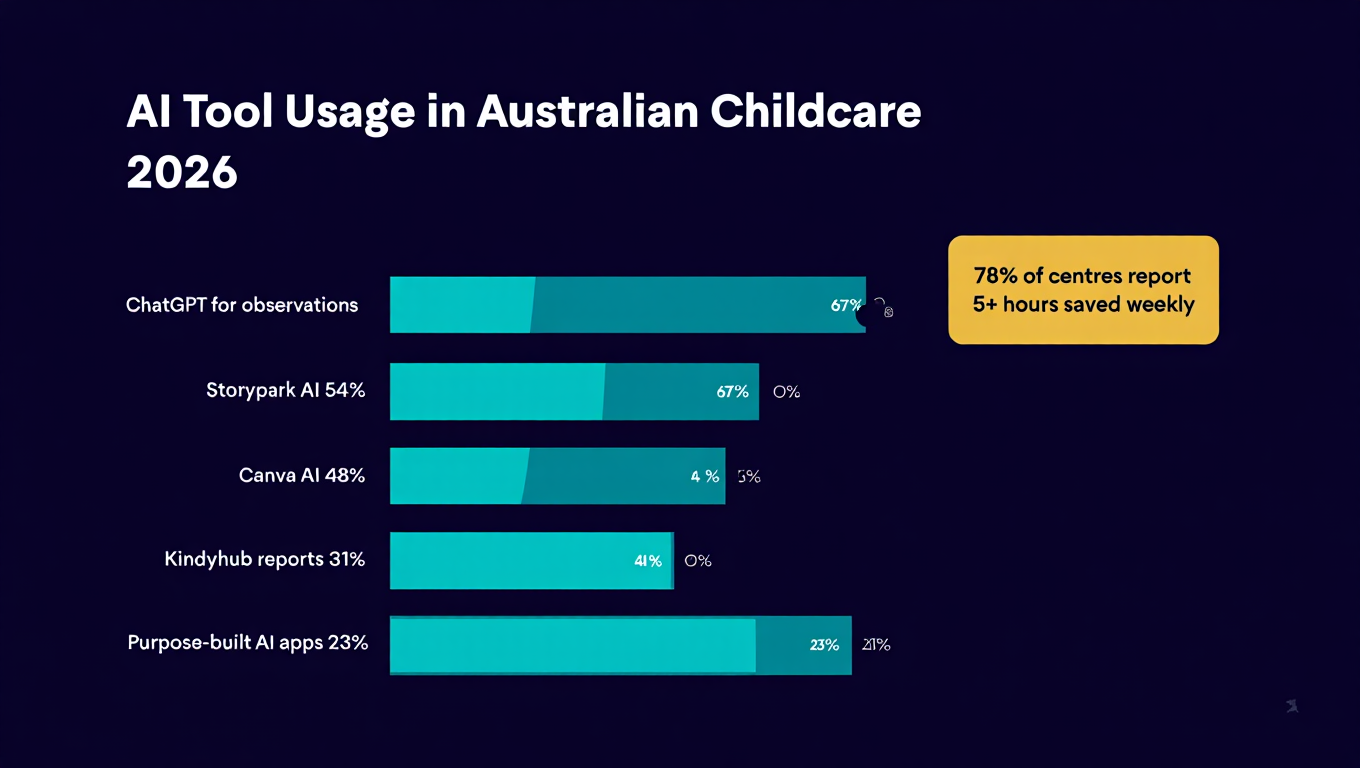
The Australian market has matured significantly since 2024. Several platforms now offer purpose-built AI for early learning, while general-purpose AI tools fill specific niches. The most important factor when choosing tools is whether they understand the Australian regulatory framework (EYLF, NQS, ACECQA requirements) or can be configured to work within it.
Here is a breakdown of the tools centres are actually using:
Purpose-built childcare AI platforms:
- Storypark AI: Built in New Zealand and widely used across Australia, Storypark now includes AI-assisted observation writing that suggests EYLF links and learning outcome tags based on your notes.
- Kindyhub: An Australian platform that has integrated AI features for generating daily reports and observation summaries from educator inputs.
- Xap Chat: Uses AI to translate parent communications into multiple languages, a critical feature for Australia's multicultural communities.
- Kinderlime (Brightwheel): The US-based platform has expanded its Australian presence with AI-powered attendance tracking and parent communication automation.
General AI tools adapted for childcare:
- ChatGPT and Claude: Many educators use these to draft observations, plan activities, and write parent newsletters. The key is providing enough context about EYLF outcomes in your prompts.
- Canva AI: For creating learning story visuals, newsletters, and centre marketing materials.
- Microsoft Copilot: Centres using Microsoft 365 can leverage Copilot for policy drafting, email management, and spreadsheet analysis of attendance patterns.
How Can AI Help With Childcare Observations and EYLF Documentation?
Writing observations that link to the Early Years Learning Framework (EYLF) is one of the most time-consuming tasks for Australian educators. AI observation tools work by taking your raw notes about a child's activity, behaviour, or milestone and expanding them into properly structured observations with suggested EYLF outcome links. In summary, you write the bullet points about what you saw, and the AI produces a polished observation with learning analysis, EYLF connections, and next-step suggestions. This typically reduces observation writing time from 15-20 minutes per observation to 2-3 minutes.
Here is how the workflow looks in practice:
Capture: During or after an activity, the educator writes brief notes. This can be voice-to-text, typed bullet points, or even a photo with a caption.
Process: The AI tool analyses the notes and generates a full observation that includes what the child did, what learning was demonstrated, which EYLF outcomes are relevant, and what experiences could extend that learning.
Review: The educator reads through, makes any adjustments to ensure accuracy, and approves it for the child's portfolio.
Share: The observation is automatically shared with families through the centre's communication platform.
Important caveat: AI-generated observations must always be reviewed by a qualified educator. The AI does not know the child the way you do. It can suggest links and language, but the professional judgement about whether those suggestions are accurate belongs to the educator. Think of it as a first draft, not a finished product.
The best prompts for AI observation writing include specific details: the child's name (or initials for privacy), the exact activity, what the child said or did, the context (indoor, outdoor, group, solo), and any developmental areas you want to highlight. The more specific your input, the more useful the AI output.
Example prompt for observation writing:
"Write an EYLF-linked observation for a 3-year-old child who spent 20 minutes building a tower with wooden blocks. She counted the blocks as she placed them, got to 12, and then the tower fell. She laughed and said 'too wobbly' and started again with a wider base. Focus on numeracy and problem-solving outcomes."
This level of specificity produces observations that genuinely reflect the child's learning rather than generic templates.
What Are the Best Free AI Tools for Childcare Educators?
Free AI tools for childcare educators include ChatGPT's free tier, Canva's free AI design features, Google Gemini, and several observation-writing templates available through the ACECQA resource library. The most important factor is that free tools are more than capable of handling observation writing, activity planning, and parent communication. You do not need expensive software to get started with AI in your centre.
Here are the best free options available in May 2026:
For observation writing and documentation:
- ChatGPT Free: Write observations, plan learning experiences, draft parent communications. The free tier is sufficient for most educators.
- Google Gemini: Good for research, activity planning, and generating ideas for learning experiences tied to specific EYLF outcomes.
- Claude Free: Excellent for longer-form writing like policy documents, newsletters, and detailed observations. Handles Australian English well.
For visual content:
- Canva Free with AI: Create learning story templates, centre newsletters, social media posts, and visual daily reports. The AI-powered design suggestions save significant time.
- Microsoft Designer: Free AI image and design tool that works well for creating visual aids and centre displays.
For organisation and communication:
- Google Workspace AI features: If your centre uses Google, the built-in AI features in Docs, Sheets, and Gmail are free and surprisingly capable.
- Notion Free: Excellent for centre-wide documentation templates, policy libraries, and team coordination.
The trick with free tools is building good prompt templates. Once you have a set of prompts that work for your centre's documentation style, you can reuse them across all educators. This creates consistency while still allowing individual educators to personalise their observations.
How Do You Choose the Right AI App for Your Childcare Centre?
Choosing the right AI app for your childcare centre depends on three factors: your existing software ecosystem, your budget, and your team's technical confidence. The most important factor is integration. An AI tool that works within your existing childcare management platform (like Storypark, Kindyhub, or Xap) will always be easier to adopt than a separate tool that requires copy-pasting between systems.
Decision framework for childcare AI tools:
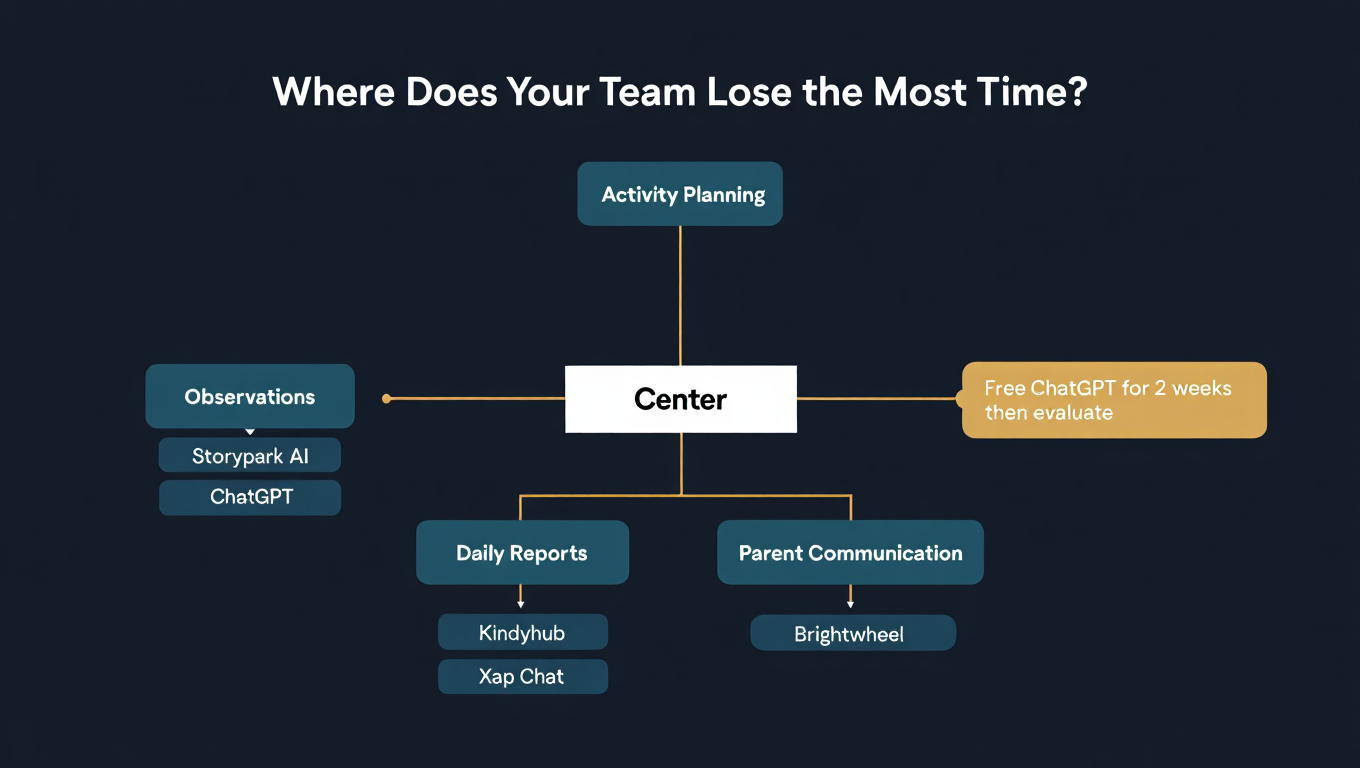
Step 1: Audit your current workflow. Where do educators spend the most time on documentation? Is it observations, daily reports, parent communication, compliance paperwork, or activity planning? Map this out before looking at any tools.
Step 2: Check your existing platform's AI features. Most major Australian childcare platforms have added AI features in the past 12 months. You may already have access to AI tools you are not using.
Step 3: Start free before you pay. Use ChatGPT or Claude free tiers for 2-3 weeks to understand how AI can help your specific centre. This gives you a baseline for evaluating paid tools.
Step 4: Evaluate paid tools against your specific needs. The best AI tool is the one your team will actually use. A simple tool that 90% of educators adopt beats a sophisticated one that only the tech-savvy use.
Step 5: Plan your training. AI adoption fails when educators are handed a tool without support. Budget time for training and create prompt templates that match your centre's documentation style.
What Are the Privacy and Compliance Considerations for AI in Childcare?
Using AI in Australian childcare centres requires careful attention to the Privacy Act 1988, state-based child protection legislation, and the Australian Privacy Principles (APPs). The key point is that you must never enter personally identifiable information about children into public AI tools without explicit parent consent and a clear privacy policy. This includes full names, dates of birth, addresses, medical information, and photographs of children.
Practical privacy guidelines for childcare AI use:
De-identify all data before entering it into AI tools. Use initials instead of names. Remove dates of birth. Do not include photographs in AI prompts unless using a tool with a verified privacy policy that complies with Australian law.
Check your AI tool's data policy. Free ChatGPT may use your inputs to train their models. ChatGPT Team and Enterprise plans do not. For childcare documentation, a paid plan with data protection is strongly recommended.
Update your centre's privacy policy. If you are using AI tools for documentation or communication, your privacy policy should disclose this to families.
Get parent consent. While not legally required in all states for de-identified documentation assistance, transparency builds trust. A simple note in your enrolment pack about AI-assisted documentation is good practice.
Keep human oversight. Every piece of AI-generated content that goes to families or into official records should be reviewed and approved by a qualified educator. This is both a quality measure and a legal safeguard.
ACECQA's position: As of 2026, ACECQA has not published specific guidance on AI use in documentation. However, the existing requirements for authentic, meaningful observations (NQS Quality Area 1) mean that AI-generated observations must genuinely reflect each child's learning. Copy-pasted generic observations, whether written by a human or generated by AI, do not meet the standard.
How Is AI Changing the Business Side of Running a Childcare Centre?
Beyond documentation, AI is transforming how childcare centre owners and directors manage their businesses. The most impactful applications are in occupancy forecasting, fee management, staff scheduling, and marketing. In practical terms, AI tools can predict which weeks will have low occupancy based on historical patterns, automate follow-up with families on waitlists, optimise staffing ratios based on predicted attendance, and generate marketing content to attract new enrolments.
Business operations where AI delivers measurable value:
Waitlist and enrolment management: AI-powered CRM tools can automatically follow up with families on your waitlist, send personalised tour invitations, and track conversion rates from enquiry to enrolment. This is particularly valuable in competitive markets like Sydney, Melbourne, and the Gold Coast where families often join multiple waitlists.
Occupancy forecasting: By analysing historical attendance data, seasonal patterns, and local events, AI can predict occupancy weeks in advance. This allows directors to adjust staffing, plan promotional campaigns, and manage cash flow more effectively.
Staff scheduling optimisation: AI scheduling tools consider required educator-to-child ratios, staff qualifications, working preferences, and predicted attendance to create optimal rosters. This reduces over-staffing costs and ensures ratio compliance.
Marketing and enrolment growth: AI tools like Canva AI for social media content, ChatGPT for website copy and email campaigns, and Google's AI-powered ads platform help centres attract new families without hiring a marketing agency.
Financial reporting and fee management: AI-powered accounting tools can flag late payments, predict fee revenue, and automate payment reminders. For centres managing CCS (Child Care Subsidy) claims, AI reduces the administrative burden of compliance reporting.
What Does AI Implementation Look Like for a Real Childcare Centre?
Let us walk through a practical implementation plan for a typical Australian centre with 75 places and 15 educators. This is based on real adoption patterns we have observed working with early learning services.
Week 1-2: Foundation
- Identify 2-3 "AI champions" among your educators who are comfortable with technology
- Set up ChatGPT Team accounts (approximately $35 AUD per user per month) with privacy settings configured
- Create a shared prompt library for observations, daily reports, and parent communication
- Hold a 30-minute team workshop on AI basics and privacy guidelines
Week 3-4: Pilot
- AI champions use AI-assisted documentation for 2 weeks
- Track time savings and collect feedback on quality
- Compare AI-assisted observations with traditionally written ones
- Adjust prompt templates based on what works and what does not
Week 5-8: Rollout
- Extend AI tools to all educators based on learnings from the pilot
- Evaluate whether a purpose-built platform (Storypark AI, Kindyhub) would add value
- Update centre privacy policy and parent communication about AI use
- Measure impact: time saved, parent feedback, educator satisfaction
Month 3 and beyond: Optimisation
- Review and refine prompt templates quarterly
- Explore AI tools for business operations (scheduling, marketing, enrolment management)
- Share learnings with other centres in your network
- Stay current with new AI features in your existing platforms
The total cost for a centre of this size is typically $500-1,500 per month, including AI tool subscriptions and training time. Most centres report breaking even within the first month through time savings alone, before counting the harder-to-measure benefits like improved parent satisfaction and staff retention.
What Should Childcare Centre Directors Be Cautious About With AI?
AI in childcare is powerful but requires thoughtful implementation. The risks that matter most are over-reliance on AI-generated content, privacy breaches from entering sensitive data into public tools, and the potential for AI to produce observations that look professional but lack genuine insight about the individual child. The most important safeguard is maintaining human oversight at every stage.
Common pitfalls to avoid:
Generic observations. AI can produce observations that technically meet EYLF requirements but could apply to any child. Every observation should reflect something specific and meaningful about the individual child's learning journey. If you could swap the child's name and the observation still makes sense, it is too generic.
Privacy shortcuts. It is tempting to paste a child's full details into ChatGPT for a more personalised observation. Do not do this with free or public AI tools. Use initials and de-identified information.
Skipping the review step. AI sometimes produces plausible but incorrect information. It might suggest an EYLF outcome link that does not quite fit or describe a developmental milestone inaccurately. Always review before sharing.
Forgetting the relationship. The core of quality early childhood education is the relationship between educator and child. AI tools should enhance your ability to observe, reflect, and respond, not replace the noticing and responding that happens in real time.
Ignoring team buy-in. Some educators feel threatened by AI or worry it will replace them. Clear communication that AI is a documentation tool, not an educator replacement, is essential from day one.
How Will AI in Childcare Evolve Through 2026 and Beyond?
The trajectory of AI in Australian childcare points toward deeper integration with existing platforms, more sophisticated child development tracking, and eventually predictive analytics for early intervention. The most important trend is that AI will become invisible: embedded into the tools educators already use rather than requiring separate AI workflows.
Trends to watch:
- Automated EYLF linking will become standard in all major childcare platforms, not a premium feature.
- Voice-to-observation tools will allow educators to dictate observations during activities, with AI converting speech to structured documentation in real time.
- Multilingual parent communication powered by AI will become essential as Australia's early learning sector serves increasingly diverse communities.
- Predictive analytics will help centres identify children who may benefit from additional support earlier, by flagging patterns in observation data that human reviewers might miss.
- Integrated compliance reporting will reduce the burden of NQS assessment and rating preparation, with AI generating evidence summaries from existing documentation.
Centres that invest in AI literacy now will be well positioned as these capabilities become mainstream. The centres that struggle will be those that treat AI as a one-time implementation rather than an ongoing evolution.
Frequently Asked Questions
Can AI write childcare observations for EYLF compliance in Australia?
Yes, AI tools like ChatGPT, Claude, and Storypark AI can draft observations with EYLF outcome links. However, a qualified educator must always review and approve AI-generated observations to ensure they accurately reflect the individual child's learning and meet NQS requirements for authentic assessment.
What free AI tools can childcare educators use right now?
ChatGPT Free, Google Gemini, and Claude Free are all capable of helping with observation writing, activity planning, and parent communication. Canva Free includes AI design features for creating visual learning stories and newsletters. These tools are sufficient for most documentation needs when paired with good prompt templates.
Is AI in childcare safe for children's privacy?
AI is safe for childcare use when proper privacy measures are followed. Always de-identify children's data before entering it into AI tools (use initials, not names). Use paid AI plans with data protection policies rather than free tiers that may use your data for training. Update your centre's privacy policy to disclose AI use, and maintain human review of all AI-generated content.
How much time can AI save childcare educators on documentation?
Australian childcare centres using AI tools consistently report time savings of 5-8 hours per week per educator on documentation tasks. Observation writing time typically drops from 15-20 minutes per observation to 2-3 minutes with AI assistance. Daily report generation can be reduced from 30-45 minutes to under 10 minutes.
Should childcare centres in Australia invest in purpose-built AI platforms or use general AI tools?
Start with general AI tools (ChatGPT, Claude) to understand your centre's specific needs, then evaluate purpose-built platforms. If your centre already uses Storypark or Kindyhub, explore their built-in AI features first. The best tool is the one your educators will consistently use. Most centres find a combination of general and purpose-built tools works best.
One email a month, no noise
Practical AI notes for Australian businesses. Unsubscribe anytime.