

On this page
Last Updated: September 27, 2026
Key takeaways
Anthropic launched a directory submission portal for Claude plugins on September 25, 2026, letting developers submit, track, and publish third-party extensions. A Claude plugin packages MCP connectors, Agent Skills, commands, and agents in any combination, and most need no build step because they are only Markdown and JSON. You can skip the public directory entirely and install a private plugin under Customize > Plugins, which is how teams connect Claude straight to their own product database. Claude supports the MCP 2.0 spec plus MCP Apps for interactive UI in chat and Enterprise Managed Auth for zero-touch enterprise OAuth. Once live, the portal shows installs by surface and version plus listing views and the searches that led people to your plugin.
What did Anthropic actually announce?
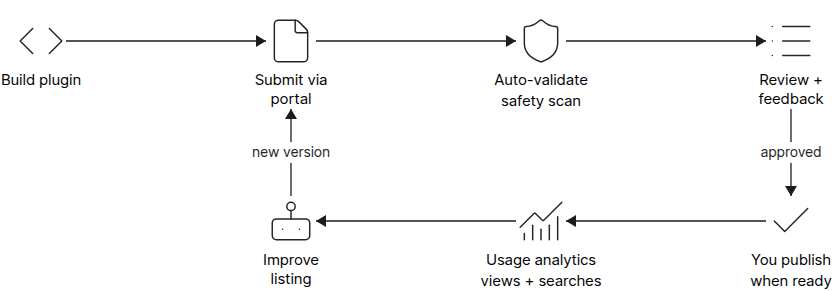
Anthropic opened a submission portal for the Claude plugin directory on September 25, 2026, with auto-validation, review tracking, and post-launch usage analytics. According to Anthropic's announcement, plugins package MCP connectors, Agent Skills, or both, and are "the main way to build third-party extensions for Claude." The portal is open to developers on paid Claude plans and supports two submission paths: a single MCP connector pointing at your remote server, or a plugin bundle combining MCP servers and skills, hosted on GitHub and submitted as a repo. In Claude Code, plugins can also include LSPs, commands, hooks, and agents. Every submission is checked and safety-scanned on submit so issues surface early, and once approved, you decide when your plugin goes live.
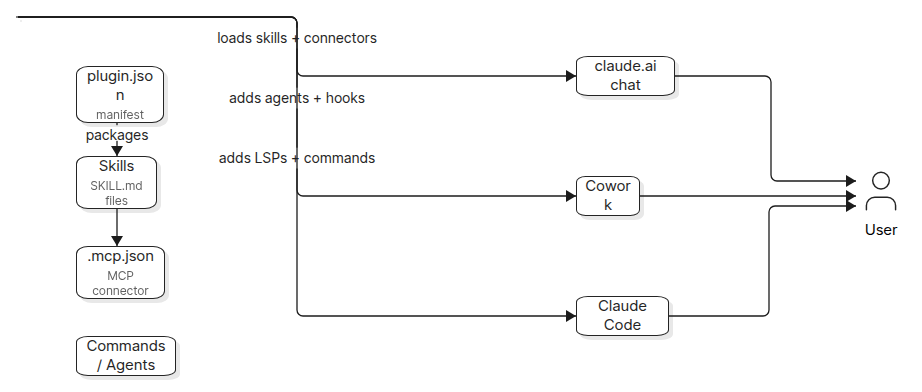
How is a Claude plugin structured?
A plugin is a folder with a manifest at .claude-plugin/plugin.json and any combination of component directories beside it. According to Anthropic's developer documentation, most plugins need no build step because they are only Markdown and JSON, and Anthropic's own knowledge-work-plugins repository on GitHub holds working examples of the layout. The manifest carries the plugin's permanent identity: name, displayName, version, description, author, and license. The directory also requires a README of at least 40 words and a license. Component loading varies by app: skills and commands load everywhere, a remote MCP server in .mcp.json appears on the plugin's Connectors tab in chat and Cowork, and agents and hooks load in Cowork and Claude Code while chat ignores them.
What can a private plugin do for your business?
The quieter half of the announcement is that you do not need the directory at all: you can build a plugin for your own use and install it under Customize > Plugins. This is the pattern that went viral after the launch: have Claude Opus 5.5 build a plugin that connects to your product's database, then ask Claude from the web, your phone, or Claude Code questions like how many of this week's new signups paid, or which endpoint threw the most errors yesterday. According to Anthropic's docs there is even a "Create a plugin with Claude" flow that builds one from a conversation without writing files. The security posture matters more than the code: use a read-only database account, mask emails, phone numbers, and keys, and host the MCP server behind a login only your own account can use.
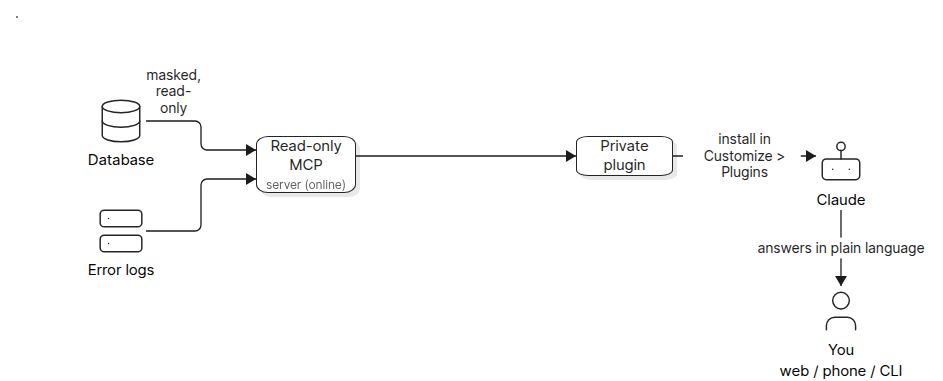
In our own workflow automation work at Flowtivity, we have seen the same pattern hold with MCP connectors for small business CRMs: the value is not the connector itself, it is the skill file that tells the model which queries matter, what the tables mean, and how paid versus active users are counted. That context layer is what separates a demo from something a founder actually uses on a Monday morning.
Submission and review: what happens after you submit?
Each submission is checked and safety-scanned as soon as you submit, and the portal shows review status, safety scan results, and recommended changes. According to Anthropic, once your plugin is approved you choose when to publish it. After launch, usage analytics show installs by product surface and version, and discovery metrics show how often your listing is viewed and which searches led people to it. Existing skills, connectors, and plugins in the Claude directory need no changes, and in the future developers will be able to turn a connector listing into a plugin. Over the coming weeks, one discovery experience rolls out across Claude and Claude Code.
Directory listing vs private plugin: which should you build?
Choose a directory listing if you want distribution to Claude's user base and are prepared to maintain a public tool. Choose a private plugin if your goal is internal access to your own product data, where security review is simpler because only your account can reach the server.
| Dimension | Directory plugin | Private plugin |
|---|---|---|
| Audience | All Claude users | You or your team only |
| Submission path | Portal: MCP connector or GitHub bundle | Upload in Customize > Plugins |
| Review process | Auto-validation, safety scan, human review | None |
| Auth | Your OAuth flow; optional Enterprise Managed Auth | Login restricted to your own account |
| Analytics | Installs by surface and version, listing views, search terms | None from Anthropic |
| Best for | Product teams wanting distribution | Founders and operators querying their own data |
What to watch next
Three things matter from here. First, MCP 2.0's extensions: MCP Apps brings interactive UI inside chat, and Enterprise Managed Auth delivers zero-touch OAuth for enterprise users, which removes the biggest adoption friction for larger organisations. Second, the unified discovery experience rolling out across Claude and Claude Code over the coming weeks will decide which plugins get found. Third, the connector-to-plugin migration path means an existing MCP server listing becomes a plugin later, so teams shipping connectors today are not wasting work. According to Anthropic, support for more MCP features and extensions is coming soon. "Plugins are the main way for third-party developers to create extensions for Claude," per the September 25, 2026 announcement, and that framing alone makes this the start of an app-store moment for AI assistants.
What's actually useful in AI, every Friday
We follow everything happening in AI and send what's worth your time: new models, AI agents, and how to put them to work. One email a week, unsubscribe anytime.


