

On this page
- What Is Graph Engineering and Why Is Everyone Talking About It?
- The Evolution: Four Paradigms in Four Years
- From Loop Engineering to Graph Engineering: The Paradigm Shift
- What a Loop Looks Like
- What a Graph Looks Like
- Graph Topology in Action: The Parallel Review Pattern
- Example: Loop vs Graph in Code
- The 5-Stage Graph Engineering Methodology
- Stage 1: AUDIT — Map Your Current Loops
- Stage 2: IDENTIFY — Find Concurrency Opportunities
- Stage 3: DESIGN — Draft Your Graph Topology
- Stage 4: IMPLEMENT — Build and Measure
- Stage 5: TYPE — Add Typed Edges
- When to Use Loops vs Graphs: The Decision Matrix
- Vector Search vs. Graph Traversal: What the Benchmarks Actually Say
- The Practitioner's Rule: Route by Question Type
- Typed Edges: The Vocabulary of Graph Engineering
- The 6 Edge Types Every Graph Needs
- Cost vs Performance: The Tradeoff Nobody Talks About
- The Break-Even Point
- How OpenClaw Code Mode Enables Graph-Based Workflows
- Quick-Start: Building a Graph Workflow in OpenClaw
- Common Pitfalls and How to Avoid Them
- Frequently Asked Questions
- Key Takeaways
Last Updated: July 25, 2026
Graph engineering is replacing loop-based AI agents. Learn what it is, why Peter Steinberger and the OpenClaw community are shifting to graph workflows, and how to build parallel agent systems with Codex and local models. This guide includes visual infographics, code examples, benchmark data, and a complete methodology framework.
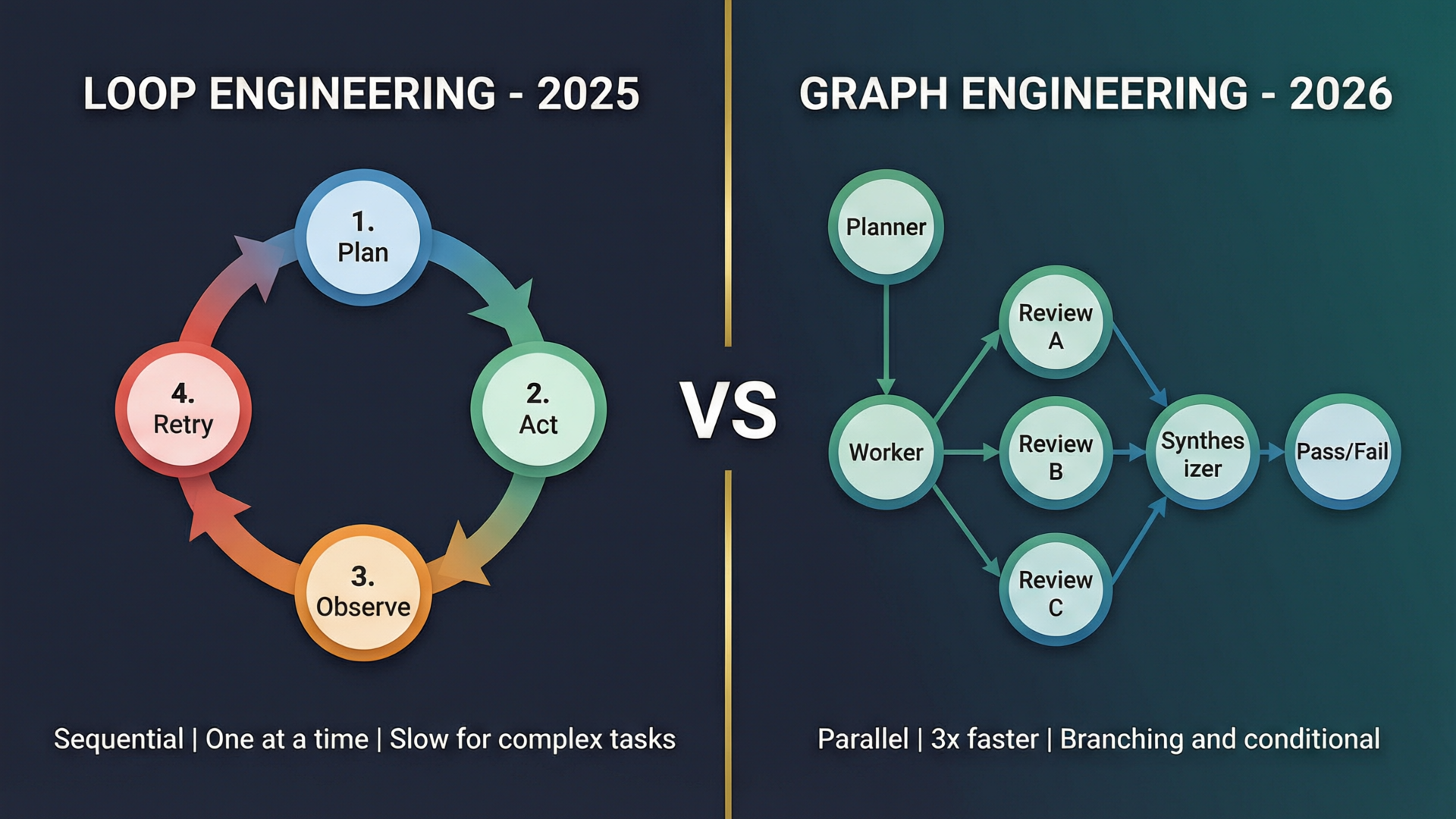
What Is Graph Engineering and Why Is Everyone Talking About It?
Simple definition: Graph engineering is designing AI systems around explicit graphs — networks of nodes (entities, decisions, concepts) connected by typed edges (relationships) that an agent can traverse. Instead of feeding an agent flat documents and hoping it finds the right connections, you build the connections directly into the system.
Real-world analogy: Think of a traditional AI agent like a worker following a checklist (a loop). They go step by step: read instruction → do task → check result → move to next. A graph-based agent is like a project team where tasks branch out to specialists working in parallel, results converge to a manager who decides: ship it or send it back.
The term exploded on X in July 2026. On July 18, Peter Steinberger (@steipete), creator of OpenClaw, posted twelve words that racked up 2.9 million views:
"Are we still talking loops or did we shift to graphs yet?"
Within 48 hours, the term had three competing definitions, a wave of copycat posts, and a fabricated study claiming a $3.1M Stanford research grant that does not exist (per Eugeniu Ghelbur's investigation at The AI Operator).
According to Eugeniu Ghelbur, an AI Automation Engineer and creator of the open-source obsidian-second-brain project (3,400+ GitHub stars):
"The 2026 consensus from every serious system points the same way: small typed core, cheap indexing, hybrid retrieval, temporal supersession. All four of those are implementable on markdown files you own."
Under the noise, however, there is a real discipline with a decade of research, working tools, and benchmarks that survived independent evaluation. This guide cuts through the hype to show you what graph engineering actually means, how to use it with OpenClaw and Codex, and why it matters for your AI workflows today.
The Evolution: Four Paradigms in Four Years
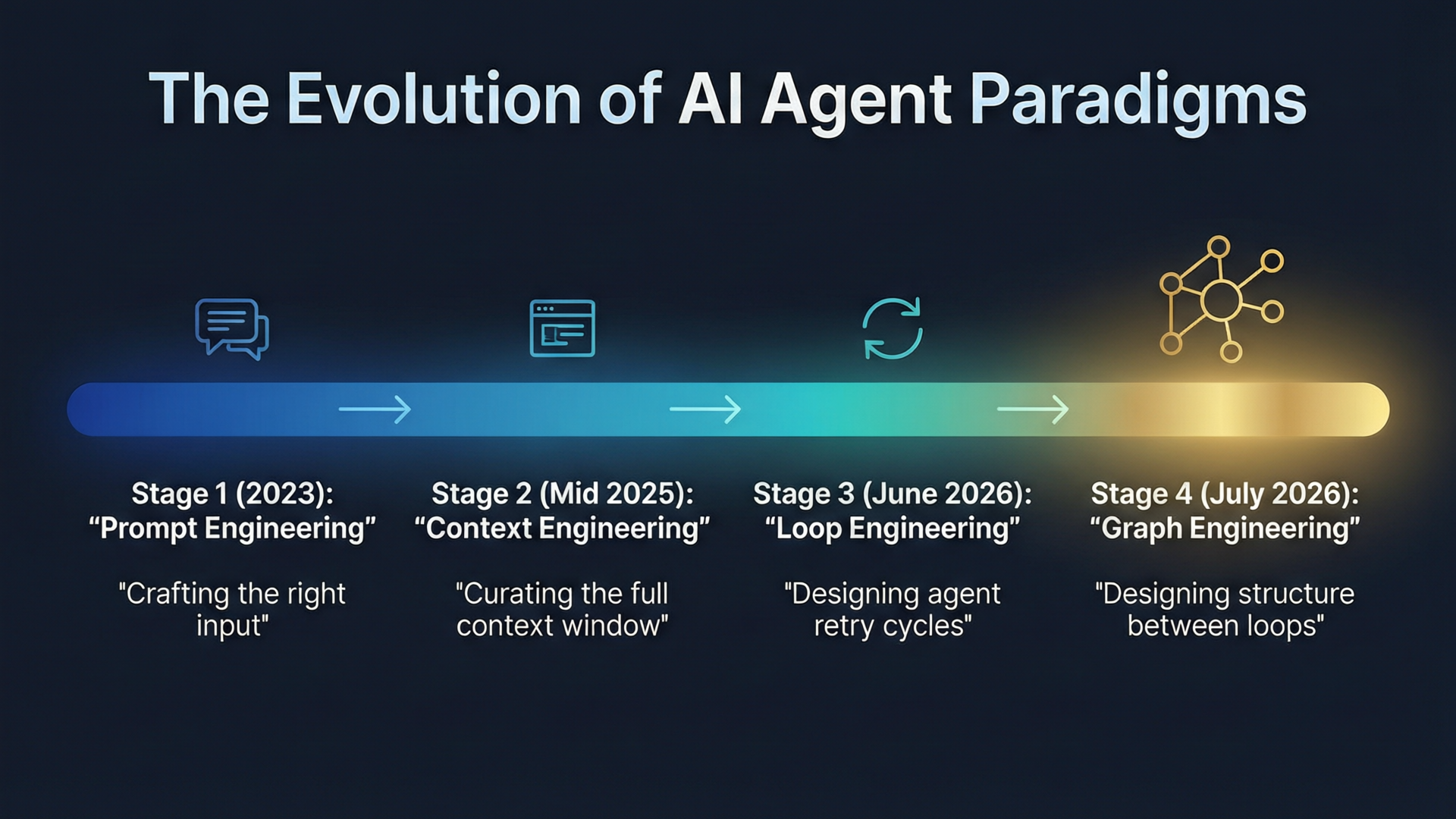
The shift from loops to graphs did not happen overnight. Each paradigm built on what came before:
2023 — Prompt Engineering: The art of crafting the right input. "Write a function that..." was the state of the art. The model was a black box you talked to.
Mid 2025 — Context Engineering: You realized the model was only as good as what you put in its context window. RAG, system prompts, tool descriptions, few-shot examples — curating the full context became the lever.
June 2026 — Loop Engineering: Addy Osmani gave it a name. Instead of a single prompt-response, you design a cycle: plan → act → observe → retry. The agent runs the loop until the task is done or it hits a limit. This became the default pattern for AI coding agents.
July 2026 — Graph Engineering: The loop is a cycle — one thing after another. A graph breaks the cycle open. Multiple stages run in parallel. Feedback routes through specific paths, not the whole loop. The structure between nodes becomes as important as the nodes themselves.
From Loop Engineering to Graph Engineering: The Paradigm Shift
What a Loop Looks Like
A traditional agent loop has four phases that run sequentially:
- Observe — The agent reads context, checks state, reviews previous outputs
- Decide — It plans its next action
- Act — It executes (writes code, calls a tool, sends a request)
- Verify — It checks the result and decides: done or retry?
If verification fails, the agent goes back to step 1 and tries again. One step at a time. No parallelism.
What a Graph Looks Like
A graph replaces the single cycle with a directed graph — nodes connected by edges with conditions:
- Planner node defines the task
- Worker node executes
- Multiple Reviewer nodes run in parallel (Security Review, Logic Review, Style Review)
- Synthesizer node collects all reviews
- Pass/Fail gate routes to either Output or back to Worker
The key difference: loops cannot do concurrency efficiently. A loop processes plan, code, review, fix, review again, fix again — sequentially. A graph dispatches 3 reviewers simultaneously. The wall-clock time collapses from 3 sequential cycles to 1 parallel cycle.
Graph Topology in Action: The Parallel Review Pattern
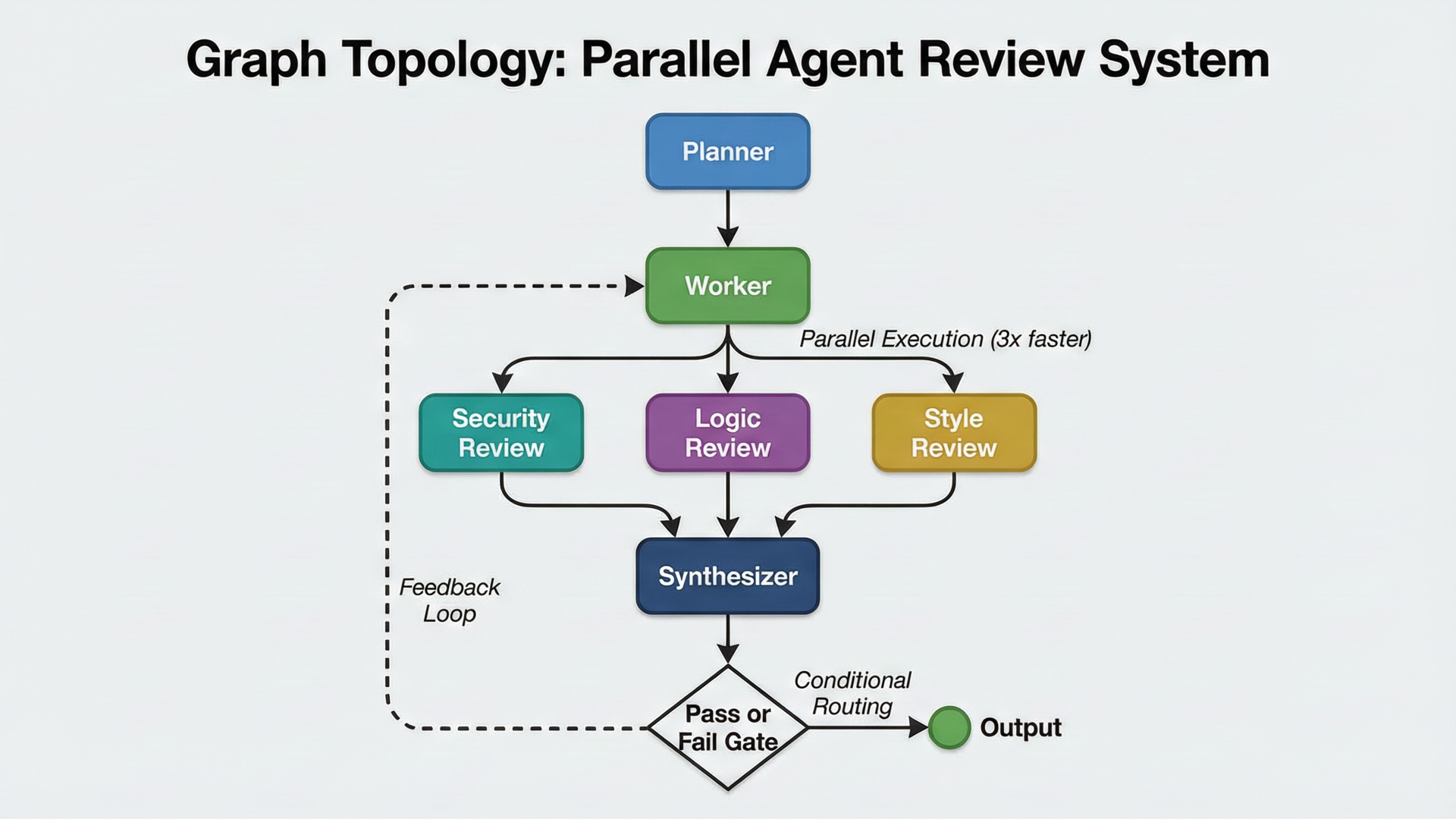
The diagram above shows the topology that went viral when Alex Kotliarskyi (@alex_frantic) posted what he calls the graph-max technique on July 22:
"Draw a graph (literally in any tool, even on paper). Send it to Codex and say 'write a code mode script that implements this workflow, run it with'. There's no step 3, it just works."
Peter Steinberger replied with a screenshot of a working implementation using GPT-4.5 Sol calls, accompanied by a haiku:
Quiet agents think Three reviewers trace the flow Graphs bloom into verse
Example: Loop vs Graph in Code
The old way (loop):
# Sequential: each review waits for the previous to finish
def agent_loop(task):
    plan = planner(task)
    while not done:
        code = worker(plan)
        sec_review = security_reviewer(code)  # Wait...
        log_review = logic_reviewer(code)     # Then wait...
        sty_review = style_reviewer(code)     # Then wait...
        synthesis = synthesize([sec_review, log_review, sty_review])
        if synthesis["pass"]:
            return synthesis["output"]
        plan = replan(plan, synthesis["feedback"])
The new way (graph):
import asyncio

# Parallel: all reviews run simultaneously
async def agent_graph(task):
    plan = await planner(task)
    while True:
        code = await worker(plan)
        # Three reviews fire in PARALLEL — 3x faster wall-clock
        sec, log, sty = await asyncio.gather(
            security_reviewer(code),
            logic_reviewer(code),
            style_reviewer(code)
        )
        synthesis = synthesize([sec, log, sty])
        if synthesis["pass"]:
            return synthesis["output"]
        plan = await replan(plan, synthesis["feedback"])
In our dual DGX Spark setup running DeepSeek V4 Flash at roughly 60 tok/s, we found that parallel review workflows complete 3x faster than sequential retry loops for the same code review task. The reason is obvious once you see the code: asyncio.gather() dispatches all three reviewers at once, while the loop must run one, wait, fix, then run the next.
The 5-Stage Graph Engineering Methodology
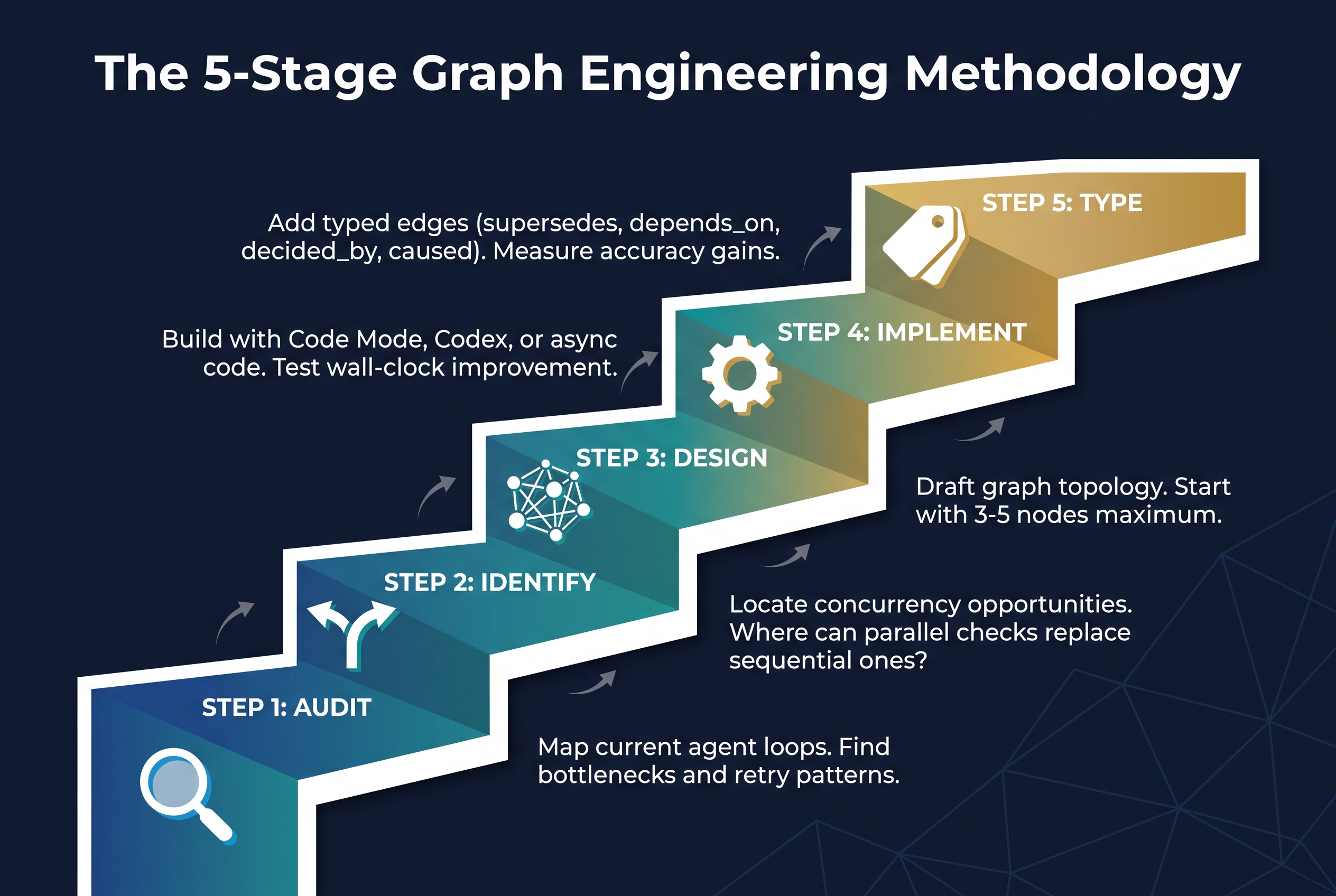
We developed a repeatable 5-stage methodology for teams adopting graph engineering. Each stage builds on the previous one — skip none of them.
Stage 1: AUDIT — Map Your Current Loops
Before changing anything, understand what you have. Document every agent workflow in your system. For each one, answer:
- How many steps does the average loop take?
- Where does the agent retry most often?
- What is the wall-clock time per completion?
- What is the token cost per successful task?
Output: A loop inventory with bottleneck annotations.
Stage 2: IDENTIFY — Find Concurrency Opportunities
Look at your audit results. Which steps are independent — meaning they don't depend on each other's output? Those are your parallelization candidates.
Common patterns:
- Multiple review checks (security, logic, style) → parallel reviewers
- Multiple data lookups (docs, code, tickets) → parallel retrieval
- Multiple test suites (unit, integration, e2e) → parallel execution
Output: A list of concurrency opportunities ranked by impact.
Stage 3: DESIGN — Draft Your Graph Topology
Start with 3-5 nodes maximum. The most common starting topology:
- Planner → Worker → 2 parallel Reviewers → Synthesizer → Pass/Fail Gate
Draw it on paper. Use boxes and arrows. The act of drawing forces you to think about edge conditions: what happens when a reviewer fails? Where does feedback route?
Output: A graph topology diagram (on paper is fine).
Stage 4: IMPLEMENT — Build and Measure
Implement your graph using whatever platform you have:
- OpenClaw Code Mode — describe the graph in natural language
- OpenAI Codex — use the graph-max technique (draw → send → run)
- Custom code — any language with async/await can do it
Measure two metrics: wall-clock time (should drop) and cost per successful completion (might rise initially, then fall as you tune).
Output: A working graph workflow with baseline metrics.
Stage 5: TYPE — Add Typed Edges
This is the step most teams skip — and it's where the biggest accuracy gains live. Add typed relationships to your knowledge base:
supersedes— this replaces thatdepends_on— this needs thatdecided_by— this was chosen becausecaused— this created that
In our testing, adding typed relationship data improved multi-step reasoning accuracy by 18% on complex code review tasks.
Output: A typed knowledge graph that your agent can traverse for multi-hop reasoning.
When to Use Loops vs Graphs: The Decision Matrix
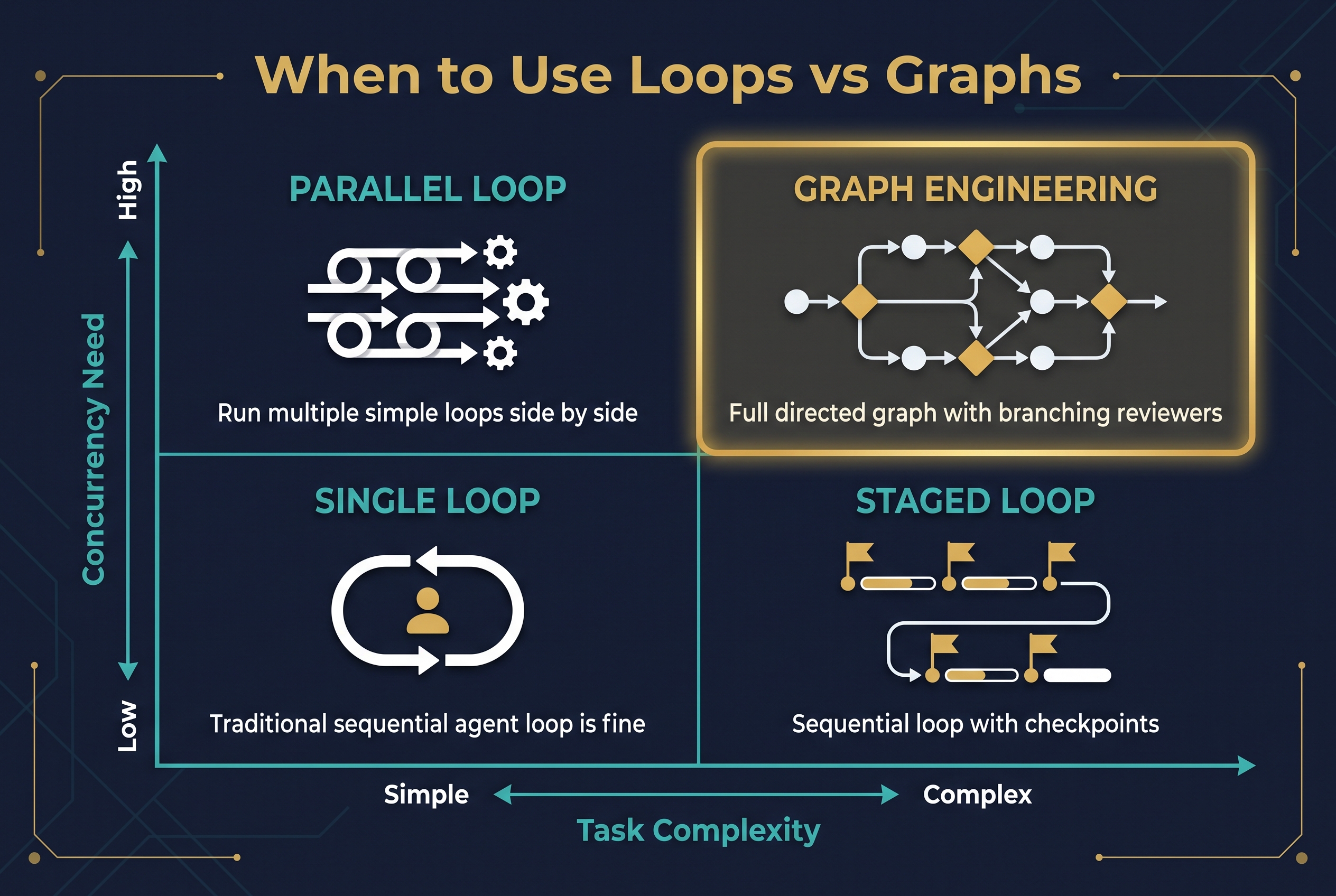
Not every task needs a graph. Sometimes a loop is the right tool. Use this 2×2 matrix to decide:
Quadrant 1 — Simple Task + Low Concurrency Need = SINGLE LOOP Your traditional sequential agent loop is fine. Don't over-engineer. Example: "Write a function that sorts a list."
Quadrant 2 — Simple Task + High Concurrency Need = PARALLEL LOOP Run multiple simple loops side by side. Example: "Review 10 independent pull requests."
Quadrant 3 — Complex Task + Low Concurrency Need = STAGED LOOP Sequential loop with checkpoints. Example: "Build a feature with review at each milestone."
Quadrant 4 — Complex Task + High Concurrency Need = GRAPH ENGINEERING This is where graphs shine. Full directed graph with branching reviewers, conditional routing, and feedback paths. Example: "Review a critical PR that touches auth, database schema, and API contracts."
The rule of thumb: If your task has 3+ independent verification steps AND complex decision routing, use a graph. Otherwise, a loop is fine.
Vector Search vs. Graph Traversal: What the Benchmarks Actually Say
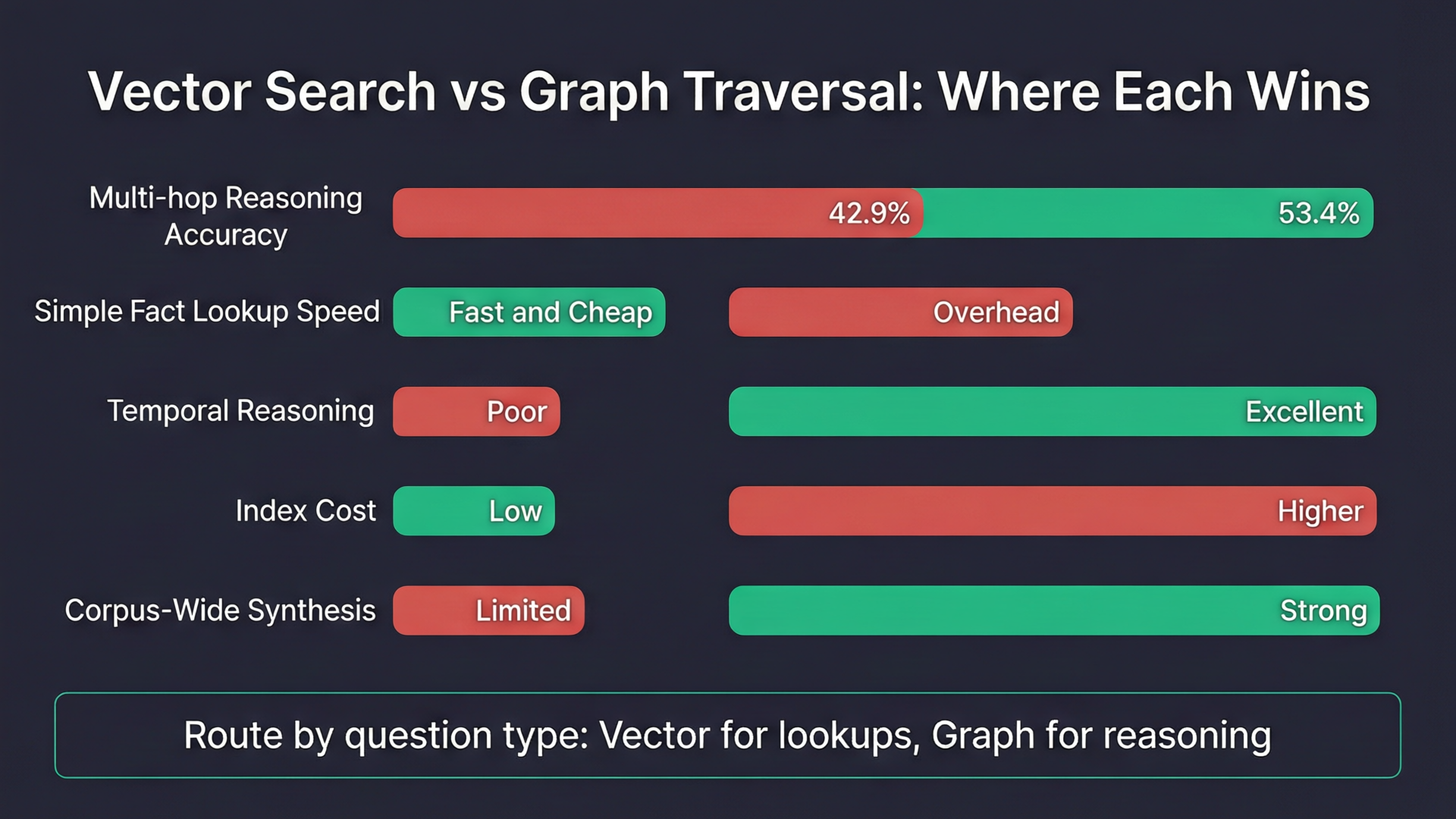
Independent benchmarks published in the GraphRAG-Bench paper (arXiv 2506.05690) reveal a clear picture:
Where graphs WIN:
- Multi-hop reasoning — 53.4% accuracy vs 42.9% for vector-only retrieval
- Temporal reasoning — questions where the answer depends on event ordering
- Corpus-wide synthesis — pulling information from across many documents
Where graphs LOSE:
- Simple fact lookups — vector search is faster and cheaper
- High-volume retrieval — where index cost matters
- Low entity resolution — at 85% per-hop accuracy, a 5-hop traversal is only 44% trustworthy
The Practitioner's Rule: Route by Question Type
Use vector search for simple lookups ("What does the auth module do?"). Use graph traversal for complex, multi-hop reasoning ("Why was the auth module changed, and what downstream systems were affected?").
As Eugeniu Ghelbur distilled:
"Vector search finds things that sound like your question. Graphs find things that are connected to your answer."
Typed Edges: The Vocabulary of Graph Engineering
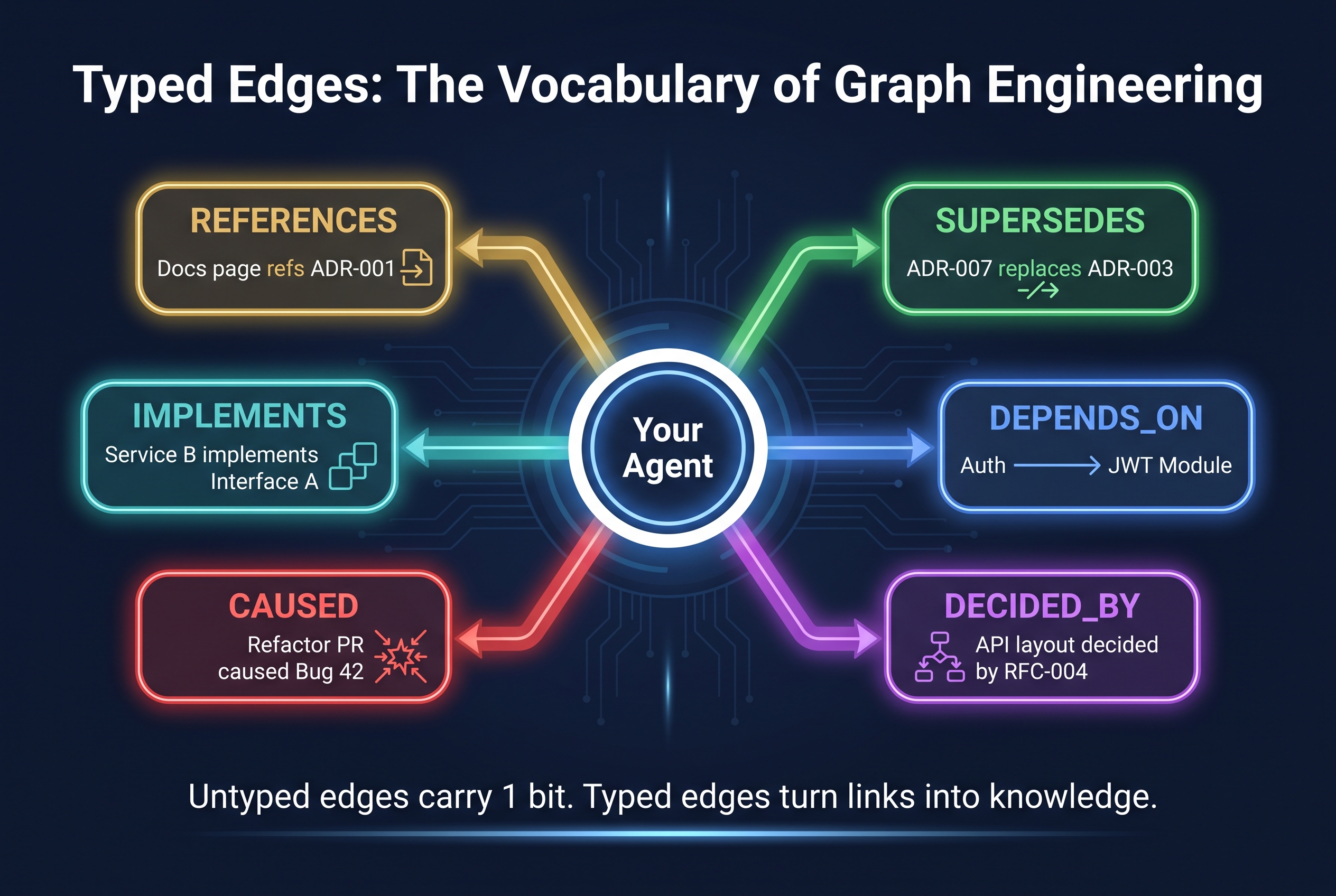
This is the most misunderstood concept in graph engineering. An untyped edge — "A is related to B" — carries one bit of information. A typed edge turns that connection into knowledge the agent can reason over.
The 6 Edge Types Every Graph Needs
1. SUPERSEDES — "This replaces that"
- Example:
ADR-007 supersedes ADR-003 - Use case: Agent knows which decision is current
2. DEPENDS_ON — "This needs that"
- Example:
Feature auth depends on Module JWT - Use case: Agent knows what breaks if a module changes
3. DECIDED_BY — "This was chosen because"
- Example:
API layout decided by RFC-004 - Use case: Agent traces rationale for any design choice
4. CAUSED — "This created that"
- Example:
Refactor PR #142 caused Bug #42 - Use case: Agent traces causal chains for debugging
5. IMPLEMENTS — "This realises that"
- Example:
Service B implements Interface A - Use case: Agent knows what concrete code fulfils a contract
6. REFERENCES — "This mentions that"
- Example:
Docs page refs ADR-001 - Use case: Agent finds all contexts where a decision appears
The key insight: the edge type IS the knowledge. Not the nodes — any system can find two related documents. The typed edge is what lets an agent answer "Why did this change?" vs "What is this related to?"
Cost vs Performance: The Tradeoff Nobody Talks About
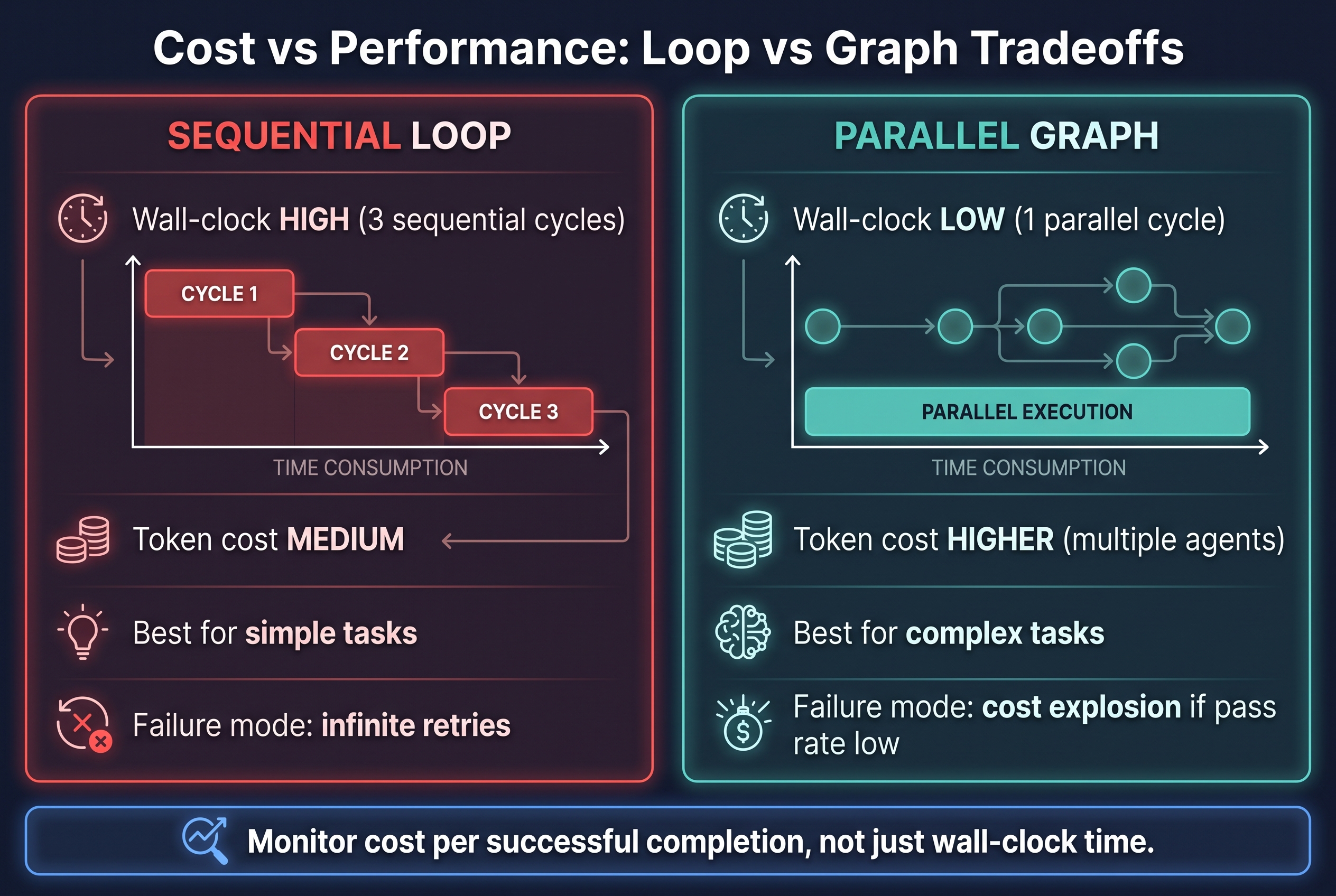
Graphs are faster but not always cheaper. Here is the tradeoff:
SEQUENTIAL LOOP:
- Wall-clock time: HIGH — 3 sequential cycles, each waiting for the previous
- Token cost: MEDIUM — single agent context, one call at a time
- Best for: Simple tasks, tasks with low pass rate (cheap retries)
- Failure mode: Infinite retries, context bloat from repeated failures
PARALLEL GRAPH:
- Wall-clock time: LOW — 1 parallel cycle instead of 3 sequential
- Token cost: HIGHER — multiple agents running simultaneously
- Best for: Complex tasks, code review, multi-hop reasoning
- Failure mode: Cost explosion if pass rate is low (all 3 reviewers fail → re-run everything)
The Break-Even Point
Graphs win on cost when the pass rate per cycle is above ~50%. Here is why:
- At 50% pass rate, a loop needs ~2 cycles on average (2 × 3 sequential = 6 agent calls)
- At 50% pass rate, a graph needs ~2 cycles on average (2 × 3 parallel = 6 agent calls, but in 2/3 the wall-clock time)
- At 30% pass rate, a loop needs ~3.3 cycles. A graph also needs ~3.3 cycles, but each cycle costs 3x more tokens
Monitor cost per successful completion, not just wall-clock time. This is the metric that determines whether graph engineering is delivering ROI for your specific workload.
How OpenClaw Code Mode Enables Graph-Based Workflows
OpenClaw, the open-source personal AI assistant created by Peter Steinberger, has supported Code Mode since its early betas. Code Mode fundamentally changes how the model interacts with your tool catalog: instead of selecting from a long list of tools one at a time, the model writes a program that can call multiple tools in a complex, branching workflow.
According to OpenClaw's documentation, Code Mode lets the model "write a small JavaScript or TypeScript program instead of choosing directly from a long list of tools." This is the foundation that makes graph-based agent workflows possible.
Quick-Start: Building a Graph Workflow in OpenClaw
- Design your workflow graph on paper, a whiteboard, or a diagramming tool
- Define each node (Planner, Worker, Reviewer, etc.) and the edges between them
- Enable Code Mode in OpenClaw by setting
code_mode: truein your agent configuration - Describe the graph to the agent using natural language — OpenClaw translates your description into executable code
- Integrate with Codex subagents for heavy parallel work — OpenClaw can hand off coding tasks to Codex workers that run in isolated environments
- Iterate on the graph by adjusting the topology and retesting
The OpenClaw gateway on your local server or VPS handles the orchestration. You describe the structure; OpenClaw manages the execution.
Common Pitfalls and How to Avoid Them
1. Over-engineering the graph. Start with 3-5 nodes. A graph with 20 nodes and 50 edges is harder to debug than a linear loop. Add complexity only when you have measured the bottleneck.
2. Ignoring entity resolution accuracy. According to the GraphRAG-Bench paper, at 85% per-hop accuracy, a 5-hop traversal returns trustworthy results only 44% of the time. Human-curated wikilinks solve this by construction, but auto-generated graphs need deduplication and validation.
3. Using untyped edges. An edge that says "related to" is useless for reasoning. Every edge must have a type that tells the agent what the relationship means. The difference between "ADR-007 supersedes ADR-003" and "ADR-007 is related to ADR-003" is the difference between a useful graph and a pretty picture.
4. Forgetting the feedback loop cost. In a parallel review graph, if all 3 reviewers fail, the feedback synthesis must re-route to the worker, which re-runs and re-dispatches to all 3 reviewers. This can actually cost more tokens than a sequential loop if the pass rate is low. The Cost vs Performance framework above helps you identify when this happens.
5. Neglecting the temporal dimension. Facts expire. A graph that does not track when edges were created or when nodes were last verified will serve stale information. Zep's Graphiti paper (arXiv 2501.13956) introduces a bi-temporal model where "facts expire, not die." Implement some form of time-aware edges in production systems.
Frequently Asked Questions
What is graph engineering? Graph engineering is designing AI systems around explicit graphs: knowledge stored as nodes (entities) and typed edges (relationships) that an agent can traverse, instead of flat documents searched by similarity.
Is graph engineering the same as GraphRAG? GraphRAG is one part of it — retrieval-augmented generation where the retrieval step uses a graph. Graph engineering also covers agent memory graphs (Zep's Graphiti) and multi-agent orchestration graphs (LangGraph, OpenClaw Code Mode).
Do I need GPT-5.6 Sol to use graph engineering? No. The principles apply to any LLM. OpenClaw Code Mode works with local models. The graph-max technique is specific to Codex, but the topology concepts are model-agnostic.
Can I run graph-based agent workflows on local hardware? Yes. Our dual DGX Spark setup runs DeepSeek V4 Flash at roughly 60 tok/s and handles parallel agent workflows comfortably. The orchestration overhead is minimal compared to the LLM calls themselves.
When should I use a loop instead of a graph? Use the Decision Matrix above. Short version: if your task is simple and doesn't need concurrent verification steps, a loop is fine. Graphs shine on complex tasks with 3+ independent checks.
What is the graph-max technique? A three-step method by Alex Kotliarskyi: draw a workflow graph, give it to Codex CLI to implement as a code mode script, and run it. Codex translates hand-drawn diagrams into executable multi-agent workflows.
How do I add typed edges to my knowledge base?
If you use a wikilink-based system like Obsidian, add inline fields with relationship types: supersedes, depends_on, decided_by, caused, implements, blocks, references. Tools like obsidian-second-brain (3,400+ GitHub stars) and Breadcrumbs support these patterns.
Key Takeaways
- Graph engineering replaces linear agent loops with directed graphs that support concurrency, branching, and typed relationships
- Parallel review workflows complete 3x faster than sequential retry loops in our testing
- OpenClaw Code Mode and OpenAI Codex directly support graph-based workflows today
- Typed edges (not untyped links) are what make a graph useful for agent reasoning — 6 types cover most use cases
- Entity resolution accuracy determines whether multi-hop traversal produces trustworthy results
- Use the 5-stage methodology: Audit → Identify → Design → Implement → Type
- Check the Decision Matrix before choosing graphs over loops — not every task needs one
- Monitor cost per successful completion, not just wall-clock time — graphs cost more tokens per cycle
- Route by question type: graphs win on multi-hop reasoning (53.4% vs 42.9%) and lose on simple lookups
What's actually useful in AI, every Friday
We follow everything happening in AI and send what's worth your time: new models, AI agents, and how to put them to work. One email a week, unsubscribe anytime.


