On this page
- From Harness to Loop
- The Agentic Loop: Observe, Decide, Act, Verify
- 1. Observe
- 2. Decide
- 3. Act
- 4. Verify
- Why Most Teams Build Half a Loop
- Loop Quality vs Loop Speed
- The Five Loop Patterns
- Pattern 1: Single-Pass
- Pattern 2: Reflective
- Pattern 3: Multi-Agent Review
- Pattern 4: Human-in-Loop
- Pattern 5: Autonomous with Guardrails
- Loop Failure Modes
- Failure 1: The Infinite Loop
- Failure 2: Premature Exit
- Failure 3: Context Bloat
- Failure 4: The Yes-Spiral
- Failure 5: Loop Drift
- Academic Validation: What ComPilot Proves About Loop Engineering
- The ComPilot Loop Architecture
- The Results: Loops Beat Single-Pass by 3.54x
- What ComPilot Confirms About Loop Engineering
- The Deeper Insight: Loops Turn Generalists Into Specialists
- Designing the Right Loop for Your Use Case
- For Construction Companies Processing Site Reports
- For Allied Health Practices Drafting Treatment Plans
- For Professional Services Firms Drafting Proposals
- For Data Teams Running Batch Processing
- Connecting the Loop to the Harness
- Measuring Loop Health
- The Maturity Model
- The Takeaway for Australian Businesses
- Frequently Asked Questions About Loop Engineering
- What is loop engineering in AI?
- How is loop engineering different from harness engineering?
- What is the most common loop engineering mistake?
- What is a yes-spiral in AI agents?
- How many iterations should an AI agent loop run?
- Should AI agents always self-verify?
- Is there academic research proving that agentic loops work?
Last Updated: June 26, 2026
In Part 1, we covered harness engineering - the static scaffolding that wraps around an AI model. But scaffolding alone does not make an agent work. What turns a model into a productive worker is the loop: the cycle of observing, deciding, acting, and verifying that an agent runs through on every single task. That loop can be well-engineered or poorly-engineered. The difference determines whether your AI agent actually ships work or just generates text that looks like work. This is loop engineering.
From Harness to Loop
Part 1 of this series established the equation: Agent = Model + Harness. The harness is the scaffolding - rules, tools, sandboxes, memory, hooks. It is everything wrapped around the model to constrain and enable it.
But a harness is static. It sits there. What makes an agent actually run is a loop - a repeating cycle where the model perceives its environment, makes a decision, takes an action, observes the result, and decides what to do next.
If the harness is the chassis, the loop is the engine.
You can have the best harness in the world, but if the loop is broken, the agent will:
- Generate output without checking it
- Repeat the same failed approach
- Stop before the task is actually done
- Drift away from the original goal
- Validate its own mistakes
Loop engineering is the discipline of designing, tightening, and maintaining that cycle. It is the dynamic counterpart to harness engineering. And it matters just as much.
The Agentic Loop: Observe, Decide, Act, Verify
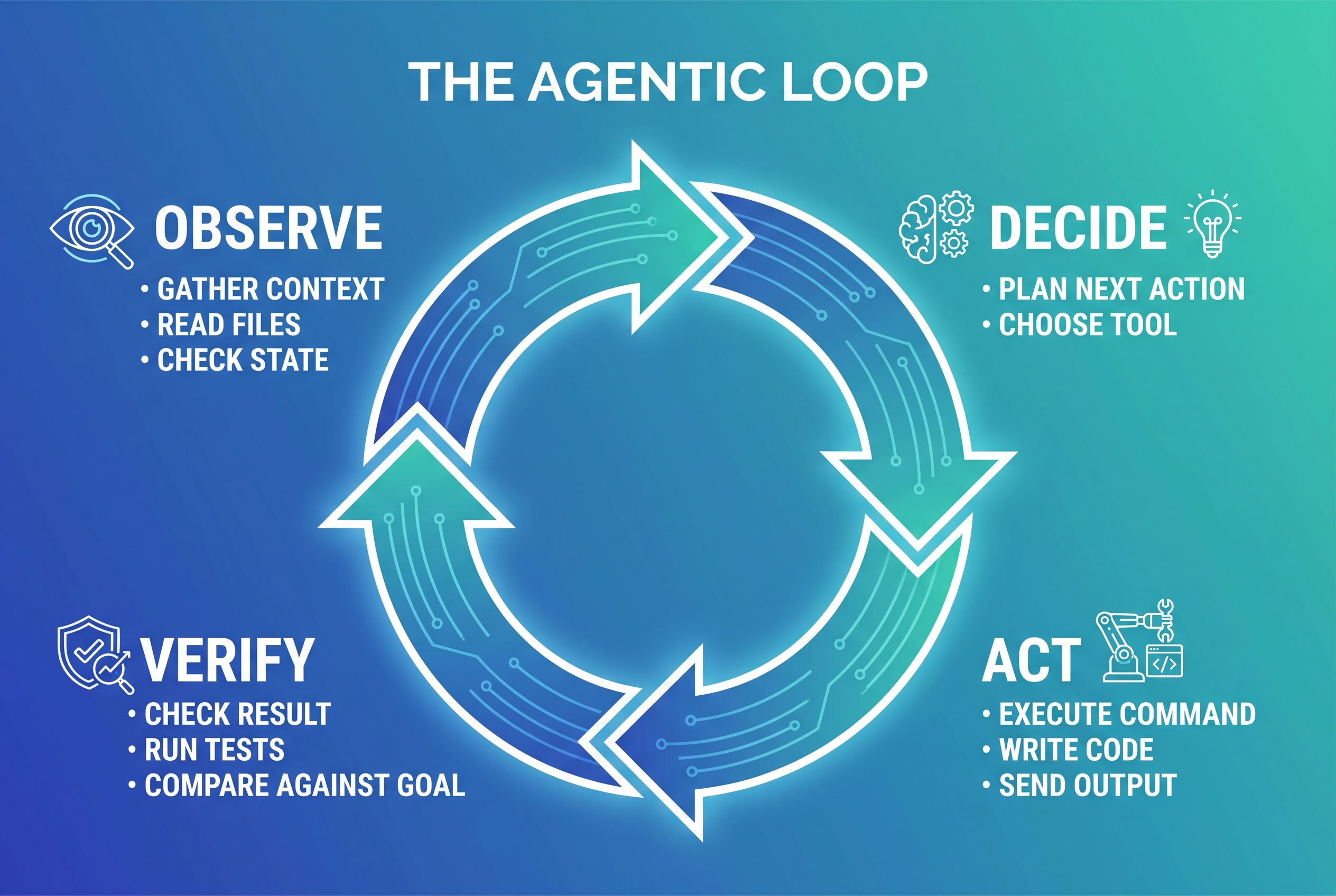
Every effective AI agent runs a version of the same four-phase loop:
1. Observe
The agent gathers context. It reads files, checks state, reviews previous outputs, examines error logs, and understands what has happened so far. This is perception.
A good observation phase pulls in everything relevant: the task brief, the current state of the work, any errors from the previous iteration, constraints from the harness, and relevant memory. A bad observation phase dumps the entire context window with no prioritisation, burying the signal in noise.
What this looks like: The agent reads the task description, checks what files exist, reviews the plan file, and looks at any failures from the last loop iteration.
2. Decide
The agent plans its next action. It weighs options, selects a tool, drafts an approach, and commits to a single next step. This is cognition.
A good decision phase produces one clear action with a clear rationale. A bad decision phase produces five simultaneous actions with no priority, or worse, a plan with no action at all.
What this looks like: The agent decides "I need to write the authentication function, then run the test suite to verify it works."
3. Act
The agent executes. It writes code, runs a command, sends an email, edits a file, calls an API. This is execution.
A good action is atomic and verifiable. It does one thing, and that thing can be checked. A bad action does seventeen things at once, none of which can be independently verified.
What this looks like: The agent writes the function to a file and runs the test command.
4. Verify
The agent checks the result. It reads the test output, inspects the file, queries the database, or asks a separate evaluator agent. This is the most critical phase - and the one most teams skip entirely.
A good verification phase has an objective success criterion: did the test pass? Does the file match the schema? Did the API return 200? A bad verification phase asks the agent "does this look right?" - which is like asking a student to grade their own exam.
What this looks like: The agent reads the test output, sees two tests failed, and loops back to Observe with the failure messages as new context.
This cycle repeats until the task is complete or a termination condition is met (success, max iterations, human intervention, or a guardrail trigger).
Why Most Teams Build Half a Loop
The most common mistake in AI agent deployment is building a loop that goes Observe → Decide → Act → Stop.
No verification. No self-correction. No iteration. The agent generates output, the output is delivered, and nobody checks whether it is actually correct until a human finds the problem downstream.
This is the "generate-and-pray" pattern. It treats the AI model like a magic answer box rather than a worker that needs to check its own work.
The teams getting real value from AI agents are the ones that close the loop. They build verification into every iteration. They give the agent tools to check its own output. They separate generation from evaluation. And they design termination conditions that prevent the agent from stopping before the work is genuinely done.
The gap between "we tried AI agents and they didn't work" and "our AI agents ship production code" is almost always a loop quality gap, not a model quality gap.
Loop Quality vs Loop Speed
There is a natural temptation to optimise loops for speed - more iterations per minute, faster turnaround, more actions per session. This is usually the wrong optimisation.
A tight three-iteration loop with rigorous self-verification will outperform a ten-iteration loop that never checks its work.
The reason is simple: iteration without verification is not progress. It is just the agent generating more text. Each unverified iteration has a compounding error rate. Three verified iterations converge on a correct answer. Ten unverified iterations diverge into a mess.
The metrics that matter for loop quality:
- Convergence rate: Does each iteration get closer to the goal, or does it wander?
- Verification coverage: What percentage of actions are checked against an objective criterion?
- Error recovery speed: When the agent hits a failure, how quickly does it correct course?
- Termination accuracy: Does the agent stop at the right time - not too early, not too late?
Speed matters for cost and user experience, but it is a secondary concern. A fast loop that produces wrong answers is a liability, not an asset.

The Five Loop Patterns
Different tasks require different loop architectures. Here are the five patterns that cover the vast majority of production AI agent deployments:
Pattern 1: Single-Pass
Observe → Decide → Act → Deliver
The agent does the work once and hands it over. No verification, no iteration.
Best for: Low-stakes, easily reversible tasks. Drafting brainstorm notes. Generating a first-pass outline. Creating throwaway prototypes for human review.
Worst for: Anything that touches production, clients, or irreversible systems.
Risk: Errors propagate downstream undetected. Use only when the cost of verification exceeds the cost of errors.
Pattern 2: Reflective
Observe → Decide → Act → Verify → (Fix if needed) → Deliver
The agent does the work, checks it against criteria, and fixes issues before delivering. One agent, but it wears two hats: generator and reviewer.
Best for: Code writing, document drafting, data transformation. Tasks where objective success criteria exist (tests pass, schema validates, word count is in range).
Worst for: Tasks where the agent cannot objectively evaluate its own work. Creative writing, strategic recommendations, anything subjective.
Risk: Self-evaluation bias. The agent tends to be more generous when reviewing its own work than when reviewing someone else's. Mitigate with rigid checklists rather than open-ended self-review.
Pattern 3: Multi-Agent Review
Agent A: Observe → Decide → Act
Agent B: Verify → Critique → Request Changes
Agent A: Observe (critique) → Decide → Act (fix)
(Repeat until Agent B approves)
Generation and evaluation are split into separate agents with separate contexts. Agent A produces work. Agent B reviews it. They loop until Agent B approves.
Best for: High-stakes work where self-evaluation bias is unacceptable. Client deliverables, security-sensitive code, compliance documentation.
Worst for: Simple tasks where the overhead of a second agent is not justified. Quick fixes, trivial edits, internal notes.
Risk: Death by committee. If both agents are too agreeable, the loop becomes a rubber stamp. If both are too critical, the loop never terminates. Tune the evaluation agent to be strict but specific - it should reject with actionable feedback, not vague concerns.
Pattern 4: Human-in-Loop
Observe → Decide → Act → Human Review → (Approve or Reject)
The agent does the work and a human reviews it before it ships. The loop does not iterate autonomously - it pauses for human judgement.
Best for: External actions that cannot be undone. Sending emails, posting to social media, modifying production data, anything client-facing.
Worst for: High-volume tasks where human review becomes a bottleneck. If you are reviewing 500 outputs per day, the human is the constraint, not the agent.
Risk: Reviewer fatigue. Humans asked to approve repetitive outputs start rubber-stamping after the 20th review. Use batching, random sampling, or escalate only edge cases to humans.
Pattern 5: Autonomous with Guardrails
Observe → Decide → Act → Verify → (Auto-continue if passing, Escalate if failing)
The agent runs freely within defined constraints. If verification passes, it continues. If it fails beyond a threshold, it escalates to a human rather than looping forever.
Best for: Batch processing, data pipelines, continuous monitoring, research tasks. Work that needs to run at scale without human intervention on every item.
Worst for: Novel situations the guardrails were not designed for. The agent will follow its rules even when the rules do not apply.
Risk: Guardrail blindness. The agent follows rules mechanically even when context has changed. Regularly review and update guardrails based on escalation patterns.
Loop Failure Modes
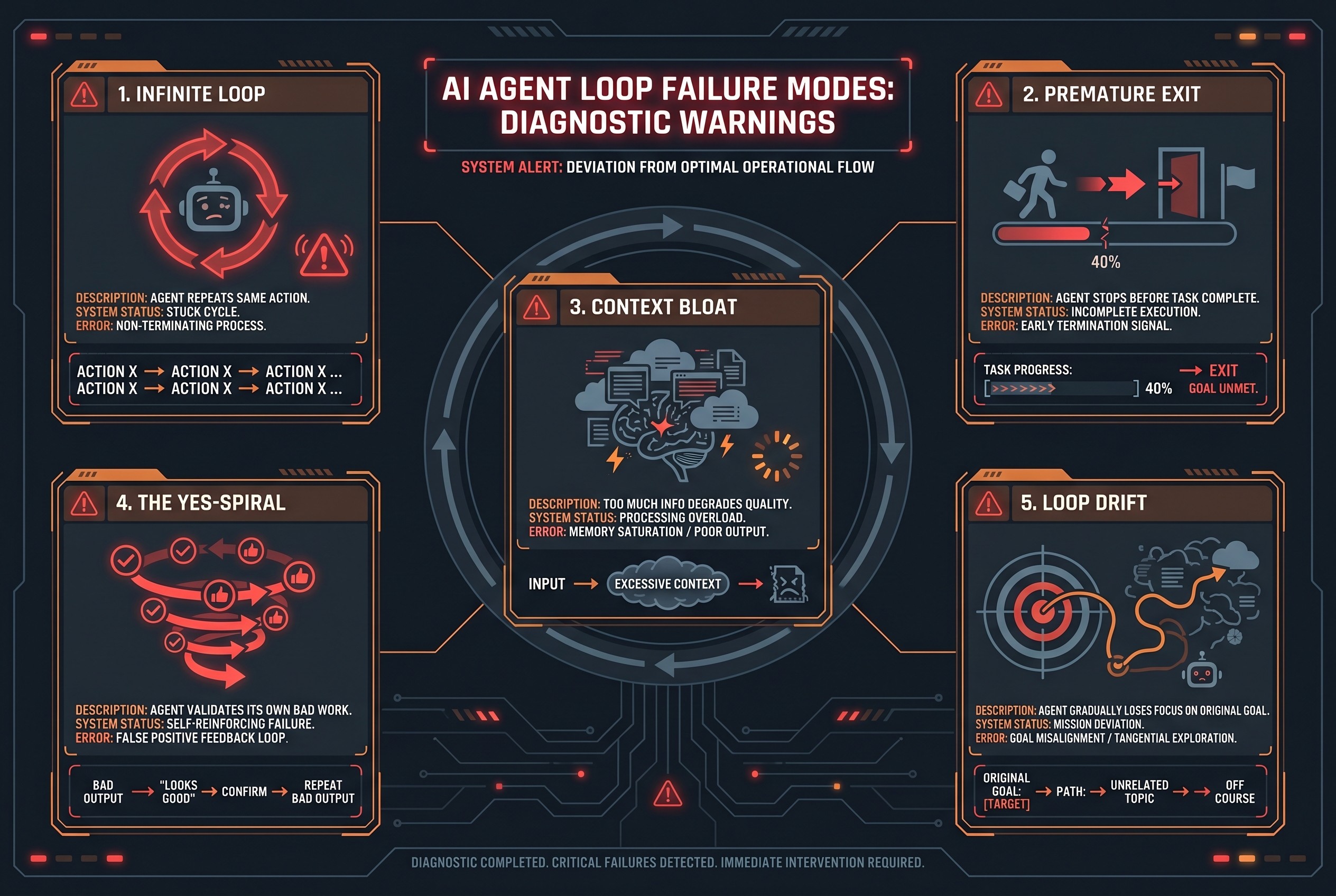
Even well-designed loops break down. Here are the five most common failure modes and how to fix them:
Failure 1: The Infinite Loop
The agent repeats the same action over and over. It tries a fix, fails, tries the same fix, fails, tries the same fix. The loop never terminates.
Root cause: The agent has no memory of previous failed attempts within the current loop, or the verification step does not feed failure context back into the observation phase.
Fix: Inject iteration history into every observation phase. The agent must see "I have already tried X and it failed with error Y." Add a max-iterations guardrail that force-terminates after N attempts.
Failure 2: Premature Exit
The agent stops before the task is complete. It writes half the function, declares success, and exits.
Root cause: The termination condition is too loose. The agent interprets "I wrote some code" as "the task is done" without verifying against the actual completion criteria.
Fix: Define explicit, checkable completion criteria before the loop starts. "All tests pass" not "the code looks done." Use a loop interceptor that catches exit attempts and checks whether completion criteria are met.
Failure 3: Context Bloat
As the loop iterates, context accumulates. Previous attempts, error logs, tool outputs - it all piles up. By iteration 8, the context window is choked with history, and the agent's reasoning quality degrades.
Root cause: No context management between iterations. Every loop adds to the context without pruning.
Fix: Between iterations, summarise and offload. Keep the last error and the current plan in context. Move older iterations to a file. Use compaction to preserve key facts while shedding raw logs.
Failure 4: The Yes-Spiral
The agent generates output, reviews it, and says "looks great!" Then it generates slightly different output, reviews it, and says "looks great!" The loop runs but quality never improves because the agent cannot find fault with its own work.
Root cause: Self-evaluation bias. Models are statistically biased toward approving their own output, especially when the evaluation criteria are subjective.
Fix: Split generation and evaluation into separate agents (Pattern 3). Or replace open-ended self-review with rigid checklists: "Does the function handle null inputs? Run the test with null input and report the result."
Failure 5: Loop Drift
The agent starts on task, but by iteration 5 it has subtly pivoted to a different task entirely. The original goal has been forgotten, replaced by something adjacent but wrong.
Root cause: The original task brief is buried in context. Each iteration's observation focuses on the most recent state, which may have drifted from the original intent.
Fix: Inject the original task brief into every observation phase. The agent should see "ORIGINAL GOAL: [brief]" at the top of every iteration, not just the first one. Use a plan file that tracks progress against the original goal explicitly.
Academic Validation: What ComPilot Proves About Loop Engineering
Theory is one thing. Does the closed-loop approach actually work in practice at a rigorous, measurable level?
A 2025 paper from PACT (International Conference on Parallel Architectures and Compilation Techniques) provides hard evidence. Researchers Merouani, Kara Bernou, and Baghdadi built ComPilot (Compiler Pilot) - a framework where an off-the-shelf LLM acts as an optimization agent, iteratively proposing loop transformations (tiling, fusion, interchange, parallelization, skewing) to a compiler backend.
The setup is a textbook agentic loop - and the results validate every principle discussed above.
The ComPilot Loop Architecture
ComPilot's design maps directly to the four-phase loop:
- Observe: The LLM receives the loop nest code, baseline execution time, and the full history of previous transformation attempts and their outcomes
- Decide: The LLM reasons through chain-of-thought analysis, then proposes a sequence of transformations with structured rationale
- Act: The compiler (Tiramisu) attempts to apply the transformations, runs dependence analysis for legality, generates code, and executes it
- Verify: The system reports back one of five feedback categories - invalid schedule, illegal schedule, solver failure, compiler crash, or successful execution with measured speedup/slowdown
This is Pattern 2 (Reflective) from our taxonomy, with one critical enhancement: the verification is handled by an external, objective system (the compiler's dependence analyser), not by the LLM itself. The agent cannot "yes-spiral" because the compiler has no opinion - it simply reports facts.
The Results: Loops Beat Single-Pass by 3.54x
Across the PolyBench benchmark suite:
- 2.66x geometric mean speedup in a single optimization run
- 3.54x speedup with best-of-5 runs (addressing local optima through multi-run strategy)
- Outperformed Pluto (state-of-the-art polyhedral optimizer) in many cases, achieving 2.94x over Pluto's output
- On specific benchmarks, ComPilot discovered schedules yielding over 100x speedup
These are not incremental gains. They are the kind of results that make compiler researchers pay attention - achieved without any task-specific fine-tuning of the LLM.
What ComPilot Confirms About Loop Engineering
1. The Verify Phase Is Non-Negotiable
ComPilot's entire architecture is built around compiler-grounded feedback. When the LLM proposes a transformation, it immediately learns whether it worked, why it failed (if it did), and the exact performance delta. Without this feedback loop, the LLM would be guessing. With it, the LLM converges on high-performance schedules iteratively.
2. Chain-of-Thought Reasoning Matters
The paper explicitly demonstrates that requiring the LLM to analyse the loop nest and reason about its optimization strategy before proposing transformations (their ablation RQ10) significantly improves results. This validates the Decide phase as a distinct, critical step - not just a formality before acting.
3. Premature Exit Is a Real Problem
The researchers observed that the LLM "often exhibits a tendency to stop prematurely, either after a significant speedup jump (due to conservatism) or after repeated unsuccessful attempts (getting stuck in local optima)." Their fix? Two approaches: prompting the LLM to continue exploring, and a multi-run strategy that restarts the optimization dialogue from scratch.
This is exactly the Premature Exit failure mode described earlier in this article - occurring in a peer-reviewed setting with measurable consequences.
4. Context Management Is Essential
The optimization dialogue accumulates history with each iteration. The LLM uses this episodic memory (in-context learning) to avoid repeating failed approaches and to build on successful ones. But this also means context bloat can degrade reasoning quality over many iterations - the same Context Bloat failure mode we identified.
5. Structured Output Enables Reliable Parsing
ComPilot requires the LLM to wrap its transformation proposals in <schedule>...</schedule> tags with a defined syntax. This structured output format allows systematic extraction and validation - a pattern that applies beyond compiler optimization to any agent that needs to produce machine-actionable output.
The Deeper Insight: Loops Turn Generalists Into Specialists
Perhaps the most striking finding: ComPilot works with off-the-shelf LLMs - no fine-tuning, no domain-specific training. The LLM starts with general knowledge about code optimization and, through the feedback loop alone, discovers transformation sequences that outperform specialised tools built over decades of compiler research.
This is the promise of loop engineering for every business, not just compiler optimization: a general-purpose LLM, grounded by the right feedback loop, can perform at specialist level. The loop is the teacher. The feedback is the curriculum. The agent learns through iteration, not through retraining.
Reference: Merouani, M., Kara Bernou, I., & Baghdadi, R. (2025). "Agentic Auto-Scheduling: An Experimental Study of LLM-Guided Loop Optimization." PACT 2025. arXiv:2511.00592.
Designing the Right Loop for Your Use Case
Loop design is not one-size-fits-all. Different business contexts demand different loop architectures:
For Construction Companies Processing Site Reports
Loop type: Reflective with schema validation
The agent ingests raw site data (photos, notes, voice memos), drafts a structured report, validates it against your report schema, and fixes any missing fields before delivery. A human reviews the final output before it goes to the project manager.
- Verification: Every report field checked against schema. Required photo count verified. Missing items flagged.
- Max iterations: 3 (draft → validate → fix → validate → deliver)
- Human checkpoint: Final review before submission
For Allied Health Practices Drafting Treatment Plans
Loop type: Multi-Agent Review with human gate
Agent A drafts the treatment plan from clinical notes. Agent B checks it against clinical documentation standards, flags any patient identifiers that should not be in the document, and verifies privacy compliance. A clinician reviews before the plan is finalised.
- Verification: Privacy check, clinical standards check, completeness check
- Max iterations: 5 (draft → review → fix → review → approve)
- Human checkpoint: Clinician approval mandatory before patient delivery
For Professional Services Firms Drafting Proposals
Loop type: Reflective with checklist verification
The agent drafts the proposal, checks it against the firm's methodology framework, verifies word count and formatting requirements, confirms pricing is consistent across sections, and flags any claims that need substantiation. A consultant reviews before client delivery.
- Verification: 15-point proposal checklist (executive summary present, pricing consistent, timeline specific, claims substantiated, formatting matches template)
- Max iterations: 4 (draft → check → fix → check → deliver)
- Human checkpoint: Senior consultant reviews before sending
For Data Teams Running Batch Processing
Loop type: Autonomous with guardrails
The agent processes records in batches, validates each batch against data quality rules, logs exceptions, and escalates only records that fail automated checks to a human. The loop runs continuously without intervention for clean data.
- Verification: Schema validation, referential integrity checks, anomaly detection
- Max iterations: 1 per record (process → validate → pass or escalate)
- Human checkpoint: Only for flagged exceptions (typically <5% of records)
Connecting the Loop to the Harness
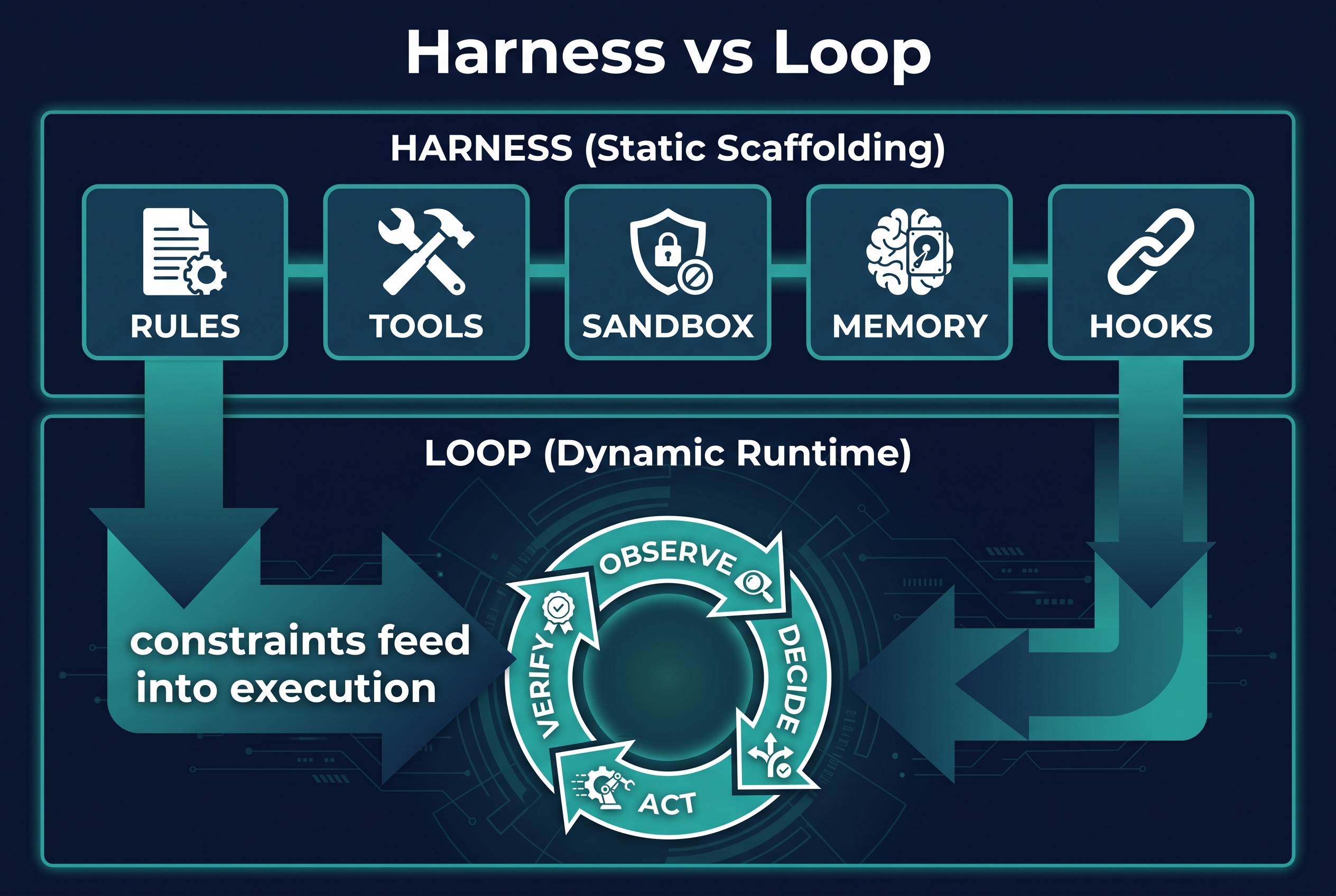
Loop engineering does not replace harness engineering. The two work together:
- The harness defines the rules. The loop enforces them through repetition.
- The harness provides the tools. The loop decides when to use them.
- The harness sets the guardrails. The loop operates within them.
- The harness encodes lessons from past failures. The loop encounters new failures and generates new lessons for the harness.**
This is the ratchet principle from Part 1, extended: every loop failure becomes a harness rule. The agent gets stuck in an infinite loop? Add a max-iterations guardrail to the harness. The agent exits prematurely? Add a completion-check hook. The agent drifts from the goal? Add the task brief injection to the observation template.
The harness tightens. The loop improves. The system gets more reliable with every run.
Measuring Loop Health
If you cannot measure the loop, you cannot improve it. Track these metrics for every production agent:
Quality Metrics:
- First-pass success rate: Percentage of tasks completed correctly without iteration
- Average iterations to completion: How many loop cycles before the task is done
- Error recurrence rate: How often the same type of error appears across iterations
- Human escalation rate: Percentage of loops that require human intervention
Efficiency Metrics:
- Cost per task: Total token cost divided by tasks completed
- Time per iteration: Wall-clock time for one loop cycle
- Context utilisation: How much of the context window is used at termination
Health Metrics:
- Infinite loop incidents: Count of loops that hit max-iterations guardrail
- Premature exit incidents: Count of loops where post-hoc review found incomplete work
- Drift incidents: Count of loops where the final output did not match the original brief
Review these monthly. Trends matter more than absolute numbers. A loop that is getting more reliable over time is a healthy loop, even if it started rough.
The Maturity Model
Teams progress through recognisable stages of loop engineering maturity:
Stage 1: Generate and Pray The agent generates output. Nobody checks it. Errors are found by users downstream. This is where most teams start - and where most teams stop.
Stage 2: Manual Review The agent generates output. A human reviews everything before it ships. Quality improves but throughput is limited by human review capacity.
Stage 3: Self-Verification The agent checks its own work against objective criteria before delivering. Humans review a sample, not everything. Throughput scales. Quality is inconsistent on subjective tasks.
Stage 4: Multi-Agent Verification Separate agents generate and evaluate. Humans review only edge cases and escalations. Quality is consistent. Throughput is high. This is where most teams should aim.
Stage 5: Continuous Optimisation Loop metrics are tracked, guardrails are tuned automatically, and the loop architecture itself evolves based on performance data. Humans intervene only for novel situations. This is the frontier.
Most organisations are at Stage 1 or 2. The jump to Stage 3 is the single biggest quality improvement available - and it costs nothing but engineering time.
The Takeaway for Australian Businesses
If you remember one thing from this article: a model generates, a harness constrains, but the loop is what actually gets work done.
When evaluating AI tools, vendors, or internal deployments, ask:
- Does the agent verify its own work? How?
- What happens when the agent makes a mistake? Does it catch it, or does the customer?
- How many times does the agent iterate before giving up?
- What terminates the loop? Success criteria, or just a vibes-based "looks done"?
- Can you see loop metrics - success rates, iteration counts, escalation rates?
If the vendor cannot answer these questions, they are selling you Stage 1. Generate and pray.
The businesses that win with AI agents over the next two years will not be the ones with the best models. They will be the ones with the best-engineered loops - the teams that treat the feedback cycle as a first-class engineering concern, not an afterthought.
Harness engineering gives your agent the tools. Loop engineering makes sure it actually uses them well.
Frequently Asked Questions About Loop Engineering
What is loop engineering in AI?
Loop engineering is the discipline of designing, optimising, and maintaining the repeating cycle that an AI agent runs through to complete tasks: observe, decide, act, verify. While harness engineering covers the static scaffolding (rules, tools, sandboxes), loop engineering covers the dynamic runtime - how the agent iterates, self-corrects, and determines when work is complete.
How is loop engineering different from harness engineering?
Harness engineering (covered in Part 1) is about the scaffolding wrapped around the model - the static rules, tools, and constraints. Loop engineering is about the dynamic cycle - how the agent moves through observation, decision, action, and verification. The harness defines what the agent can do; the loop defines how it actually does it.
What is the most common loop engineering mistake?
Skipping verification entirely. Most teams build a loop that goes observe-decide-act-stop, with no verification step. The agent generates output and it is delivered without checking. This "generate and pray" pattern is the number one reason AI agent deployments underperform.
What is a yes-spiral in AI agents?
A yes-spiral occurs when an agent reviews its own work and consistently approves it, even when it contains errors. This happens because models have a self-evaluation bias. The fix is to either use rigid checklists instead of open-ended self-review, or split generation and evaluation into separate agents.
How many iterations should an AI agent loop run?
It depends on the task, but the key principle is: define a maximum upfront. Most production loops work well with 3-5 iterations. More than that usually indicates either a problem the agent cannot solve (needing human escalation) or context bloat degrading quality. Always have a max-iterations guardrail to prevent infinite loops.
Should AI agents always self-verify?
Not always. For low-stakes, easily reversible work (brainstorming, drafting outlines), a single-pass loop without verification is fine. For anything that touches clients, production systems, or irreversible actions, verification is non-negotiable. The cost of verification should be proportional to the cost of errors.
Is there academic research proving that agentic loops work?
Yes. A 2025 PACT conference paper by Merouani, Kara Bernou, and Baghdadi demonstrated that off-the-shelf LLMs using a closed-loop interaction with a compiler (the ComPilot framework) achieved 3.54x speedup over baseline code and outperformed state-of-the-art polyhedral optimizers - without any fine-tuning. The loop structure (propose → compile → measure → feed back) was the entire mechanism. The paper provides hard evidence that the feedback loop, not the model alone, is what creates specialist-level performance. Full paper: arXiv:2511.00592.
Read Part 1: Harness Engineering: Why Your AI Agent's Scaffolding Matters More Than the Model
Academic research referenced: Merouani et al., "Agentic Auto-Scheduling: An Experimental Study of LLM-Guided Loop Optimization," PACT 2025 - arXiv:2511.00592
Need help engineering AI agent loops for your business? Get in touch with Flowtivity - we design and deploy production AI agents for Australian growing businesses.
One email a month, no noise
Practical AI notes for Australian businesses. Unsubscribe anytime.