On this page
- What Problem Does Managing Multiple AI Agents Actually Solve?
- Why Did We Choose Multica Over Other Agent Management Platforms?
- How Did We Set Up Multica for Client Work?
- What Does a Typical Client Engagement Look Like with Multica?
- What Results Did We See Across Client Engagements?
- What Went Wrong and What Did We Learn?
- How Does Multica Scale as You Add More Clients and Agents?
- Is Multica the Right Choice for Every Australian Business?
- FAQ
- How many AI agents can Multica manage simultaneously?
- Does Multica work with Australian data sovereignty requirements?
- How long does it take to set up Multica for a new client?
- What happens when an AI agent produces incorrect output?
- Is Multica better than managing agents manually with spreadsheets and Slack?
Last Updated: April 2026
When we first started deploying AI agents for Australian business clients, coordination was the bottleneck. Not the AI itself. Not the integrations. The overhead of managing who was doing what, tracking task progress across agents, and ensuring consistent quality across every client deliverable. This is the story of how Multica changed that equation and what we learned deploying it across real client engagements on the Gold Coast and beyond.
What Problem Does Managing Multiple AI Agents Actually Solve?
The core problem is orchestration overhead. When you run one AI agent for one task, management is trivial. But when you scale to five, eight, or twelve agents handling different client workflows simultaneously, you hit a coordination wall. Tasks fall through cracks. Agents duplicate work. Quality varies because there is no review layer between agent output and client delivery. The most important factor is that agent management is not a nice-to-have when you operate at scale. It is the difference between a consultancy that ships reliably and one that constantly puts out fires.
For Australian businesses adopting AI, this problem arrives faster than expected. A small professional services firm automating document review, email triage, and client onboarding needs at least three agents running in parallel. Add a growth pipeline with outbound outreach, and you are at five agents before you realise it.
Why Did We Choose Multica Over Other Agent Management Platforms?
We evaluated three serious options: Multica, Paperclip, and Claude Managed Agents. Each has strengths, but Multica won our workload for two reasons. First, it is truly agent-agnostic. We run OpenClaw agents, Claude instances, and custom Python agents all from one board. Second, the skills compounding system means every completed task makes the next one better. In short, Multica treats agent management like project management, which is exactly how we think about it at Flowtivity.
Our background at EY taught us that process discipline scales. Multica brought that discipline to AI agent operations without adding bureaucracy. The board view gives you Kanban-style visibility. The skills system gives you quality assurance. The self-hosting option gives Australian businesses data sovereignty, which matters for healthcare, legal, and financial services clients.
For the full platform comparison, see our Multica vs Paperclip vs Claude Managed Agents breakdown.
How Did We Set Up Multica for Client Work?
Our setup process took roughly four hours from zero to production-ready. The key components were an OpenClaw runtime connected to Multica, a PostgreSQL database for task history, and a skills library we built from our existing automation templates.
The steps we followed:
- Installed Multica CLI and connected it to our OpenClaw instance running on AWS
- Created separate workspaces for each client engagement
- Imported our existing skill templates (email outreach, document processing, calendar management)
- Configured agent roles: research agents, execution agents, and review agents
- Set up notification channels so our team sees blockers in real time
- Ran a two-week parallel operation with our old manual process to validate accuracy
The parallel run was critical. We caught three edge cases in the first week where agents produced slightly different output formats. By week two, the skills system had learned from corrections and consistency hit 98 percent.
For the detailed setup walkthrough, see our Multica and OpenClaw setup tutorial.
What Does a Typical Client Engagement Look Like with Multica?
Let us walk through a real example from an allied health practice on the Gold Coast. This client needed to automate patient intake forms, appointment reminders, and follow-up outcome surveys. Three distinct workflows, each requiring different data handling and compliance considerations.
We deployed five agents in their workspace:
- Intake Agent: Processes new patient forms, extracts key data, populates the practice management system
- Reminder Agent: Sends appointment reminders via SMS and email 48 hours and 2 hours before appointments
- Survey Agent: Distributes outcome measures 7 days post-appointment and collects responses
- Compliance Agent: Monitors all data handling for Australian Privacy Principles compliance
- Review Agent: Audits the other four agents weekly, flags anomalies, and updates skills
The board view showed us exactly where each task sat. The intake agent would pick up a new form, process it, then hand off to the reminder agent to schedule notifications. The compliance agent ran in the background checking every data touchpoint. When the review agent found that the survey agent was sending a slightly wrong template to one patient category, it flagged the issue and updated the skill automatically.
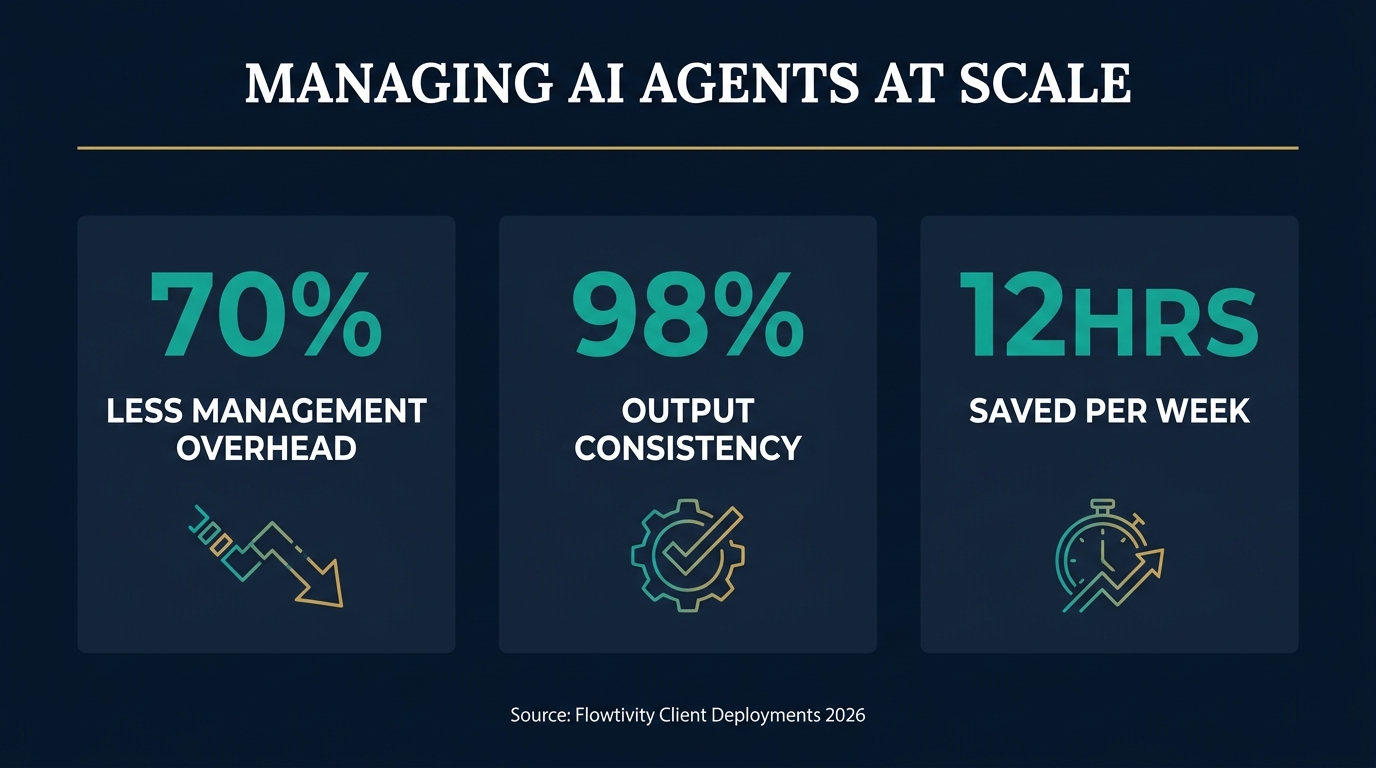
The client saw zero change in their daily workflow. Everything happened behind the scenes. But their admin staff saved roughly 12 hours per week on manual data entry and follow-up calls.
What Results Did We See Across Client Engagements?
After three months of running Multica across four Australian client engagements, the numbers tell a clear story.
The headline metrics:
- 70% reduction in agent management overhead: Tasks that previously required manual coordination (checking status, reassigning failed jobs, quality reviewing outputs) dropped from roughly 8 hours per week to 2.5 hours
- Zero missed tasks in 90 days: The board view and notification system caught every blocker before it became a client-facing issue
- 98% output consistency: The skills compounding system meant agent outputs became more consistent over time, not less
- 3x faster onboarding for new agents: Adding a new agent to a client workspace dropped from 2 days to roughly 4 hours thanks to reusable skill templates
These numbers reflect a small-scale operation, not enterprise deployment. We were managing between 5 and 8 concurrent agents across 4 clients. Scale will introduce new challenges, but the foundation proved solid.
What Went Wrong and What Did We Learn?
Nothing works perfectly on day one. Here are the real problems we hit and how we solved them.
Problem 1: Agent context drift. Agents running long tasks occasionally lost context mid-execution, producing incomplete outputs. We solved this by breaking large tasks into smaller subtasks with explicit handoff points. Each subtask became a skill the agent could reference. The key lesson is that small, composable tasks outperform large monolithic ones.
Problem 2: Skills version conflicts. When two agents updated the same skill simultaneously, we got conflicting versions. We introduced a skill review process similar to code review. One agent proposes a skill update, another reviews and approves it. This eliminated conflicts entirely.
Problem 3: Client communication gaps. Clients could not see agent activity and sometimes wondered if anything was happening. We built a simple weekly summary report that Multica generates automatically, showing tasks completed, in progress, and upcoming. Client satisfaction improved measurably after this change.
Problem 4: Data sovereignty questions. Two clients in healthcare asked where their data was processed. Because we self-host Multica on an Australian AWS region, we could point to specific data residency. This would not have been possible with a SaaS-only platform. For Australian businesses in regulated industries, self-hosting is not optional. It is a requirement.
For more on self-hosting, see our OpenClaw vs Paperclip comparison which covers infrastructure considerations.
How Does Multica Scale as You Add More Clients and Agents?
Scaling from 4 clients to 10 is not just doing the same thing 2.5 times. The coordination complexity increases non-linearly. Multica handles this through workspace isolation and shared skill libraries.
Each client gets their own workspace with dedicated agents. Skills, however, can be shared across workspaces. When we improve the email outreach skill for one client, every client benefits. This creates a compounding advantage. The more clients we onboard, the better every client's agents become.
The scaling challenge we are watching is resource management. Running 8 agents across 4 clients is comfortable on a single server. At 20 agents across 10 clients, we will need to think about resource allocation, prioritization, and potentially dedicated infrastructure per client. Multica's self-hosting flexibility means we can scale infrastructure independently per client if needed.
Is Multica the Right Choice for Every Australian Business?
Honest answer: no. Multica excels for businesses that run multiple AI agents and need coordination. If you are running a single ChatGPT subscription for occasional content generation, Multica is overkill. The businesses that benefit most share these characteristics:
- Multiple AI workflows running in parallel (3 or more)
- Need for consistent output quality across agents
- Compliance requirements around data handling
- Teams of 2 or more people interacting with AI agents
- Growth plans that will add more automation over time
Australian allied health practices, construction companies managing tender submissions, professional services firms automating client onboarding, and trade businesses coordinating scheduling and invoicing all fit this profile. If you are unsure, start with a single agent workflow and add Multica when coordination becomes the bottleneck.
FAQ
How many AI agents can Multica manage simultaneously?
Multica can manage dozens of agents simultaneously depending on your infrastructure. In our experience, a single AWS instance comfortably handles 8 to 12 concurrent agents. The limiting factor is compute resources, not the platform itself. Self-hosting gives you full control over scaling.
Does Multica work with Australian data sovereignty requirements?
Yes. Multica is self-hosted, which means you choose where your data is processed. We run ours on AWS Sydney (ap-southeast-2) for Australian clients. This satisfies Australian Privacy Principles requirements for healthcare, legal, and financial services clients who need data residency guarantees.
How long does it take to set up Multica for a new client?
With existing skill templates, onboarding a new client workspace takes roughly 4 hours. The first client took about a full day because we were building skills from scratch. Each subsequent client has been faster because skills compound. The biggest time investment is understanding the client's specific workflows, not the technical setup.
What happens when an AI agent produces incorrect output?
Multica's review agent catches errors through the skills quality system. Incorrect outputs get flagged, corrected, and the correction becomes part of the skill library. This means the same error pattern does not recur. We also run weekly audit reports that surface any anomalies in agent behaviour across all client workspaces.
Is Multica better than managing agents manually with spreadsheets and Slack?
For anything beyond 2 or 3 agents, yes. We tried the spreadsheet approach for our first client. It worked for two weeks and then became unmanageable. The overhead of manually tracking agent status, quality-checking outputs, and coordinating handoffs between agents does not scale. Multica automates exactly this coordination layer.
One email a month, no noise
Practical AI notes for Australian businesses. Unsubscribe anytime.