

On this page
- What Is OpenClaw 2.0?
- Why the Release Is Called "Accidental"
- The Features That Matter Most in Version 2026.8.1
- Swarm vs Fleet: Two Ways to Scale Agent Work
- OpenClaw 2.0 vs Earlier Versions
- Running OpenClaw 2.0 in Production: Our Experience
- Why Vendor Independence Matters After April 2026
- How to Deploy OpenClaw 2.0
- Should Growing Businesses Run OpenClaw 2.0?
- Frequently Asked Questions About OpenClaw 2.0
- What is OpenClaw 2.0?
- Is OpenClaw free to use?
- Which chat channels does OpenClaw support?
- Can OpenClaw run local models?
- Is OpenClaw safe for business credentials?
- What is the difference between Swarm and Fleet in OpenClaw?
Last Updated: September 1, 2026
OpenClaw 2.0 is the community name for version 2026.8.1 of OpenClaw, the MIT-licensed self-hosted AI agent gateway, released on August 31, 2026. According to the official announcement, it is the largest update in the project's history: 933 contributors, 569 first-time contributors, and more than 16,000 pull requests, roughly 50 percent of all code changes ever merged into the platform. The release rebuilds the browser app, simplifies installation so it reuses AI access you already pay for, adds shared cloud sessions for teams, and hardens credential handling for business use. This guide covers what changed, how it behaves in production, and whether growing businesses should deploy it in 2026.
What Is OpenClaw 2.0?
OpenClaw 2.0 is version 2026.8.1 of OpenClaw, and the official release notes now carry the title "v2026.8.1 (AKA OpenClaw 2.0)." OpenClaw is a self-hosted gateway that connects chat apps including Telegram, WhatsApp, Slack, Discord, iMessage, Signal, Microsoft Teams, Google Chat, Matrix, and Zalo to AI agents running on your own hardware. The non-profit OpenClaw Foundation stewards the project under an MIT license, and the 2026.8.1 release shipped on August 31, 2026.
One Gateway process serves every configured channel at once, so the same assistant answers in Telegram during a commute and in Slack at a desk. "No single company controls OpenClaw," the OpenClaw Foundation states on its site. "No gates, no gatekeepers." Installation is a single npm command on Node 22.22.3 or newer, and the official documentation lists full setup in under five minutes before channel pairing.
Why the Release Is Called "Accidental"
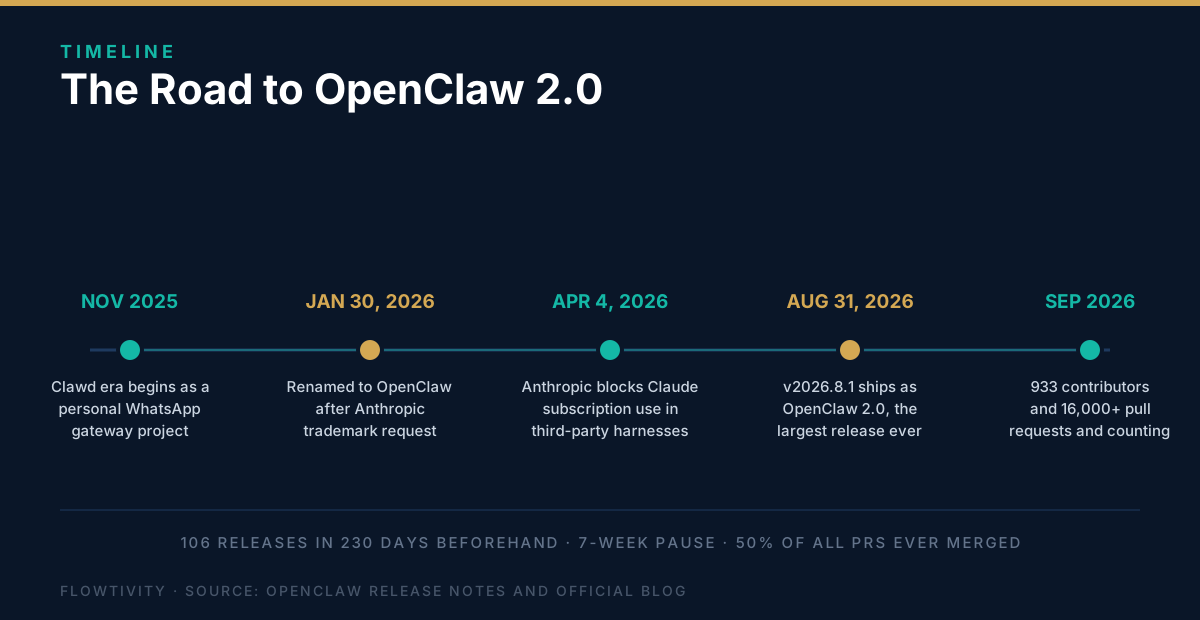
The team never planned a 2.0 release. According to the official blog post "OpenClaw 2.0, Accidentally," the work began as an installation simplification and a browser app rebuild, and the cleanup carried through every layer of the product until the team concluded it had built a second-generation platform. Before this release the project shipped 106 releases in 230 days, then went nearly seven weeks without shipping while the changes landed.
The scale explains the pause. According to the announcement, the release contains roughly 50 percent of all pull requests ever merged into OpenClaw, with 569 of the 933 contributors contributing for the first time. Even the versioning stayed accidental: the package published as 2026.9.1-beta.1 was later corrected to 2026.8.1-beta.4 in the release notes. On Hacker News, the announcement gathered 144 points and 171 comments within its first day.
The Features That Matter Most in Version 2026.8.1
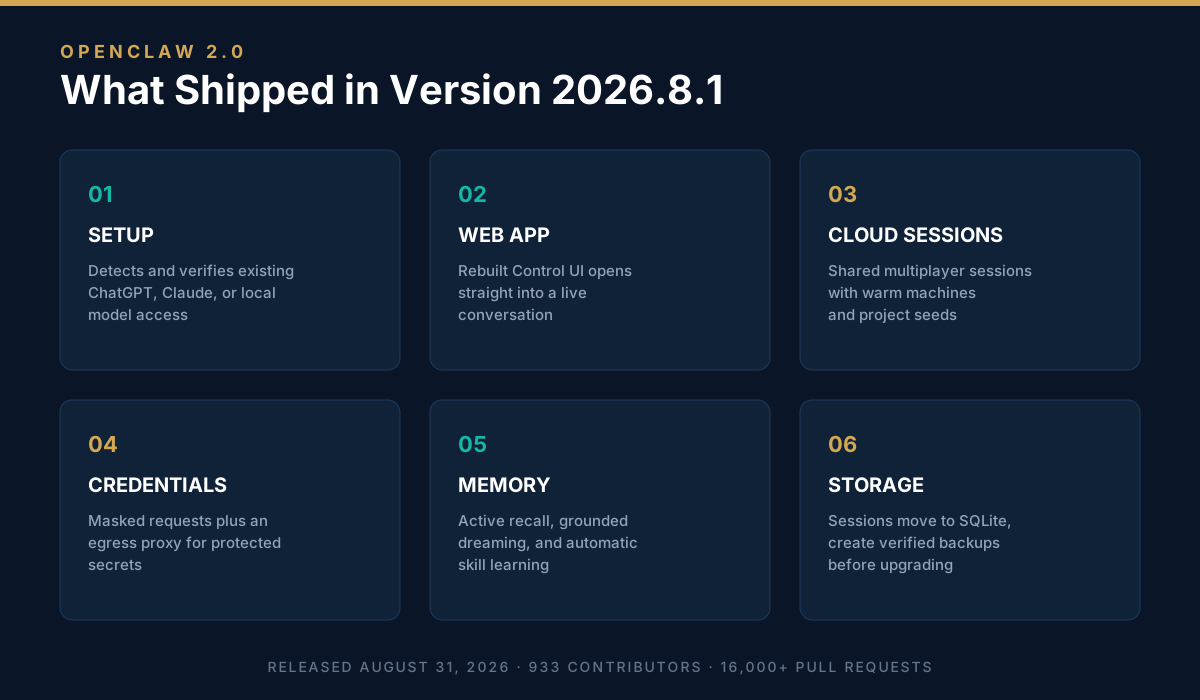
Five capability groups define this release: faster setup that detects and verifies AI access you already own, a rebuilt Control UI web app, shared cloud sessions that turn single-user agents into multiplayer tools, masked credential requests with a restricted egress proxy, and durable automations that can be approved once and inspected later. Memory also changed fundamentally, because agents now consolidate memory in the background and can adopt new skills automatically.
- Setup that starts with what you own. According to the release notes, guided setup reuses verified Codex, ChatGPT, or Claude CLI sign-ins, accepts an API key, or finds Ollama and LM Studio models, then proves the exact choice can answer before saving it. Fresh OpenAI setups default to GPT-5.6, Gemma 4 becomes the RAM-gated llama.cpp default, and in-process GGUF inference removes the need for a separate local server.
- A first-class web app. The rebuilt Control UI opens directly into a conversation with your agent, keeps setup flows in the browser, and shows durable progress cards that survive reloads while you follow subagent work live.
- Shared cloud sessions. Sessions can now run on paired devices or cloud workers, move their workspace with them, and reuse warm machines and project seeds. Teammates can join live work or take it over with context intact, which the team says turned OpenClaw into a multiplayer experience they now use to build OpenClaw itself.
- Safer credentials and approvals. Agents request credentials through masked prompts that keep values out of chat and model context, an opt-in proxy limits protected secret substitution to approved destinations, and recurring automations can be granted an exact permission once and revoked later.
- Memory that maintains itself. Active Memory adds personal conversation recall by default on personal installs, background "grounded dreaming" consolidates provenance-qualified material into long-term memory with a Dream Diary, and automatic self-learning applies scanner-approved skills without manual curation.
One breaking change deserves planning: sessions and transcripts moved into SQLite, so the official guidance is to create a verified backup before upgrading and to avoid downgrades after migration.
Swarm vs Fleet: Two Ways to Scale Agent Work
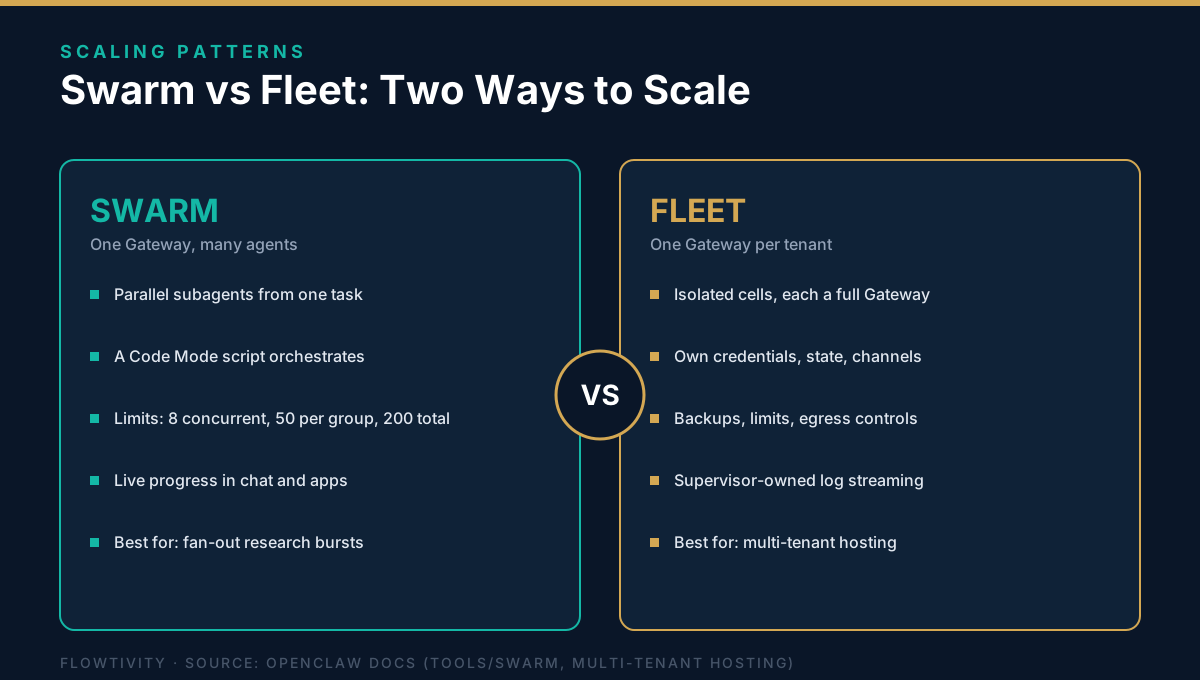
Swarm and Fleet solve different scaling problems. Swarm is one OpenClaw task fanning out into parallel subagents inside a single Gateway: a script spawns bounded collector children, collects their structured results, and reports live progress in chat. Fleet is infrastructure-level isolation: the openclaw fleet command creates multiple isolated cells, each a full Gateway in a hardened container with its own credentials, state, workspace, and channel accounts. Use Swarm to parallelize one job, and Fleet to run separate agents for separate tenants.
According to the official Swarm documentation, Swarm is experimental and opt-in, enabled through Settings, Labs, Swarm. There is no graph DSL and no separate workflow format, because "the program is the orchestration": normal JavaScript or TypeScript control flow such as Promise.all fans work out and collects results. Guardrails are bounded by default: 8 concurrent children, 50 live children per group, and 200 total spawns per group as a runaway backstop. The 2026.8.1 release notes add live Swarm progress surfaces in chat, on the session dashboard, and in the native apps.
Fleet takes the opposite approach to scale. According to the multi-tenant hosting documentation, each Fleet cell is a full Gateway in a hardened container with its own state, credentials, workspace, channel accounts, token, and loopback-only host port, created with commands like openclaw fleet create. Per-tenant channel accounts terminate inside the cell that owns them, so there is no shared inbound router. According to the release notes, cells gain backups, limits, egress controls, diagnostics, and supervisor-owned log streaming in this release.
| Dimension | Swarm | Fleet |
|---|---|---|
| What scales | Parallel subagents inside one Gateway | Isolated Gateways, one cell per tenant |
| Unit of work | Bounded collector children from a Code Mode script | A full Gateway in a hardened container |
| Isolation | Shared Gateway config and state | Own credentials, state, workspace, and channel accounts |
| Built for | Fan-out research, review, and collection jobs | Multi-tenant hosting and client separation |
| Guardrails | Defaults: 8 concurrent, 50 per group, 200 total per group | Cell backups, limits, egress controls, log streaming |
OpenClaw 2.0 vs Earlier Versions
The jump from earlier 2026 builds to 2026.8.1 is the largest in project history. Setup drops from manual configuration to detected and verified AI access. Memory moves from static files to an active, self-consolidating system. Credentials move from chat text to masked prompts with an egress proxy. The table below compares the generations side by side.
| Capability | OpenClaw before 2026.8.1 | OpenClaw 2.0 (2026.8.1) |
|---|---|---|
| Model setup | Manual provider config | Detects existing ChatGPT, Claude, or local model access and verifies it before saving |
| Web experience | Secondary admin surface | Rebuilt Control UI, opens into a live conversation with durable progress cards |
| Teamwork | Single user per session | Shared cloud sessions with handoff, context intact, warm machines and project seeds |
| Memory | Static markdown files | Active recall, background consolidation, automatic skill learning |
| Credentials | Values pass through chat context | Masked requests, egress proxy restricted to approved destinations |
| Automations | Re-approve each action | One-time exact-operation grants, inspectable and revocable |
| Session storage | File-based transcripts | SQLite, with verified-backup guidance before upgrade |
Running OpenClaw 2.0 in Production: Our Experience
Flowtivity has run OpenClaw 2026.8.1 in production since release day on a Linux VPS that has been up 170 days. Our agent runs growth operations through Telegram with roughly 280 markdown memory files and 54 installed skills, on GLM 5.3 via Z.ai as the default model. This entire article was researched, drafted, and published through the OpenClaw gateway itself.
Three things stood out after the upgrade. Session search now finds past conversations by exact words and phrases, which matters when a client thread resurfaces weeks later. Progress cards survive reloads, so long automation runs no longer lose their status view. And a five-post blog series we shipped through OpenClaw automations on August 30 published and verified cleanly across the transition. The upgrade itself completed without downtime after a verified backup, exactly as the release guidance recommends.
Why Vendor Independence Matters After April 2026
Multi-provider support stopped being theoretical in April 2026. According to user emails shared on Hacker News, Anthropic stopped allowing Claude subscription limits for third-party harnesses starting April 4, 2026, naming OpenClaw first in the policy. A related story about Claude Code treating commits that mention OpenClaw differently reached 1,349 points and 720 comments. Teams already on provider-neutral gateways rerouted to other models in minutes.
Version 2026.8.1 leans into that neutrality. According to the release notes, official provider packages now include BytePlus, ComfyUI, Mistral, NovitaAI, OpenCode, Synthetic, Volcengine, Vydra, Xiaomi, Cohere, and Meta, alongside local model support. Explicit model allowlists separate aliases from access policy per agent, and remembered model selection lets each session, agent, or shared default keep its own scope. "We are not selling anything here or asking you to trust one company, one model, or one AI provider with that future," the OpenClaw team wrote in the announcement.
How to Deploy OpenClaw 2.0
A working deployment takes about 15 minutes on Linux, macOS, or Windows: install the package, run guided onboarding that reuses AI access you already have, link one chat channel, verify a first conversation in the web app, then enable memory and automations. If you are upgrading an existing install, create a verified backup first because 2026.8.1 moves sessions into SQLite.
- Install OpenClaw. Run
npm install -g openclaw@latest --allow-scripts=openclawon Node 22.22.3 or newer. - Run guided onboarding. Run
openclaw onboard --install-daemon. Setup detects existing ChatGPT or Claude sign-ins, API keys, and local models, then verifies the chosen model before saving. - Connect a chat channel. Link Telegram, WhatsApp, or another channel. According to the official docs, Telegram is the fastest to connect.
- Verify a first conversation. Run
openclaw dashboardto open the rebuilt Control UI and confirm the agent responds. - Enable memory and automations. Turn on Active Memory and create conversation-bound automations, including fixed-interval or self-paced loops.
Should Growing Businesses Run OpenClaw 2.0?
For teams of 10 to 200 people that already work in chat apps, OpenClaw 2.0 is the strongest self-hosted agent platform available as of September 2026: free, MIT licensed, provider-neutral, and now usable by non-engineers. The tradeoffs are real. You operate the gateway, you own its security posture, and model costs still flow to your providers. After running it since release day, our verdict is that shared sessions and credential safety outweigh the operational burden.
Teams that want a turnkey managed SaaS with zero hosting should wait or choose a hosted alternative, and anyone upgrading an existing Claw should follow the verified-backup guidance before the SQLite migration. For everyone else, the accidental second generation of OpenClaw is the moment self-hosted AI agents stopped being a developer hobby and became business infrastructure.
Frequently Asked Questions About OpenClaw 2.0
What is OpenClaw 2.0?
OpenClaw 2.0 is the community name for version 2026.8.1, released August 31, 2026. The official release notes carry the title "v2026.8.1 (AKA OpenClaw 2.0)." It is the largest update in project history, built by 933 contributors across more than 16,000 pull requests.
Is OpenClaw free to use?
Yes. OpenClaw is MIT licensed open source, so the gateway itself is free. You pay only your AI model providers, or run local models with Ollama or LM Studio at no API cost.
Which chat channels does OpenClaw support?
Core channels include Telegram, WhatsApp, Slack, Discord, iMessage, Signal, Microsoft Teams, Google Chat, Matrix, and Zalo. Plugin channels add Twitch, Nostr, and more.
Can OpenClaw run local models?
Yes. Onboarding detects Ollama and LM Studio models, and version 2026.8.1 adds in-process GGUF text inference with Gemma 4 as the RAM-gated llama.cpp default.
Is OpenClaw safe for business credentials?
Version 2026.8.1 adds masked credential requests that never place secret values in chat or model context, plus an opt-in egress proxy that restricts protected secret substitution to approved destinations. Recurring automations can be approved once and revoked later.
What is the difference between Swarm and Fleet in OpenClaw?
Swarm parallelizes one task: a single Gateway fans out bounded subagents from a Code Mode script and collects structured results. Fleet isolates entire deployments: each cell is a separate Gateway in a hardened container with its own credentials, state, and channel accounts for multi-tenant hosting.
What's actually useful in AI, every Friday
We follow everything happening in AI and send what's worth your time: new models, AI agents, and how to put them to work. One email a week, unsubscribe anytime.


