On this page
- What is Modern Web Guidance?
- How far off is your coding agent, measured?
- What actually changes in the code
- How Baseline decides when to ship a fallback
- What 507 MB of retrieval taught the team
- Where it falls short
- How an Australian team should adopt it
- Frequently asked questions
- What is Modern Web Guidance?
- Is Modern Web Guidance free?
- Does Modern Web Guidance replace code review or an accessibility audit?
- Which coding agents does it support?
- What data does Modern Web Guidance collect?
- What does legacy-scan do?
- About the author
Last Updated: 18 November 2026
Key takeaways
- ▪ Modern Web Guidance is a free, Apache-2.0 skill pack that teaches coding agents the current web platform instead of the 2019 patterns most of them learned from training data.
- ▪ In Google’s own evaluations on 8 November 2026, unguided agents passed 54 to 58 per cent of modern web checks. With the skill installed, the same agents passed 82 to 94 per cent.
- ▪ The biggest single failure is animation and motion. Five of six unguided runs failed modern CSS entry and exit transitions, and six of six ignored
prefers-reduced-motion. - ▪ The skill is not a linter and not a guarantee. It is a retrieval layer: about 205 tokens of description at rest, one guide of roughly 800 tokens pulled into context when the agent asks for it.
- ▪ Governance is the weak point. Chrome holds two seats, Edge one, Mozilla and MDN one, independents two, and Safari holds none. Edge runs Chromium, so three of six seats are Chromium-aligned.
- ▪ Telemetry is on by default. It records the agent name, retrieved guide IDs and your two to five word search queries. Set
DISABLE_TELEMETRY=1before it touches a client codebase.
Your coding agent is confidently writing web code that a senior front-end developer would reject in review. Not because the model is weak, but because it is repeating what it saw most often in training data, and the most common web code on the internet is a decade old. Custom div modals with focus traps. Scroll listeners where CSS would do. Validation logic bolted onto forms that the browser now handles natively. Polyfills for features that shipped everywhere in 2024.
Modern Web Guidance is Google Chrome’s attempt to fix that at the source. It is a skill pack, installable with one command, that sits inside Claude Code, Codex, Cursor, Copilot or any agent that reads a skills directory, and hands the model the current platform answer at the moment it needs it. The project crossed 1.0 on 12 November 2026, hit the top of GitHub trending within 48 hours, and has since passed 261,000 npm downloads in a single week.
This post covers what it actually is, what the vendor’s own numbers show, what changes in your code when it is installed, how the Baseline fallback rules work, and where the thing genuinely falls short. The short version is that it works, it is worth installing, and it is not a substitute for code review or an accessibility audit.
What is Modern Web Guidance?
Modern Web Guidance is an Apache-2.0 skill pack that embeds current web platform guidance and browser compatibility data into AI coding agents. It ships as an npm package with no runtime dependencies and installs a set of skills that agents can discover and search. It is stewarded jointly by Google Chrome, Microsoft Edge, Mozilla Firefox and MDN, and it covers more than 200 guides spanning CSS, HTML, JavaScript, performance, accessibility and security.
The package installs into whatever agent you are using with a single command. The CLI supports Claude Code, Codex, Cursor, GitHub Copilot, Antigravity, WebStorm, Kimi Code, Grok Build and Pi, and it can also be installed through the Vercel skills registry, the GitHub CLI, or the Claude Code plugin marketplace.
npx modern-web-guidance@latest install
npx modern-web-guidance@latest legacy-scan .
The design decision that makes it practical is that nothing sits in your context window until the agent asks for it. At rest the agent sees only a skill description of about 205 tokens. When it searches, it gets ten results for roughly 530 tokens. When it retrieves, it pulls one guide of about 800 tokens. The full corpus is around 1.7 MB of Markdown, which would be absurd to load on every turn and is never loaded.
That matters for cost and for reasoning quality. A 1.7 MB corpus dumped into a context window would burn budget on every request and dilute the model’s attention. A retrieval step that returns one relevant guide at the moment of need is the same trick that makes retrieval-augmented generation work in production, applied to a much narrower and more reliable corpus.
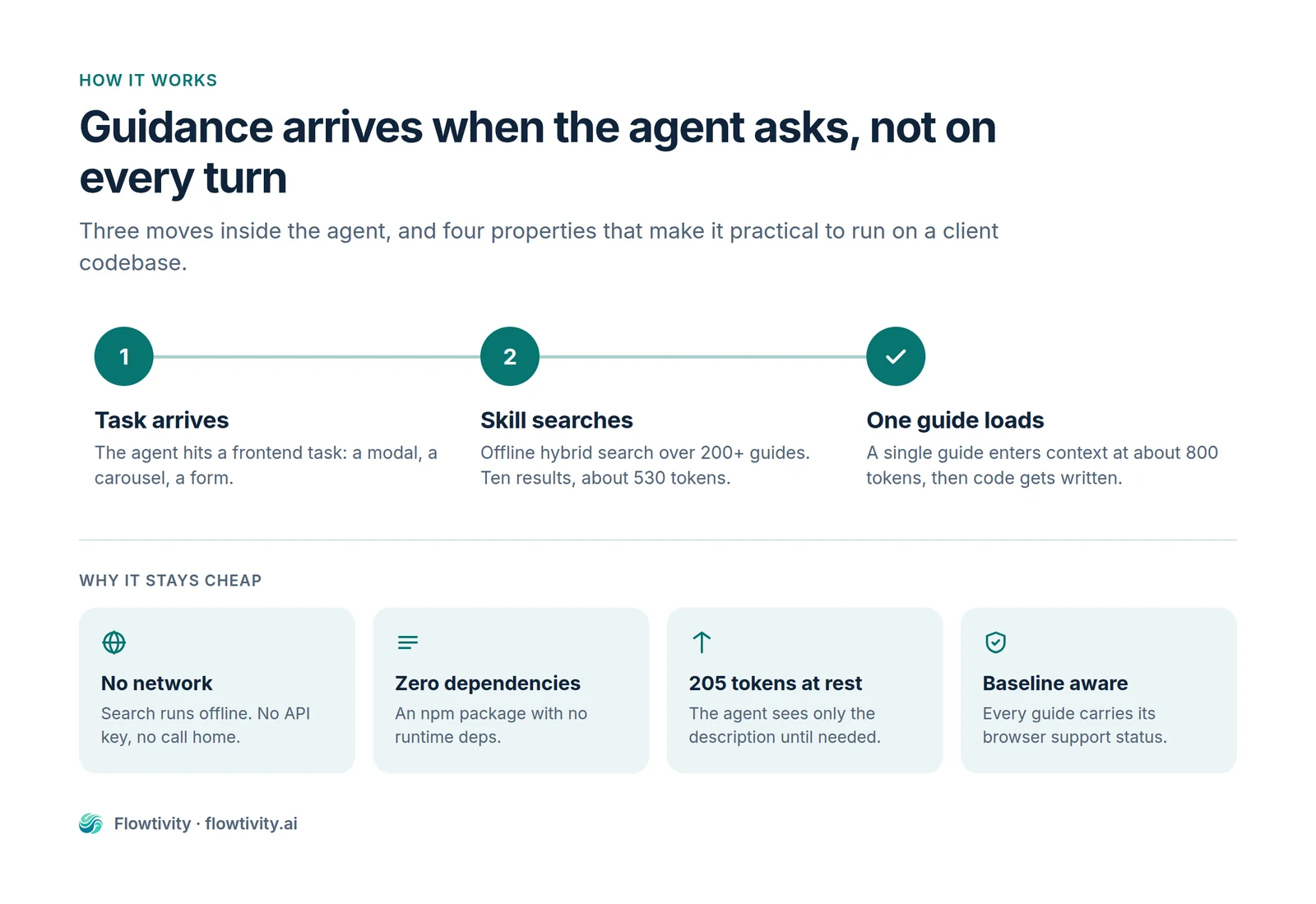
There are two skill packs. The main one is modern-web-guidance at roughly 205 tokens. A second pack covers Chrome extension development at about 175 tokens. Both are opt-in per project, which is the right default for a consultancy that works across several client repositories.
How far off is your coding agent, measured?
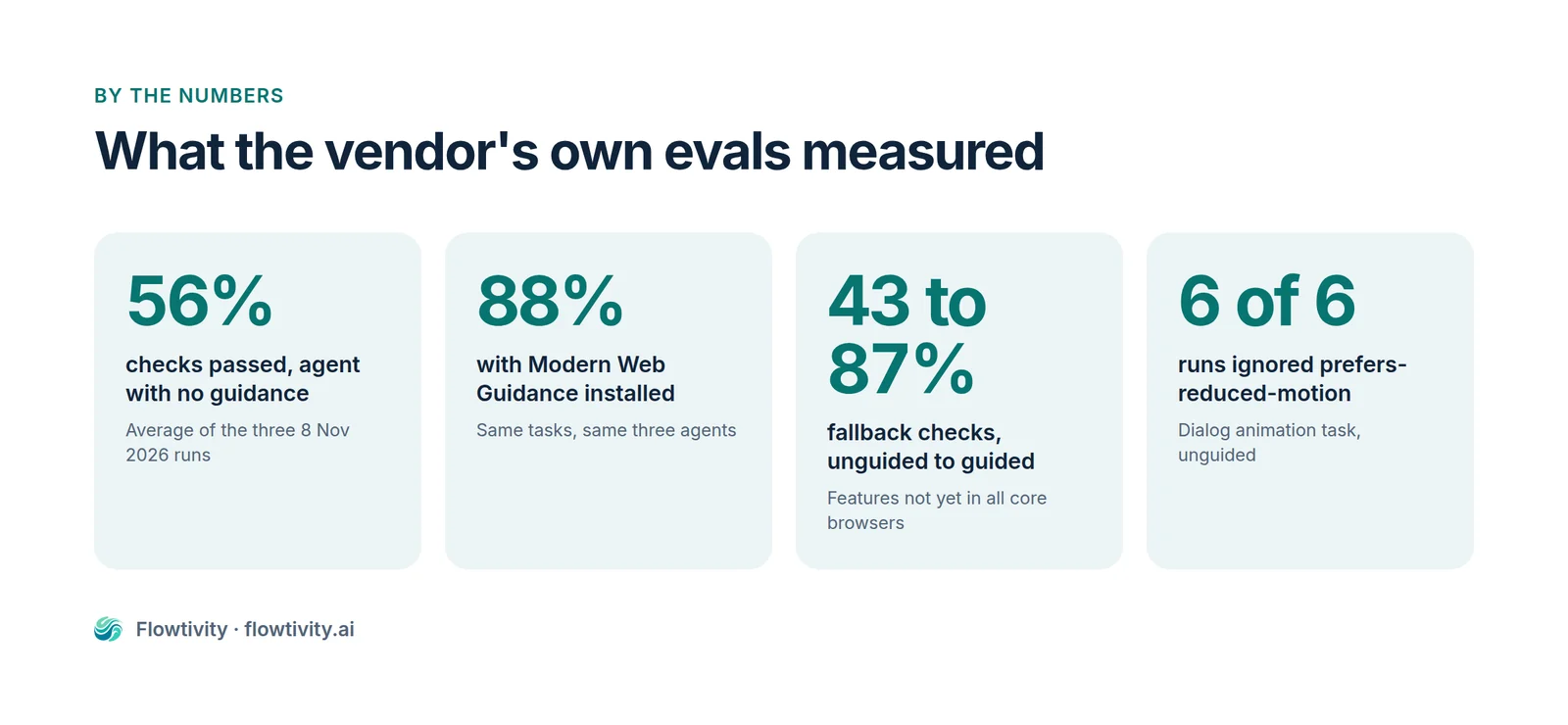
In Google’s published evaluations from 8 November 2026, unguided coding agents passed between 54 and 58 per cent of modern web checks. With Modern Web Guidance installed, the same agents on the same tasks passed between 82 and 94 per cent. The gap is roughly 28 to 36 percentage points, and it held across three separate agents and three separate evaluation dates.
The evaluation method is more rigorous than most vendor benchmarks, which is why the numbers are worth taking seriously. Each guide defines its own expectations, and Playwright graders verify rendering, computed styles, DOM state and runtime behaviour rather than pattern-matching source code. The graders are calibrated in both directions: a golden solution has to score 100 per cent and the untouched base application has to score zero, so a grader that passes everything or fails everything is rejected. Agents run in sandboxed environments so they cannot read the grader source and reverse-engineer the expected output.
| Date | Agent and model | Tasks / checks | Unguided | With Modern Web Guidance |
|---|---|---|---|---|
| 8 Nov 2026 | Antigravity CLI, Gemini 4 Argon | 214 / 1,673 | 58% | 94% |
| 8 Nov 2026 | Claude Code, Opus 5.5 | 215 / 1,801 | 57% | 88% |
| 8 Nov 2026 | Codex CLI, GPT-6.1 Sol | 215 / 1,795 | 54% | 82% |
| 6 Nov 2026 | Antigravity CLI | 212 / 1,722 | 60% | 96% |
| 6 Nov 2026 | Claude Code | 212 / 1,773 | 56% | 90% |
| 6 Nov 2026 | Codex CLI | 212 / 1,773 | 53% | 86% |
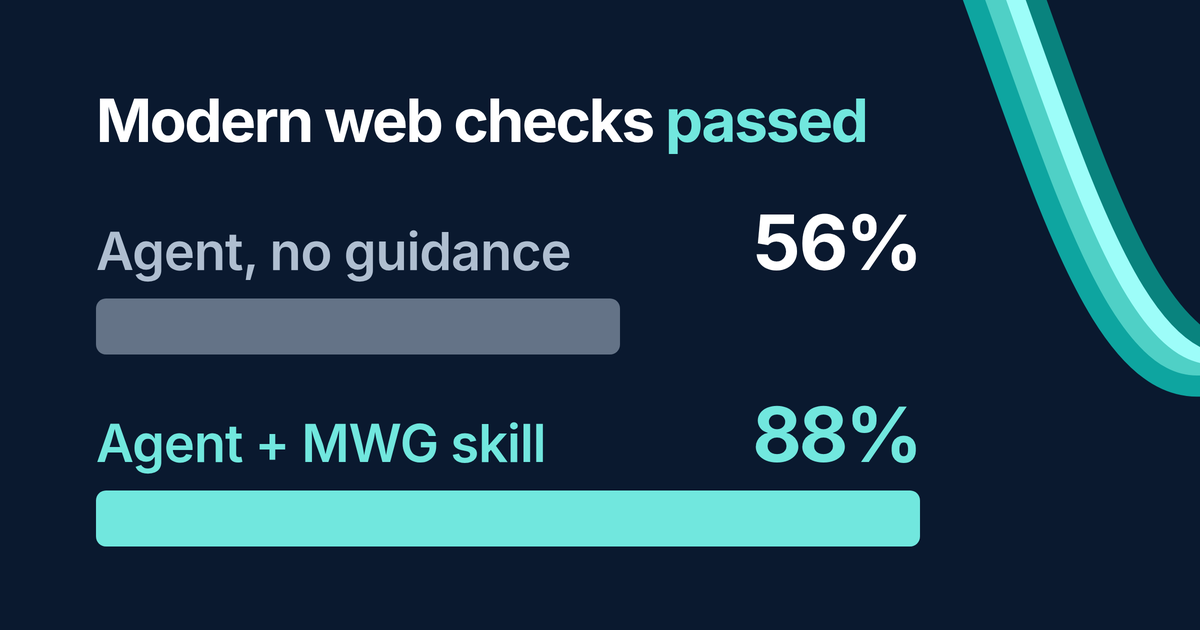
Averaged across the three 8 November runs, the pass rate moved from 56 per cent to 88 per cent, which is the cleanest single comparison in the dataset and the one used in the graphic above.
One thing to watch when you read the coverage of this launch. The vendor’s headline framing varies between its own posts. The launch post says unguided agents pass “only about 50%” of checks against “around 90%” with the skill. A companion engineering post says “about 60%” rising to “around 80-90%” across nearly 1,000 runs. The documentation hub says roughly 51 per cent against 91 per cent. All of those are defensible readings of different slices of the same data, and none of them is the per-agent table above. If you are citing a number internally, cite the table with the date and the agent name attached, because that is the only version a sceptical engineer cannot pick apart.
The most interesting result is not the headline pass rate. It is the fallback checks, the subset of tasks where a feature is not yet available in every core browser and the code has to degrade gracefully. There, unguided agents scored 43 per cent and guided agents scored 87 per cent. That is the category where a model writing from memory is most dangerous, because it has no idea which features are safe to use bare and which need a guard.
The animation results are worse than the averages suggest. In a task to animate a dialog into and out of the top layer, five of six unguided runs failed to produce a working modern CSS entry and exit transition, and six of six ignored prefers-reduced-motion entirely. A model that has learned to animate things with JavaScript timers will keep doing that, and it will not think about the user who set their operating system to reduce motion unless something in its context tells it to.
Security shows the same pattern. Unguided models added no Content Security Policy and no cross-origin isolation headers without explicit prompting, and even when asked directly for security hardening, they failed more than half of the security checks. These are not exotic requirements. They are the things a competent review would catch, and the point of the skill is to catch them before review.
What actually changes in the code
With the skill installed, the agent stops writing custom JavaScript for things the platform now does natively and starts using the platform features directly. The changes are concrete and easy to spot in a diff: a native dialog with light dismiss instead of a hand-built modal, CSS scroll snap instead of a pointer-tracking carousel, declarative validation instead of blur handlers, and CSS entry animations instead of transition-end callbacks.
Here is the shape of it. A modal built the old way is a stack of divs, a manual focus trap, a keydown listener for Escape, a backdrop click handler, an aria-modal attribute you have to remember to add, and a body scroll lock that breaks on iOS. The platform answer is one element with an attribute.
<dialog closedby="any">
  <h2>Confirm deletion</h2>
  <p>This cannot be undone.</p>
  <button autofocus>Cancel</button>
  <button>Delete</button>
</dialog>
That element gets the focus trap, the Escape key, the top layer stacking, the inert background and the accessibility semantics for free, because the browser implements them. The closedby="any" attribute adds light dismiss, meaning a click outside closes it. The catch is that closedby is Limited availability: Chrome 134 and Edge 134 shipped it in March 2025, Firefox 141 in July 2025, and Safari has not shipped it at the time of writing. That is exactly the situation the skill’s fallback rules exist for, and the guide ships a click listener of under fifty lines to cover Safari.
The animation half of that same component is where most agents fall down. The modern pattern uses @starting-style and transition-behavior: allow-discrete so an element can animate from display: none into view, which was impossible before 2024 without JavaScript.
dialog {
  opacity: 0;
  transform: translateY(8px);
  transition: opacity .2s, transform .2s, display .2s allow-discrete, overlay .2s allow-discrete;
}
dialog:open { opacity: 1; transform: none; }
@starting-style { dialog:open { opacity: 0; transform: translateY(8px); } }

@media (prefers-reduced-motion: reduce) {
  dialog { transition: none; }
}
That last block is the one the unguided runs kept missing. Motion preference is not an optional nicety. For a user with a vestibular disorder, a sliding panel can cause genuine nausea, and in Australia it sits inside the accessibility obligations most public-facing projects already carry.
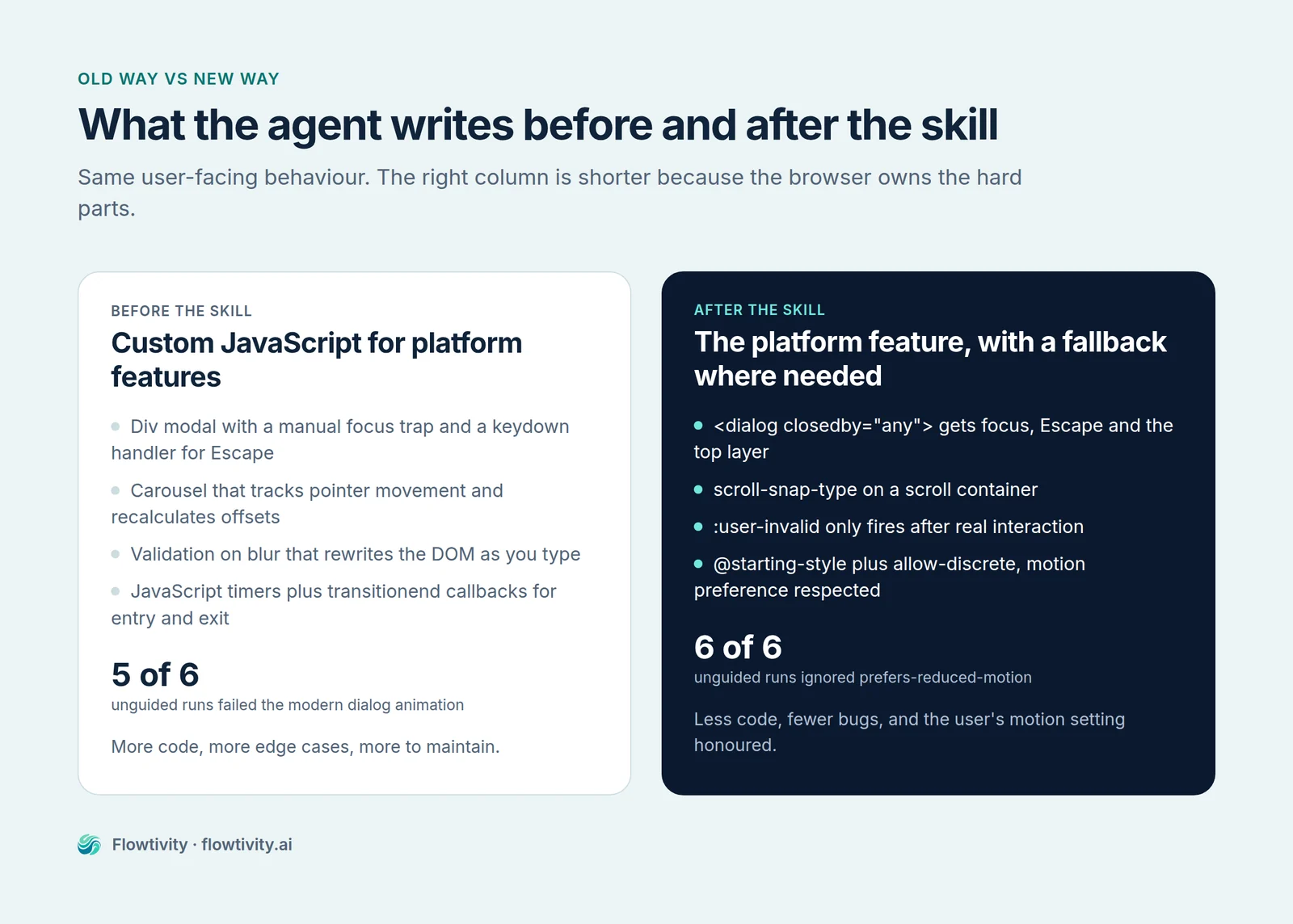
Other examples follow the same logic. Overlays that were absolutely positioned divs with z-index wars become the popover attribute, which puts them in the top layer and gives them light dismiss for free. Carousels that tracked pointer movement and recalculated offsets become scroll-snap-type on a scroll container, which is smoother, works with trackpads and keyboards, and respects momentum. Long lists that were virtualised with a JavaScript library can use content-visibility: auto so the browser skips rendering offscreen content itself. Work that was chopped into setTimeout slices to avoid blocking the main thread can use scheduler.yield() or scheduler.postTask() where available. Form validation that ran on blur and rewrote the DOM can use :user-invalid, which only fires after the user has actually interacted, so a form does not shout at someone who has not finished typing.
There is a security category too, and it is the one most agents skip. setHTML() with Trusted Types replaces innerHTML assignment with something the browser will police. Passkeys now have JSON serialisation methods on PublicKeyCredential, so an agent does not need to hand-roll base64url conversions and get them subtly wrong. Content Security Policy and cross-origin isolation headers belong in the response, not in a comment, and the guides push the agent to add them rather than assume someone else will.
The honest critique from the launch thread is worth repeating here. One commenter observed that the skills sometimes prefer JavaScript where plain HTML would do, which is a fair concern: a skill pack that nudges an agent toward scheduler.yield() in a context where a plain server-rendered form would be simpler is not obviously an improvement. The answer is that guidance reduces the worst outcomes, not that it optimises every case. A human still has to decide whether the interaction needs JavaScript at all.
How Baseline decides when to ship a fallback
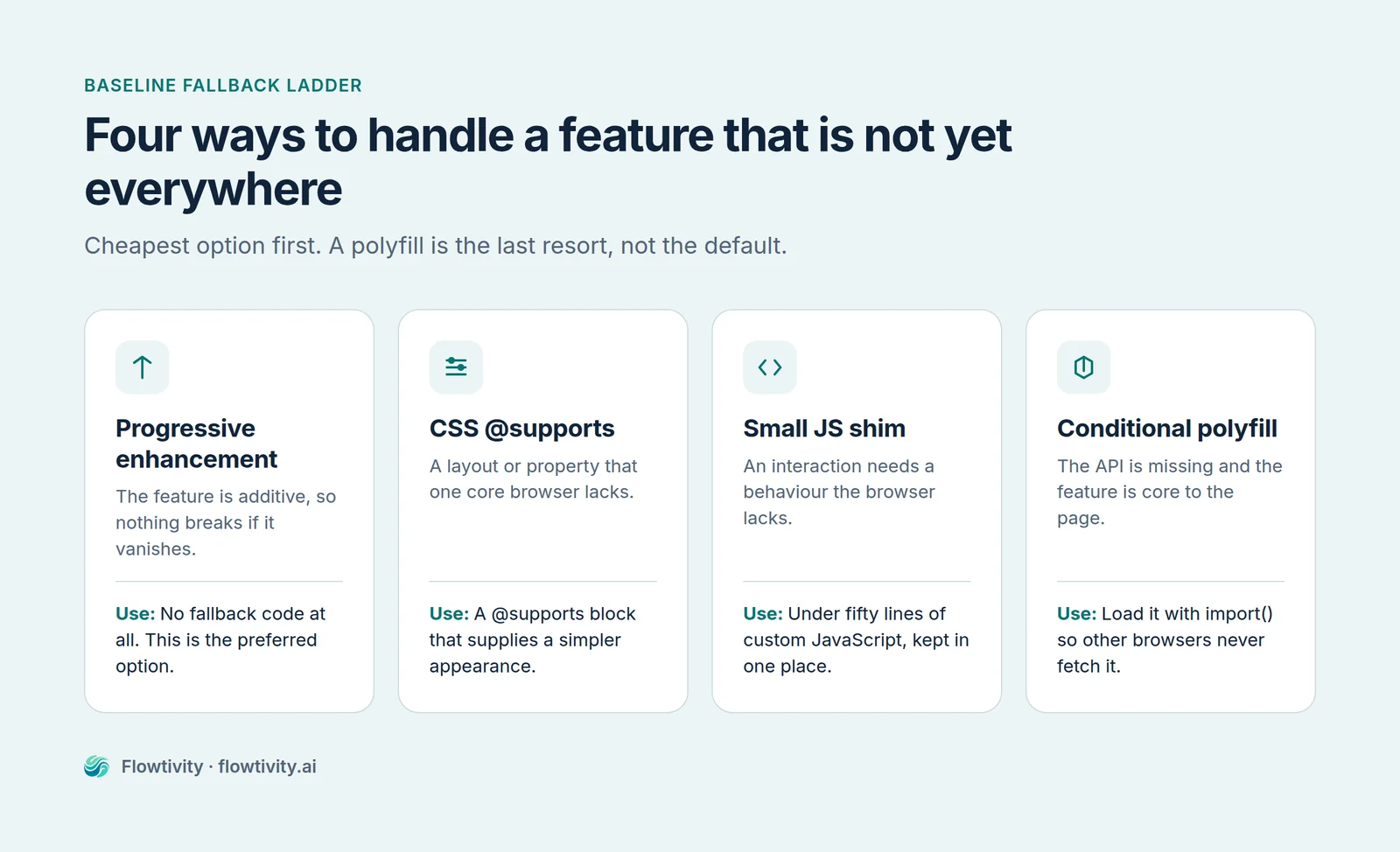
Modern Web Guidance uses Baseline to decide whether a feature can be used bare or needs a fallback. Baseline has three statuses: Widely available means the feature has been supported in all core browsers for at least 30 months, Newly available means it works in all core browsers but not for long enough, and Limited availability means at least one core browser does not support it. The default policy is simple. Widely available features are used directly with no fallback, and Newly available or Limited features ship with a verified fallback.
The fallback decision itself is a ladder, not a single technique. The preferred option is progressive enhancement, where the feature is additive and nothing breaks without it, so there is no fallback code at all. Next is a CSS @supports block that provides a simpler layout or appearance when the feature is missing. Then a small amount of custom JavaScript, capped at under fifty lines, that emulates the behaviour. The last resort is a polyfill, loaded conditionally with a dynamic import() so it never reaches a browser that does not need it.
The rules are also editable, which is the part most teams miss. You can override the default policy in your AGENTS.md or CLAUDE.md. A team supporting government users on older managed browsers can write “target Baseline 2024 or earlier” and the agent will treat anything newer as requiring a fallback. A team building an internal dashboard on a known Chrome fleet can write the opposite and let the agent use Newly available features without ceremony. That turns a generic policy into a project-specific one, which is the difference between guidance an agent can follow and guidance it will ignore.
The closedby example shows the mechanism working as intended. The feature is Limited, so the guide does not pretend it is safe to use bare. It gives the agent the modern markup and a small click handler for the browsers that lack the attribute. The agent ships code that is clean on current browsers and correct on Safari, without the developer having to know which browser shipped what and when. That is the whole value proposition in one component.
There is a real limitation hidden in this design. Baseline tracks web platform features, not accessibility support. A feature can be Widely available and still be badly exposed to screen readers, or a pattern can be Baseline-ready and still fail WCAG. Adrian Roselli makes exactly this point in his critique, and it is correct: Baseline tells you whether the code will run, not whether the result is accessible. Do not let a green Baseline badge stand in for an audit.
What 507 MB of retrieval taught the team
The skill’s search layer went through three generations in under a year, and the engineering post that documents it is the most useful part of the launch for anyone building retrieval into an agent. Generation one used LanceDB with an ONNX embedding model, required node-gyp to build, unpacked to 507 MB, and peaked above 400 MB of resident memory. Generation two swapped to TensorFlow.js with a MiniLM model, which removed the native build but still shipped 23.4 MB and took 770 milliseconds to cold start. Generation three is a static Int8 lookup table with BM25, ships 7.1 MB, cold starts in 185 milliseconds and peaks at 145 MB.
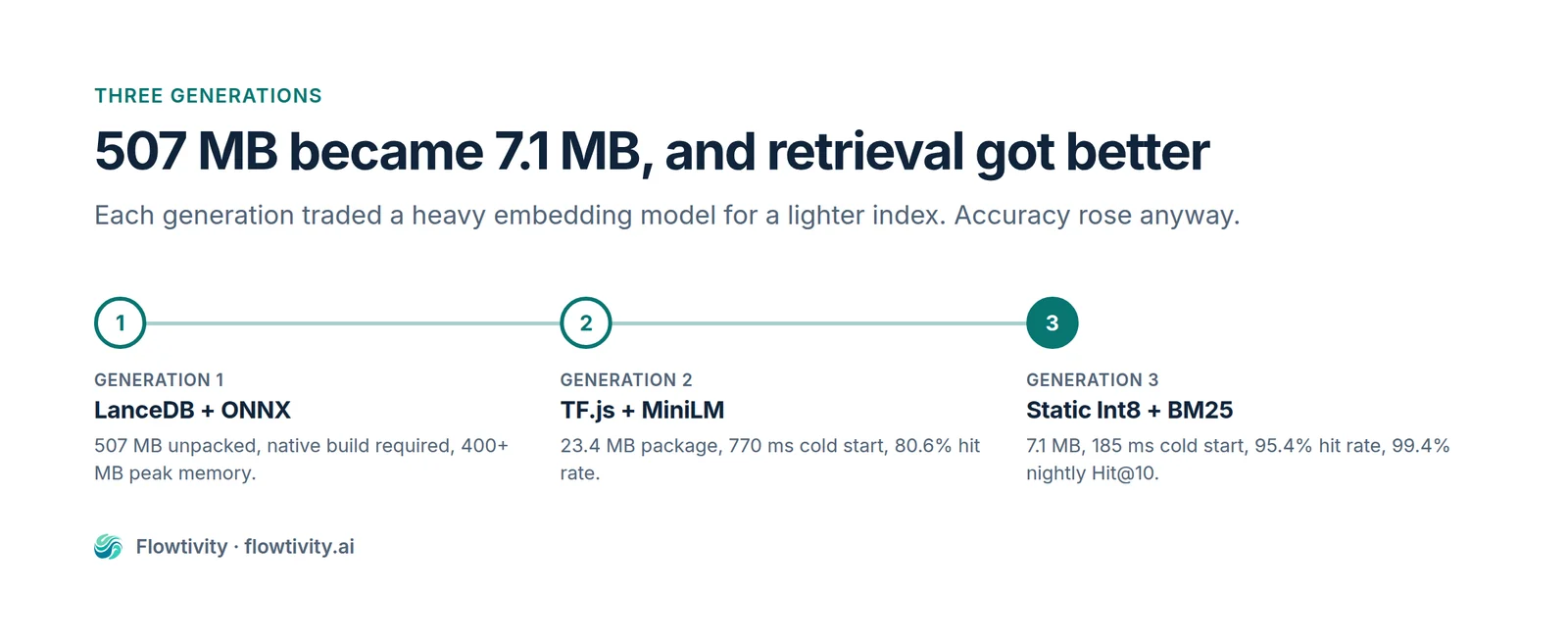
The numbers that matter are not only the size ones. Hit rate at K rose from 80.6 per cent in generation two to 94.7 per cent, then to 95.4 per cent in generation three, and the nightly Hit@10 rate reached 99.4 per cent. So the version that is twenty-nine times smaller and four times faster also retrieves more accurately. That is unusual, and it happened because they benchmarked against real queries rather than synthetic ones.
The reason it worked is in the query distribution. Of live searches, 86.7 per cent are two to five words, with a median of three. Short queries like “modal focus trap” or “carousel scroll snap” do not need a semantic embedding to disambiguate, because the vocabulary is small and the domain is narrow. A word-level lookup table plus BM25 handles them faster and more predictably than a transformer. Embedding a three-word query with a neural model is spending compute to solve a problem that does not exist.
There is a cautionary tale in the post that every agent builder should read. A 0.38 cosine similarity cutoff was silently spiking empty results by a factor of eight. In one Codex run, the agent searched for “confirm destructive action”, got an empty array, and wrote window.confirm(), despite a dialog guide existing in the corpus. The retrieval layer failed quietly, the agent did not know it had failed, and it fell back to the pattern in its training data. That is the failure mode to design against: a retrieval miss that returns nothing is worse than a retrieval miss that returns something imperfect, because the agent cannot tell the difference between “no guidance exists” and “the search is broken”.
For anyone building their own skills, the transferable lessons are these. Benchmark retrieval against real user queries, not a synthetic set. Prefer the smallest index that clears your accuracy bar, because agent context is expensive and latency compounds across a session. And make an empty result loud, so the agent knows to try a different query rather than assume the platform has nothing to offer.
Where it falls short
Modern Web Guidance measurably improves agent output, but it is not a guarantee, it is not a compliance tool, and its governance has a real gap. The vendor says plainly that there is no way to guarantee a guide is retrieved and applied on any given task. Adrian Roselli’s independent test of the May preview found an accordion component that added unrequested features, failed its animation in Firefox despite the Baseline fallback promise, and was not WCAG-conformant. He also concedes that you will almost certainly get better output than doing nothing, which is the fair summary.
Two things need saying about that critique. It tested the May preview, not the 1.0 release, and the project has since added an accessibility review and sign-off step to its contribution process. At the time of writing there was no published 1.0-specific retest. So the right reading is that the specific defects may be fixed while the structural criticism, that Baseline is not an accessibility baseline, still stands.
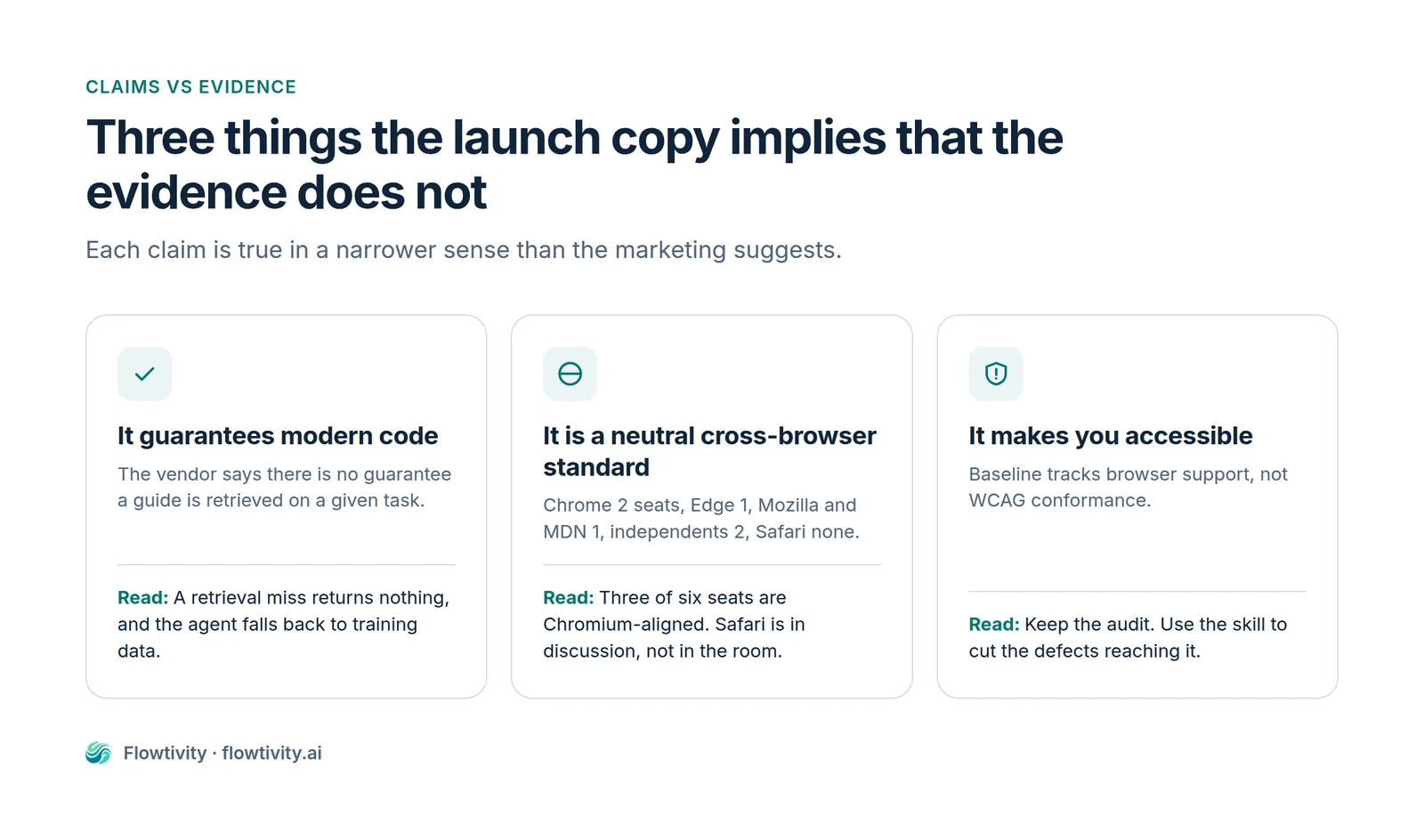
Governance is the harder problem. The owners group has six seats: two for Google Chrome, one for Microsoft Edge, one for Mozilla Firefox and MDN, and two for independent web platform experts, one of whom is Lea Verou. Safari and WebKit hold no seat. Philip Walton from Chrome said on Hacker News that they would love Safari to join and are in discussion with them, which is honest, but the current composition means three of six seats belong to Chromium-based browsers. One commenter put it bluntly: if you are building for the web rather than for Chrome, a project where the dominant engine holds a third of the votes and the only real competitor holds none is a project you should read carefully rather than adopt uncritically.
The maturity signals are mixed. The repository has 8,507 stars and 400 open issues, and npm has published 122 versions since 30 April 2026, which is a release roughly every other day. There is exactly one GitHub release, and it contains audit data rather than code, because npm is the shipping channel. That pace is normal for a project iterating in public, and it is also a supply-chain consideration: if you pin a version, you will be several dozen releases behind within a month, and if you do not pin, your agent’s behaviour can change between sessions.
Telemetry deserves a paragraph of its own. It is on by default. It records install counts, the name of the calling agent, which guide IDs were retrieved, and the two to five word queries passed to the CLI. It does not collect raw prompts or repository code, and you can disable it with DISABLE_TELEMETRY=1. For a team working on client codebases under an NDA, that environment variable should be set before the first install, and it should be in the onboarding checklist rather than left to whoever reads the docs.
The vendor-reported case studies are worth knowing but not worth quoting as evidence. Pensionbazaar reports new page turnaround falling from about four days to a few hours. Policybazaar reports a 92 per cent reduction in manual Core Web Vitals auditing effort across about thirty landing pages. WeTV reports auto-resolving 90 per cent of failed performance checks and cutting debugging time by 87 per cent. note inc. reports a 180-run evaluation on its production codebase moving from 61 to 94 per cent, and MetaMask reports a three-line prompt bot reviewing about 480 pull requests in five weeks. None of these has been independently audited. Treat them as directionally interesting, not as benchmarks.
How an Australian team should adopt it
The sensible adoption path is a one-day pilot on a real repository rather than a policy change. Install the skill into one agent, run legacy-scan against a single application, and compare a handful of pull requests written with and without it before deciding whether to make it standard. The decision rule is straightforward: adopt it if your agents write front-end code, skip it if they only touch back-end services, and treat it as a starting point rather than a replacement for review.
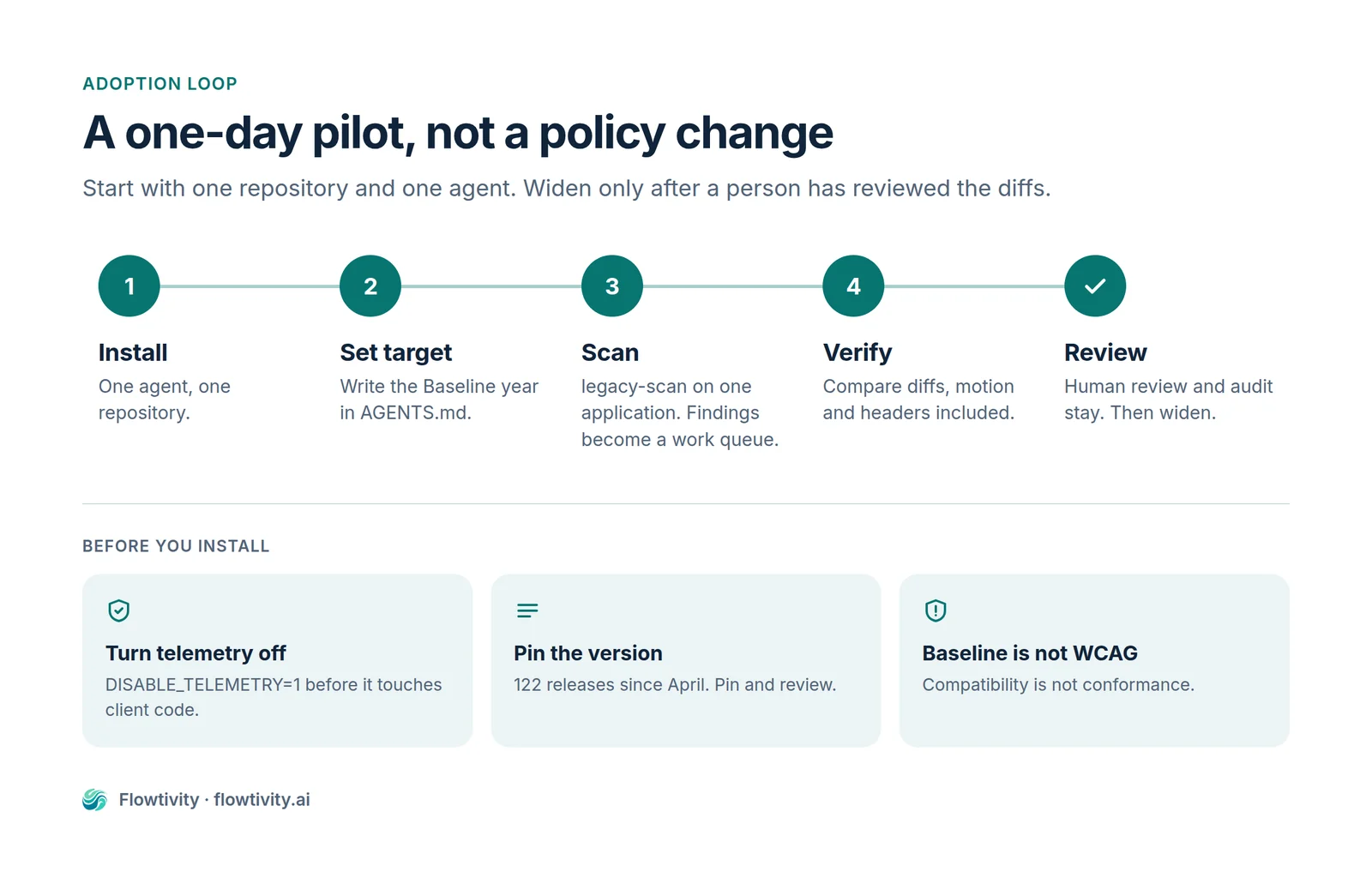
Three Australian considerations are worth building into the pilot. The first is privacy. Telemetry is on by default and records search queries, so set DISABLE_TELEMETRY=1 in the environment before installing, and note it in your collection notice if you are handling personal information under the Privacy Act. The second is accessibility. Baseline is not a WCAG conformance baseline, and the Disability Discrimination Act obligations that apply to public-facing services in Australia are not satisfied by a green compatibility badge. Keep your audit process and use the skill to reduce the volume of defects reaching it. The third is supply chain. The package has zero runtime dependencies, which is genuinely good, but 122 releases in seven months means you need a pinning and review policy, not a “latest” policy.
For a Flowtivity-style engagement, the practical play is to install it on the agent fleet, set the Baseline target per client in AGENTS.md, and add a review checklist item that asks whether the diff uses a platform feature where one exists. That last item is where the value compounds. An agent that knows the platform writes less code, and less code is easier to review, cheaper to maintain and less likely to break when a browser updates.
One more thing is worth saying about the framing. The launch thread’s claim that this is a fix for “2019 JavaScript” is a fair shorthand for a real problem, and the vendor’s own explanation is that ten years of legacy code in training data outweighs the last twelve months of new platform features. That is not a model failure you can prompt your way out of. It is a data distribution problem, and the only reliable fix is to put the current answer in front of the model at the moment it writes. Which is what this package does, and why it is worth the install.
Frequently asked questions
What is Modern Web Guidance?
Modern Web Guidance is an Apache-2.0 skill pack from Google Chrome, Microsoft Edge, Mozilla Firefox and MDN that embeds current web platform guidance and browser compatibility data into AI coding agents. It ships as an npm package with no runtime dependencies, covers more than 200 guides, and works with Claude Code, Codex, Cursor, Copilot, Antigravity, WebStorm and other agentic tools.
Is Modern Web Guidance free?
Yes. The package is published on npm under the Apache 2.0 licence, which permits commercial use, modification and redistribution. There is no paid tier and no account requirement.
Does Modern Web Guidance replace code review or an accessibility audit?
No. It improves the probability that an agent writes modern, compatible code, but the vendor states there is no guarantee a guide is retrieved on any given task. Baseline tracks browser support rather than accessibility conformance, so an accessibility audit is still required for WCAG and for Australian Disability Discrimination Act obligations.
Which coding agents does it support?
The CLI installs into Claude Code, Codex, Cursor, GitHub Copilot, Antigravity, WebStorm, Kimi Code, Grok Build and Pi. It can also be installed through the Vercel skills registry, the GitHub CLI, or the Claude Code plugin marketplace.
What data does Modern Web Guidance collect?
Telemetry is on by default and records install counts, the calling agent name, retrieved guide IDs and the two to five word queries passed to the CLI search. Raw prompts and repository code are not collected. You can opt out by setting DISABLE_TELEMETRY=1 before installing.
What does legacy-scan do?
legacy-scan analyses an existing codebase for a limited set of legacy patterns across HTML, CSS, JavaScript and package.json, then guides the agent through the changes. In version 1.0 it is static analysis only, and the scope is deliberately narrow so results stay predictable. Agentic audits that reason about the code directly are planned.
About the author
AJ Awan is the founder of Flowtivity, an AI consultancy based on the Gold Coast. He is a former EY management consultant and a TOGAF certified enterprise architect, and he builds agent systems for Australian businesses that need them to run in production rather than in a demo.
What's actually useful in AI, every Friday
We follow everything happening in AI and send what's worth your time: new models, AI agents, and how to put them to work. One email a week, unsubscribe anytime.