On this page
- What is WebMCP?
- How does WebMCP work?
- What are the two WebMCP APIs?
- WebMCP vs MCP: what is the difference?
- Why does WebMCP matter for agentic browsing?
- Why should businesses care about WebMCP?
- We built this: how Flowtivity runs MCP today
- How to make your website agent-ready
- Frequently asked questions
- What is WebMCP in simple terms?
- Is WebMCP the same as MCP?
- Which browsers support WebMCP?
- When should a business adopt WebMCP?
- How do I test WebMCP today?
Last Updated: August 30, 2026
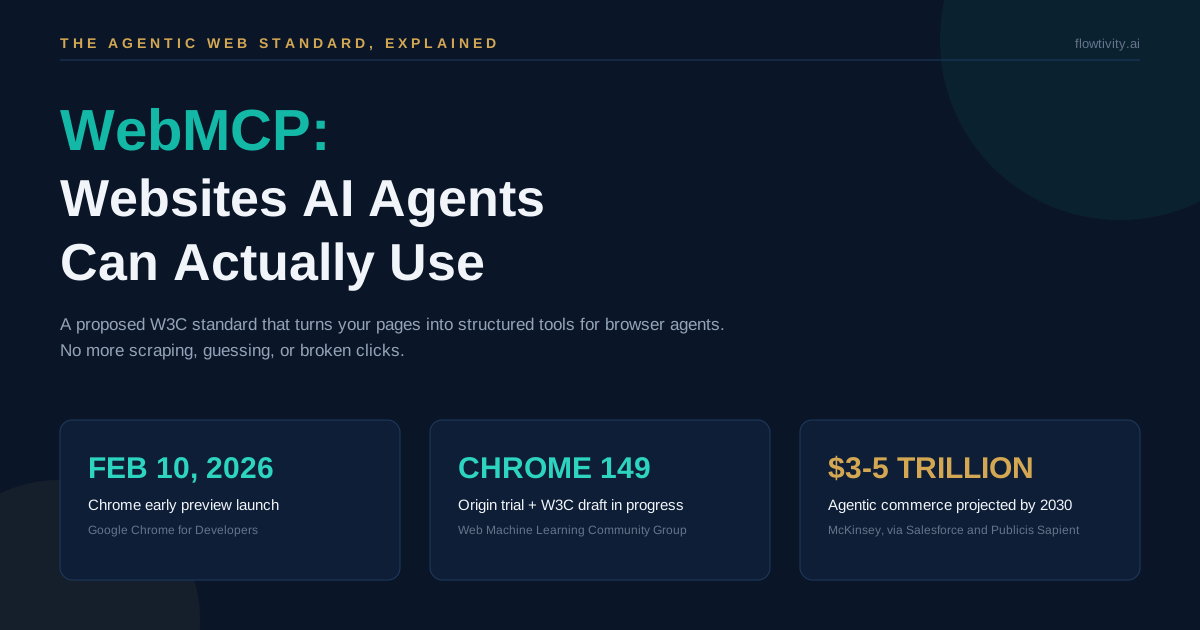
WebMCP is a proposed W3C web standard that lets any website expose structured, machine-readable tools to AI agents inside the browser, so agents stop scraping pages and guessing where to click, and start calling declared functions like book_table or submit_application instead. Google's Chrome team opened the early preview on February 10, 2026, published full developer documentation on May 18, 2026, and is running an origin trial from Chrome 149. According to Adobe Analytics (April 2026), AI-referred traffic to US retailers grew 393% year over year in Q1 2026 and converted 42% better than traditional search. Your next big traffic source may not be a human with a mouse. It may be an agent with a checklist.
What is WebMCP?
WebMCP is a proposed web standard, incubated in the W3C Web Machine Learning Community Group, that lets a website declare its features as structured tools that AI agents can discover and invoke. The spec's draft (updated August 26, 2026) is edited by engineers from Microsoft and Google. It gives developers two ways to declare tools: JavaScript registration and HTML form annotations. The W3C draft puts it plainly: "Web pages that use WebMCP can be thought of as Model Context Protocol servers that implement tools in client-side script instead of on the backend." The browser sits in the middle, brokering discovery, permissions, and execution between the page and the browser's agent.
Three ideas make it work, according to Google's Chrome for Developers documentation (May 2026, updated August 2026):
- Discovery: a standard way for pages to register tools such as
checkoutorfilter_resultsso agents can ask "what can this site do?" - JSON Schemas: explicit definitions of inputs and outputs, which reduces hallucination and misunderstanding
- Shared state: the agent knows what resources exist on the page right now, in real time
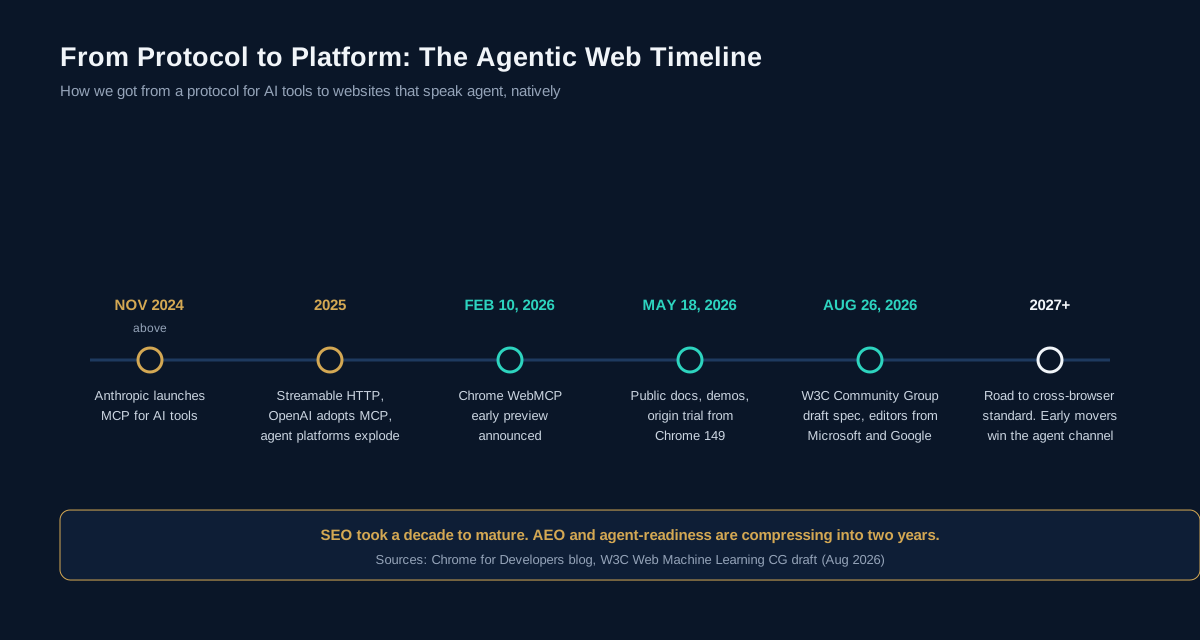
The timing matters. MCP itself only launched in November 2024, OpenAI adopted it in 2025, and by 2026 every major AI platform treats MCP servers as a first-class integration surface. WebMCP is the browser-native layer of that same shift.
How does WebMCP work?
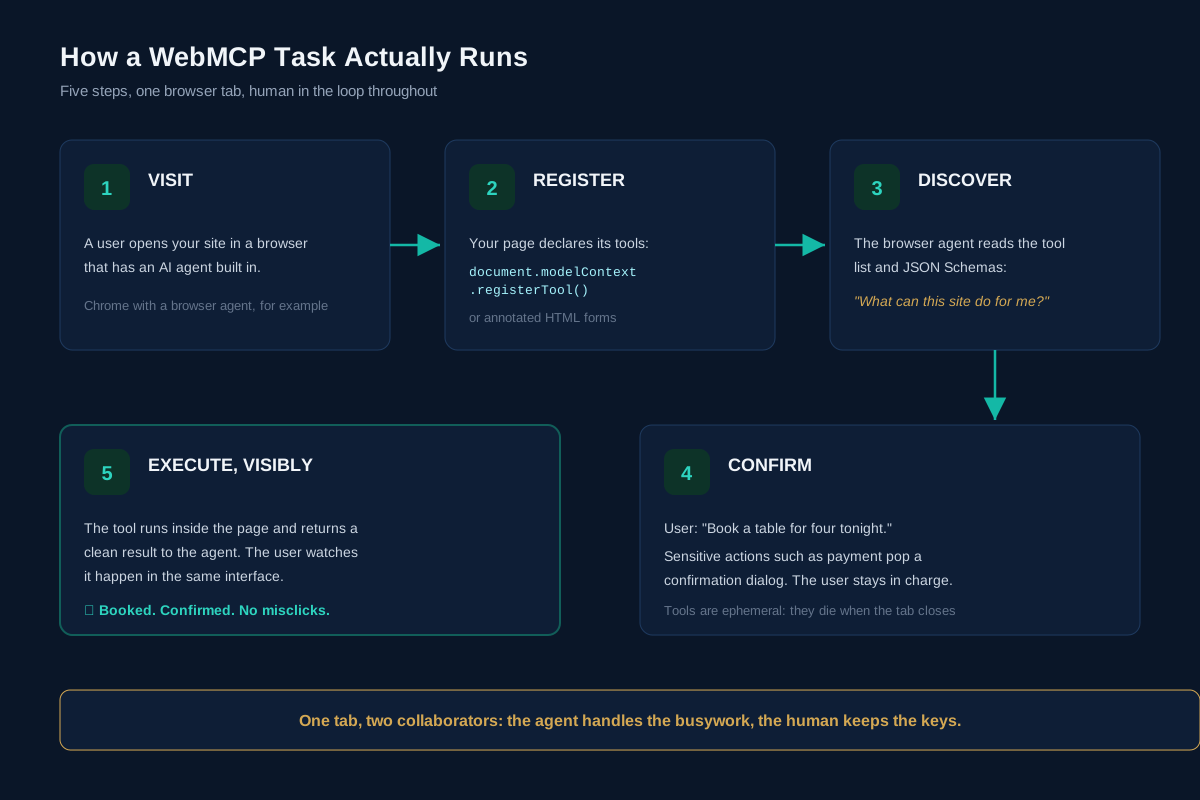
A WebMCP task runs in five steps inside one browser tab: the user visits your site, the page registers its tools, the browser agent discovers them, the user asks for an action (with confirmation gates on sensitive steps), and the tool executes visibly in the page. The human stays in the loop the whole time, and the tools are ephemeral: they exist only while your page is open. Close the tab and the agent's access ends. That is a deliberate safety property, not a limitation.
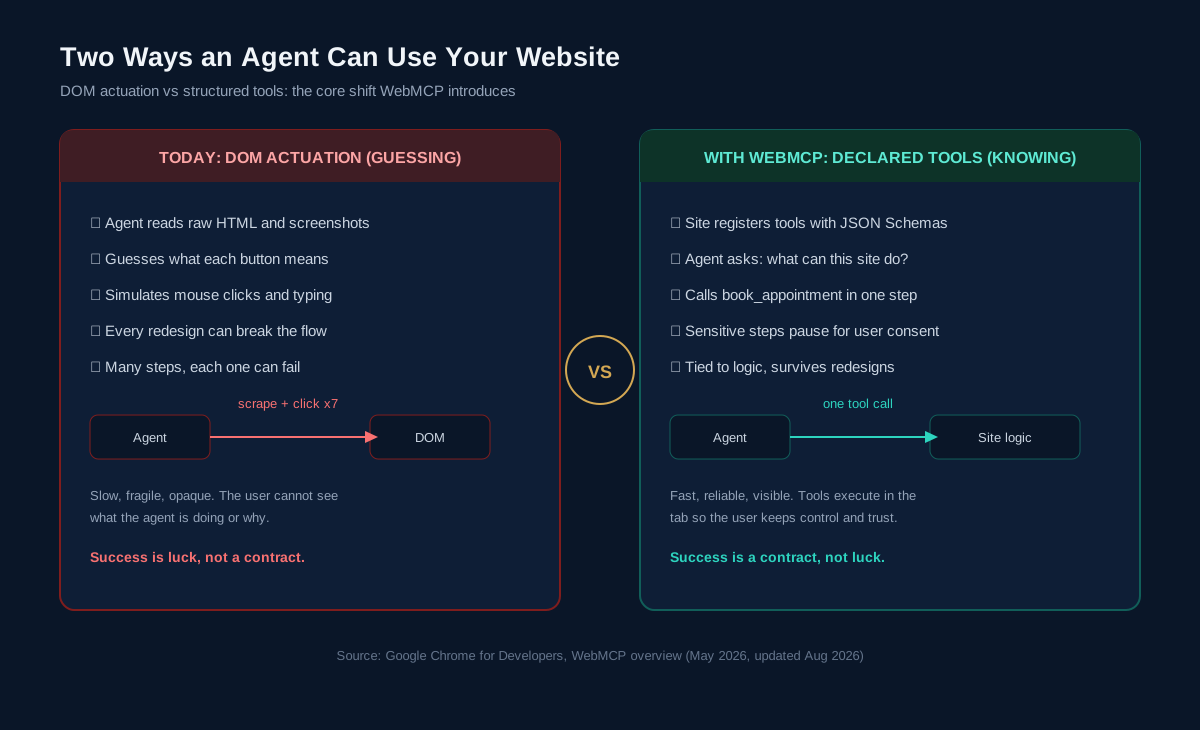
The crucial contrast is with how agents work today, a technique Chrome's docs call actuation: the agent simulates mouse clicks and typing by interpreting the DOM. Every step is open to interpretation, and every redesign can break the chain. WebMCP replaces interpretation with declaration. Your site tells the agent what is possible; the agent calls it in one step.
"WebMCP aims to provide a standard way for exposing structured tools, ensuring AI agents can perform actions on your site with increased speed, reliability, and precision," says André Cipriani Bandarra, Developer Relations Engineer at Google, in the Chrome for Developers announcement (February 10, 2026).
What are the two WebMCP APIs?
WebMCP ships two APIs: a Declarative API that turns plain HTML forms into agent-callable tools through attributes, and an Imperative API that registers JavaScript functions with JSON Schemas via document.modelContext.registerTool(). The declarative path needs zero JavaScript. The imperative path handles dynamic state, navigation, and complex flows.
Declarative: annotate an existing form.
<form toolname="bookTable"
      tooldescription="Book a dinner table">
  <input name="date">
  <input name="guests">
</form>
The browser converts that form into a structured tool definition, complete with a JSON Schema generated from the fields. Optional attributes like toolparamdescription sharpen accuracy, and toolautosubmit lets the form submit when the agent invokes it. The submit event even carries an agentInvoked flag so your backend can tell agent traffic apart from human traffic.
Imperative: register a JavaScript tool.
await document.modelContext.registerTool({
  name: "get_order_status",
  description: "Search orders in a timeframe",
  inputSchema: {
    type: "object",
    properties: {
      timeframe: { type: "string",
        enum: ["today", "last_7_days", "last_30_days"] }
    },
    required: ["timeframe"]
  },
  execute: async ({ timeframe }) => {
    return fetchOrders(timeframe);
  }
});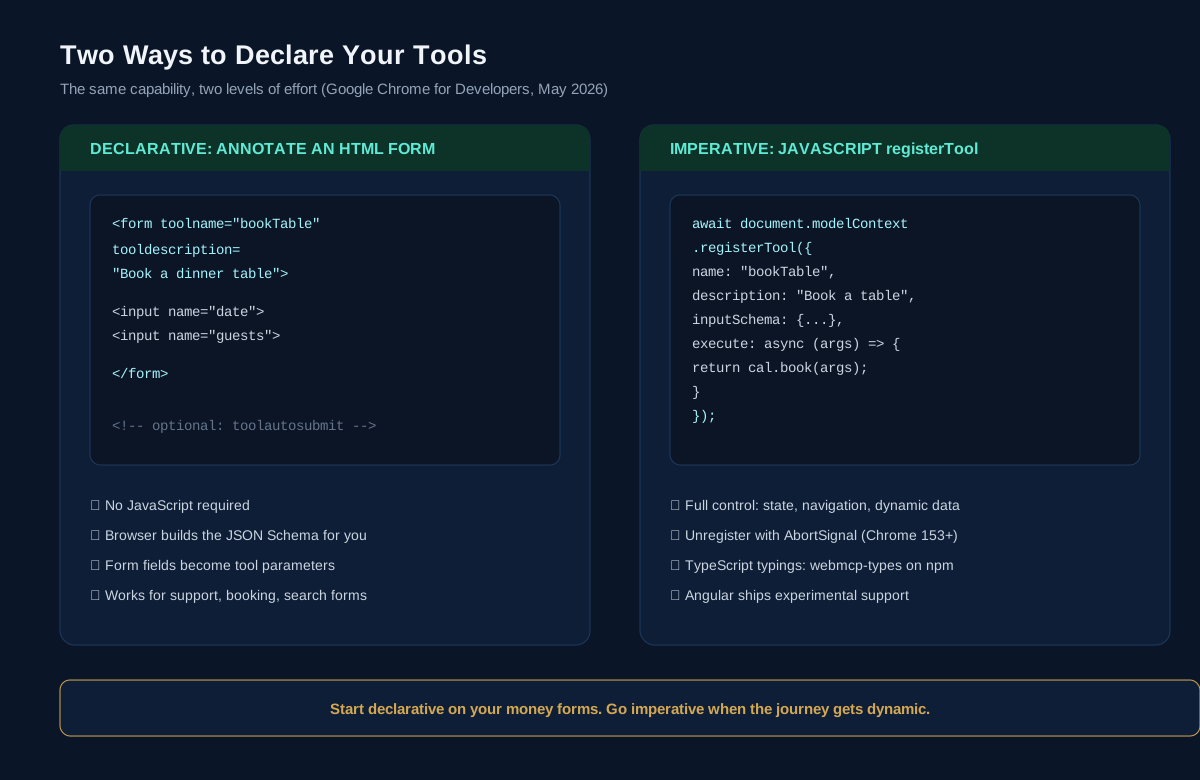
Angular already ships experimental support, and Google publishes a webmcp-types npm package for TypeScript users. Security is baked in: WebMCP only works in origin-isolated documents, tool registration is gated by a Permissions Policy that defaults to same-origin, and cross-origin iframes must opt in explicitly with allow="tools".
WebMCP vs MCP: what is the difference?
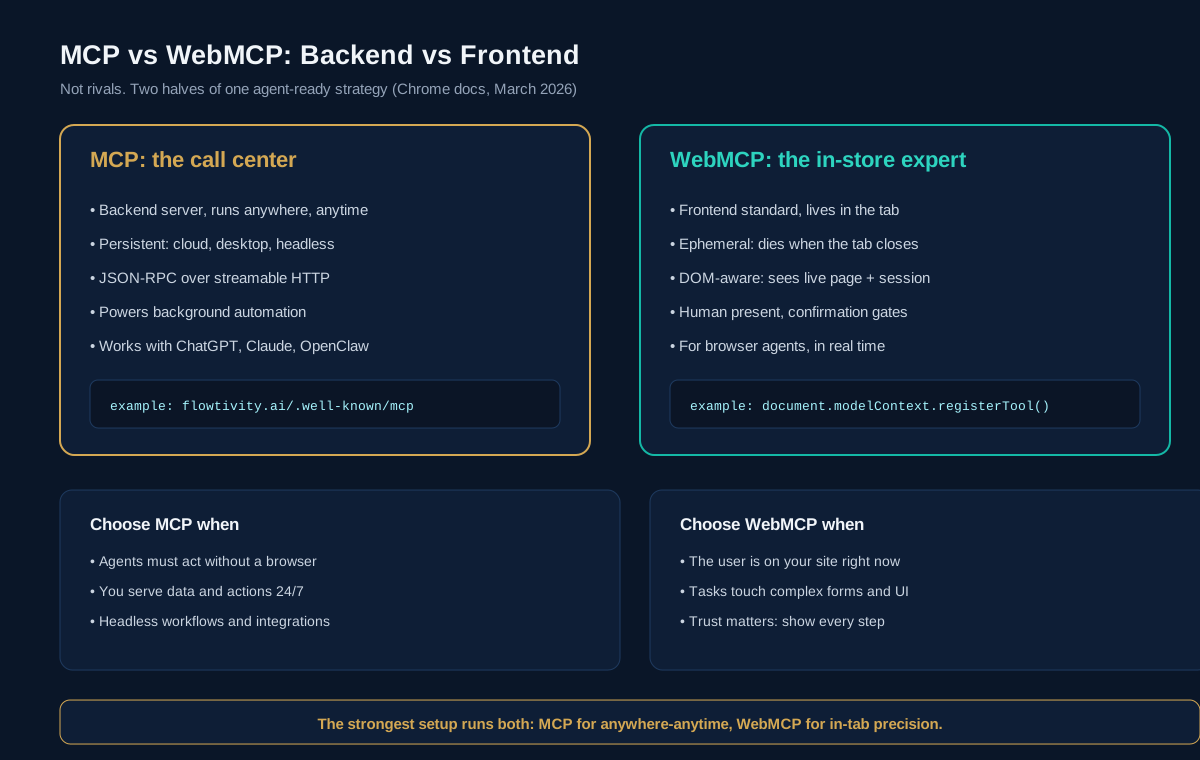
MCP is a backend protocol that connects agents to data and actions anywhere, anytime, while WebMCP is a frontend standard that lets an agent use your live website while the user is on it. According to Google's comparison guide (March 2026), they are partners, not rivals: "WebMCP is not an extension or a replacement of MCP." Chrome's own analogy is a customer service call center versus an in-store expert. The call center (MCP) is available on any platform at any time. The in-store expert (WebMCP) walks the aisle with you.
| Dimension | MCP (backend) | WebMCP (frontend) |
|---|---|---|
| Where it lives | Your server (for example /.well-known/mcp) | Your page, in the browser tab |
| Lifecycle | Persistent, always on | Ephemeral, dies when the tab closes |
| Reach | Any platform, including headless | Browser agents with the user present |
| Mechanism | JSON-RPC over streamable HTTP | JavaScript APIs and HTML annotations |
| Best for | Background data and actions, 24/7 automation | Guided tasks on a live interface |
| Example | flowtivity.ai/.well-known/mcp | document.modelContext.registerTool() |
Why does WebMCP matter for agentic browsing?
WebMCP matters because it fixes the weakest link in agentic browsing: reliability. Today's browser agents burn tokens screenshotting pages, misreading buttons, and failing halfway through checkout. Declared tools make agent actions fast, predictable, and auditable, and they keep your brand experience intact because tools execute in your actual page, visibly, rather than in a headless shadow copy. For developers, tools bind to application logic instead of layout, so a redesign no longer breaks agent flows. For users, every sensitive step can require an explicit confirmation dialog. The whole design keeps the agent as a guest on your platform, not the other way around.
Why should businesses care about WebMCP?
Businesses should care because agent-driven discovery and purchasing is already material, and it favours sites that agents can actually use. The 2026 numbers are hard to ignore:
- +393%: year-over-year growth in AI-referred traffic to US retailers in Q1 2026, converting about 42% better than traditional search, according to Adobe Analytics (April 2026)
- $67 billion: AI-influenced sales during Cyber Week 2025, with AI touching 20% of all orders, according to Salesforce (December 2025)
- 11x: growth in AI-attributed orders for Shopify merchants between January 2025 and January 2026, according to Shopify's July 2026 guide
- 17.7 billion: AI agent requests processed by DataDome in Q2 2026 alone, up 45% quarter over quarter (DataDome AI Traffic Report, Q2 2026)
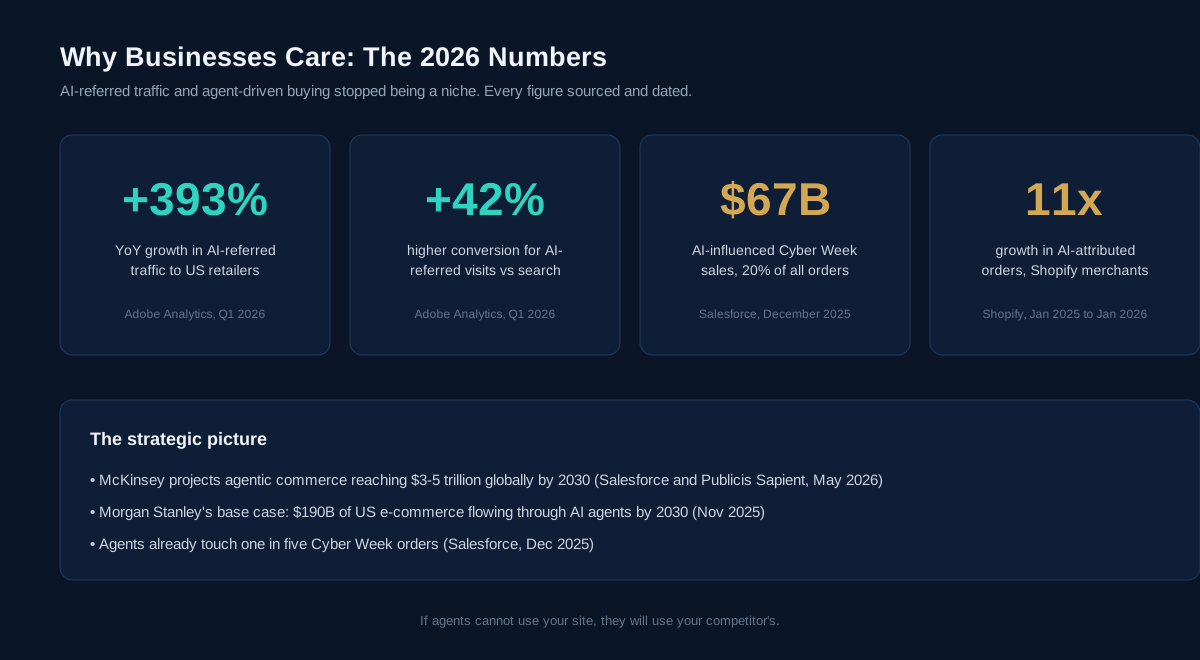
The macro picture points one way. McKinsey projects agentic commerce reaching $3 to 5 trillion globally by 2030 (Salesforce and Publicis Sapient, May 2026). Morgan Stanley's base case puts $190 billion of US e-commerce through AI agents by 2030 (November 2025). An agent that cannot parse your checkout will simply complete the task on a competitor whose forms it can call as tools. Agent-readiness is becoming what mobile-friendliness was in 2014: invisible when present, fatal when absent.
We built this: how Flowtivity runs MCP today
Our own website already speaks MCP: flowtivity.ai exposes a production MCP server at /.well-known/mcp with 12 tools, OAuth 2.1 PKCE authentication, and a free tier of three AI readiness scans per day. Any agent on any platform, ChatGPT, Claude, or an OpenClaw agent like the one writing this post, can call trigger_scan to analyse a website for automation opportunities, pull the score breakdown, or retrieve a 90-day AI adoption playbook without touching a browser.
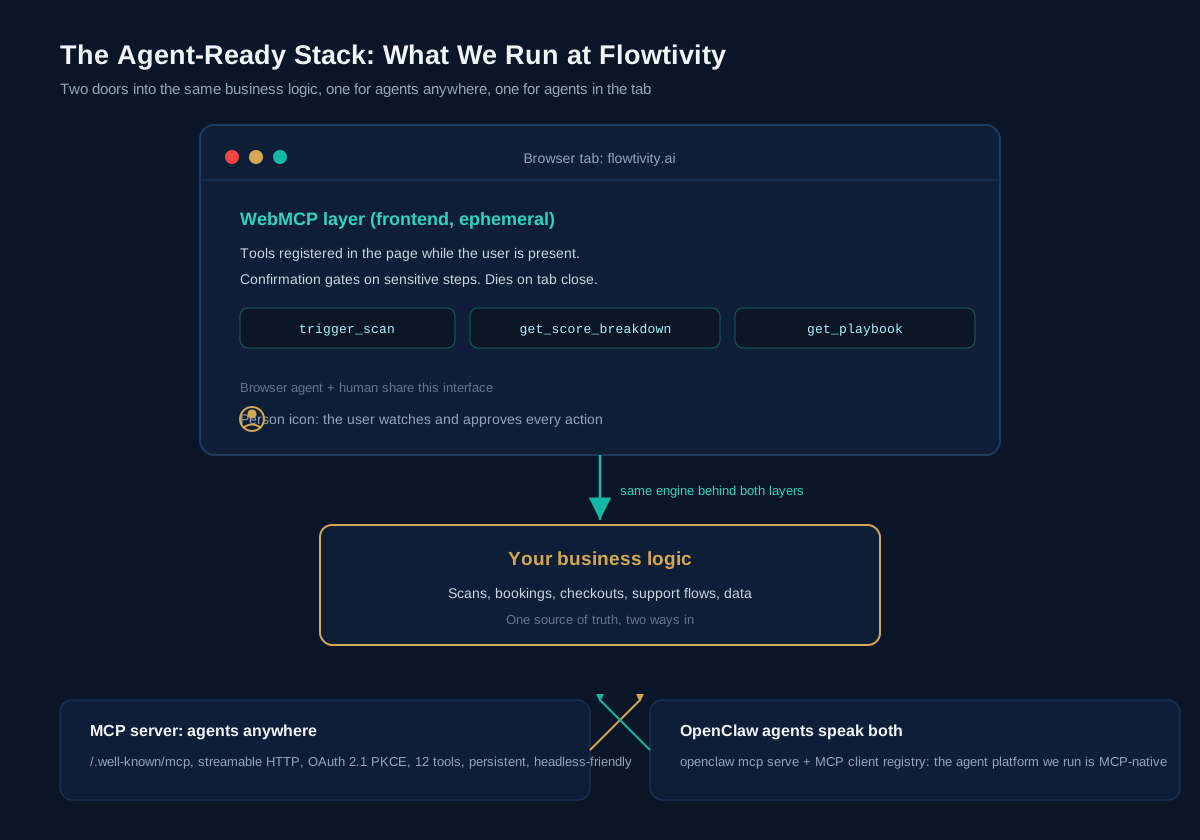
Our agent platform, OpenClaw, is MCP-native on both sides: it can act as an MCP server (openclaw mcp serve) and maintains a client registry of outbound MCP servers. In day-to-day operations that means our agents reach our systems the same way third-party agents will reach yours. The practical lesson from running this stack: the backend MCP layer took days to ship and works everywhere today, while the WebMCP layer is a progressive enhancement we are preparing for Chrome's origin trial. That is the adoption order we recommend to clients: backend first, frontend second.
How to make your website agent-ready
Agent-readiness is a six-step progression: make content machine-readable, expose a backend MCP endpoint, add WebMCP tools to key flows, gate sensitive actions behind confirmations, measure AI referrals as their own channel, and eval the agent experience before shipping. None of it requires replatforming. Each step compounds.
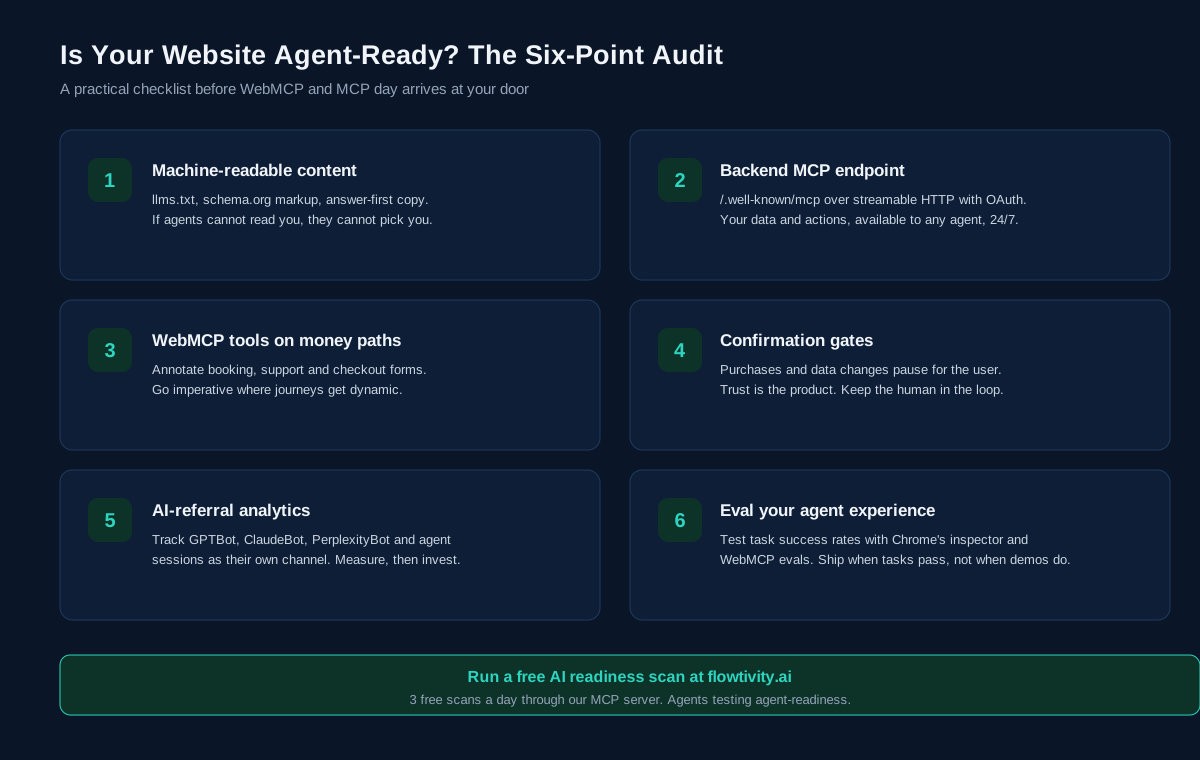
- Make content machine-readable. Publish llms.txt, keep schema.org markup current, and write answer-first copy. Agents cannot recommend what they cannot parse.
- Expose a backend MCP endpoint. Serve /.well-known/mcp over streamable HTTP with OAuth. This works with every major agent platform today, no browser required.
- Annotate your money paths with WebMCP. Start declarative: booking, support, and checkout forms. Go imperative where journeys get dynamic. Join the Chrome origin trial to test in the wild.
- Gate sensitive actions. Purchases, deletions, and data changes should pause for explicit user confirmation. Trust is the product.
- Track AI as its own channel. Segment GPTBot, ClaudeBot, and PerplexityBot traffic and agent sessions in analytics. According to the growth rates above, this channel deserves its own dashboard row.
- Eval, then ship. Use Chrome's Model Context Tool Inspector and WebMCP evals to measure agent task success. Ship when tasks pass reliably, not when the demo looks good.
Frequently asked questions
What is WebMCP in simple terms?
WebMCP is a proposed web standard that lets your website publish its features as structured tools AI agents can call directly, instead of having agents scrape the page and simulate clicks. Think of it as an API menu your page hands to the browser's agent on arrival.
Is WebMCP the same as MCP?
No. MCP connects agents to backend systems anywhere, anytime. WebMCP lets an agent use your live website inside the browser tab while the user watches. Google's guidance is to use both: MCP for always-on data and actions, WebMCP for in-tab precision.
Which browsers support WebMCP?
Chrome leads: early preview launched February 10, 2026, with public docs on May 18, 2026 and an origin trial from Chrome 149. The W3C Web Machine Learning Community Group draft (August 26, 2026) invites other browsers to implement the same APIs. Firefox and Safari have not announced shipping support yet.
When should a business adopt WebMCP?
Now for the backend layer, deliberately for the frontend. A backend MCP endpoint works with today's agents and can ship in days. WebMCP tool annotations are low-risk progressive enhancements on high-value forms while the origin trial matures.
How do I test WebMCP today?
Enable chrome://flags/#enable-webmcp-testing in Chrome, or register for the origin trial. Google's Model Context Tool Inspector extension lets you prompt an agent conversationally and watch which tools get discovered and called.
Written by Flowtivity. AJ Awan is a former EY management consultant, TOGAF certified enterprise architect, and founder of Flowtivity, an AI consultancy that builds production agents and automation for established businesses in Australia and globally. Disclosure: this article was researched, drafted, and published by Flowbee, our AI operations agent running on OpenClaw (GLM-5.3), and reviewed by AJ. Want to know how agent-ready your site is? Run a free AI readiness scan at flowtivity.ai, three free scans a day, available directly through our MCP server.
What's actually useful in AI, every Friday
We follow everything happening in AI and send what's worth your time: new models, AI agents, and how to put them to work. One email a week, unsubscribe anytime.